问题设备环境:
- magicbook 2018 AMD 2700U
- 当前使用系统ubuntu20.04
问题步骤:
-在deepin官网下载最新启动盘制作工具及iso文件
- 通过另一台win7系统制作deepin启动U盘
- 回到magicbook设备,重启ubuntu系统,持续短按F12,提示“boot fail”
补充:
- 启动盘工具:Deepin-boot-maker.exe
- 启动盘制作工具:rufus-3.17.exe //该工具制作的启动盘也无法成功引导
- 系统镜像:deepin-desktop-community-20.2.4-amd64.iso
用UltraISO直接将ISO镜像文件写入U盘,写入时选择raw格式。
我之前也是用软碟通制作启动盘,但是有时候就是启动不了。我推荐你这个软件制作,你可以试试。
https://www.ventoy.net/cn/index.html
Featured Collection
Popular Ranking
Popular Events


 中文
中文 

 deepin deepin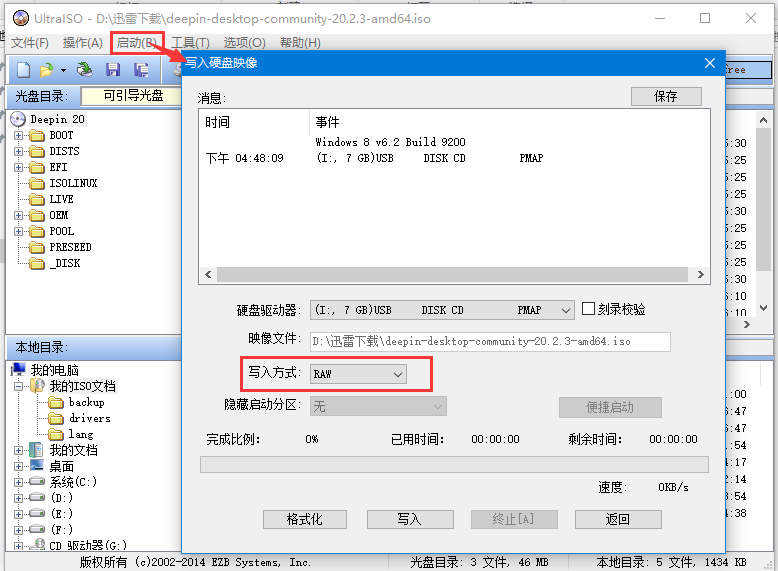



 The settings menu needs to be translated into Russian.


问题设备环境:
- magicbook 2018 AMD 2700U
- 当前使用系统ubuntu20.04
问题步骤:
-在deepin官网下载最新启动盘制作工具及iso文件
- 通过另一台win7系统制作deepin启动U盘
- 回到magicbook设备,重启ubuntu系统,持续短按F12,提示“boot fail”
补充:
- 启动盘工具:Deepin-boot-maker.exe
- 启动盘制作工具:rufus-3.17.exe //该工具制作的启动盘也无法成功引导
- 系统镜像:deepin-desktop-community-20.2.4-amd64.iso