

 中文
中文 
deepinuser17 deepin
2021-10-25 15:55 deepin 扫描需要安装另外的驱动。 从官网下载扫描驱动, 并安装官方的安装说明设置。
Reply Like 0 View the author
 deepin
 扫描需要安装另外的驱动。 从官网下载扫描驱动, 并安装官方的安装说明设置。
 deepin deepin
 扫描需要安装另外的驱动。 从官网下载扫描驱动, 并安装官方的安装说明设置。
官网叫我去其它网站下载
deepin deepin 深度自带的软件包,hplip-3.18, 已经支持这个型号的打印机。 无需再另外安装驱动。
https://developers.hp.com/hp-linux-imaging-and-printing/supported_devices/index
$ dpkg -l hplip
Desired=Unknown/Install/Remove/Purge/Hold
| Status=Not/Inst/Conf-files/Unpacked/halF-conf/Half-inst/trig-aWait/Trig-pend
|/ Err?=(none)/Reinst-required (Status,Err: uppercase=bad)
||/ Name           Version         Architecture Description
+++-==============-===============-============-============================================
ii  hplip          3.18.12+dfsg0-2 amd64        HP Linux Printing and Imaging System (HPLIP)
这几个链接看看:
https://developers.hp.com/hp-linux-imaging-and-printing/howtos/scanning
https://developers.hp.com/hp-linux-imaging-and-printing/howtos/other
deepin 深度自带的软件包,hplip-3.18, 已经支持这个型号的打印机。 无需再另外安装驱动。
https://developers.hp.com/hp-linux-imaging-and-printing/supported_devices/index
$ dpkg -l hplip
Desired=Unknown/Install/Remove/Purge/Hold
| Status=Not/Inst/Conf-files/Unpacked/halF-conf/Half-inst/trig-aWait/Trig-pend
|/ Err?=(none)/Reinst-required (Status,Err: uppercase=bad)
||/ Name           Version         Architecture Description
+++-==============-===============-============-============================================
ii  hplip          3.18.12+dfsg0-2 amd64        HP Linux Printing and Imaging System (HPLIP)
这几个链接看看:
https://developers.hp.com/hp-linux-imaging-and-printing/howtos/scanning
https://developers.hp.com/hp-linux-imaging-and-printing/howtos/other
这怎么下载
deepin 深度自带的软件包,hplip-3.18, 已经支持这个型号的打印机。 无需再另外安装驱动。
https://developers.hp.com/hp-linux-imaging-and-printing/supported_devices/index
$ dpkg -l hplip
Desired=Unknown/Install/Remove/Purge/Hold
| Status=Not/Inst/Conf-files/Unpacked/halF-conf/Half-inst/trig-aWait/Trig-pend
|/ Err?=(none)/Reinst-required (Status,Err: uppercase=bad)
||/ Name           Version         Architecture Description
+++-==============-===============-============-============================================
ii  hplip          3.18.12+dfsg0-2 amd64        HP Linux Printing and Imaging System (HPLIP)
这几个链接看看:
https://developers.hp.com/hp-linux-imaging-and-printing/howtos/scanning
https://developers.hp.com/hp-linux-imaging-and-printing/howtos/other
过去看了,可是没看到下载啊,怎么下载?
 deepin
 同样的问题,扫描易,无法用,但是打印正常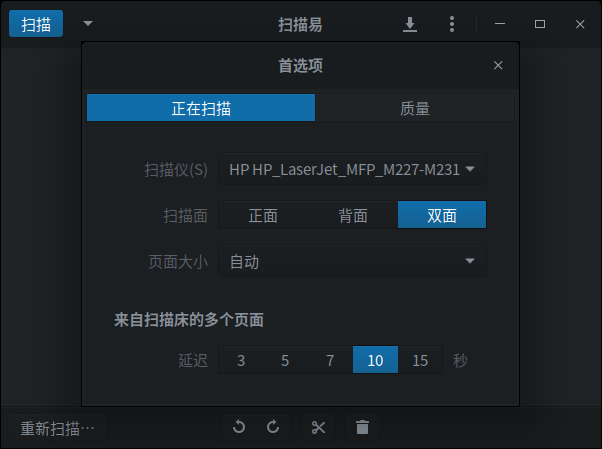
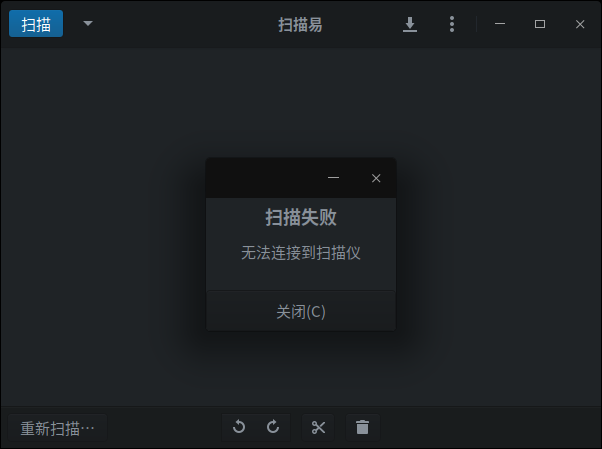
 deepin
 深度自带的软件包,hplip-3.18, 已经支持这个型号的打印机。 无需再另外安装驱动。
https://developers.hp.com/hp-linux-imaging-and-printing/supported_devices/index
$ dpkg -l hplip
Desired=Unknown/Install/Remove/Purge/Hold
| Status=Not/Inst/Conf-files/Unpacked/halF-conf/Half-inst/trig-aWait/Trig-pend
|/ Err?=(none)/Reinst-required (Status,Err: uppercase=bad)
||/ Name           Version         Architecture Description
+++-==============-===============-============-============================================
ii  hplip          3.18.12+dfsg0-2 amd64        HP Linux Printing and Imaging System (HPLIP)
这几个链接看看:
https://developers.hp.com/hp-linux-imaging-and-printing/howtos/scanning
https://developers.hp.com/hp-linux-imaging-and-printing/howtos/other
好吧 安装了这个版本的hplip后 用什么软件指定或者绑定特定设备并实现扫描(局域网内有20多台hp一体机)
deepin 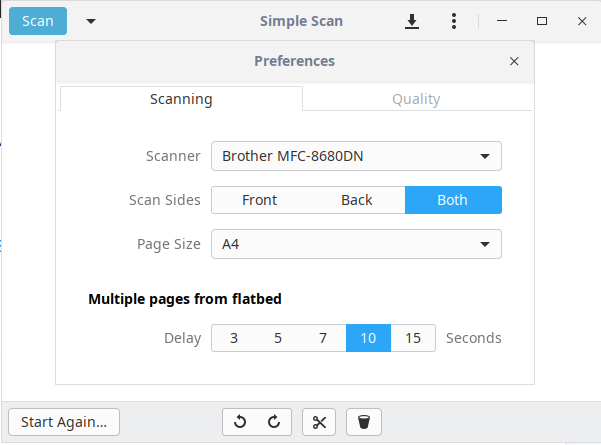
我是在Brother打印机上配置扫描的。方法应该是类似的。
扫描应用是Simple Scan (深度自带的).
参考这个链接 https://www.cyberciti.biz/faq/how-to-install-networked-hp-printer-and-scanner-on-ubuntu-linux/
Popular Ranking
ChangePopular Events
More


 The settings menu needs to be translated into Russian.
惠普Laser Jet pro MFP M227fdn打印机装了驱动可以打印但无法扫描