

 中文
中文 
神末shenmo deepin
2021-10-05 16:35 deepin Spark-App
Q&A Team
这种情况似乎是你没有安装独显驱动
下载显卡驱动管理器
如果安装失败请把你的显卡型号发出来
Reply Like 0 View the author
 deepin
 这种情况似乎是你没有安装独显驱动
下载显卡驱动管理器
如果安装失败请把你的显卡型号发出来

 deepin
 这种情况似乎是你没有安装独显驱动
下载显卡驱动管理器
如果安装失败请把你的显卡型号发出来
没有安装显卡驱动的提示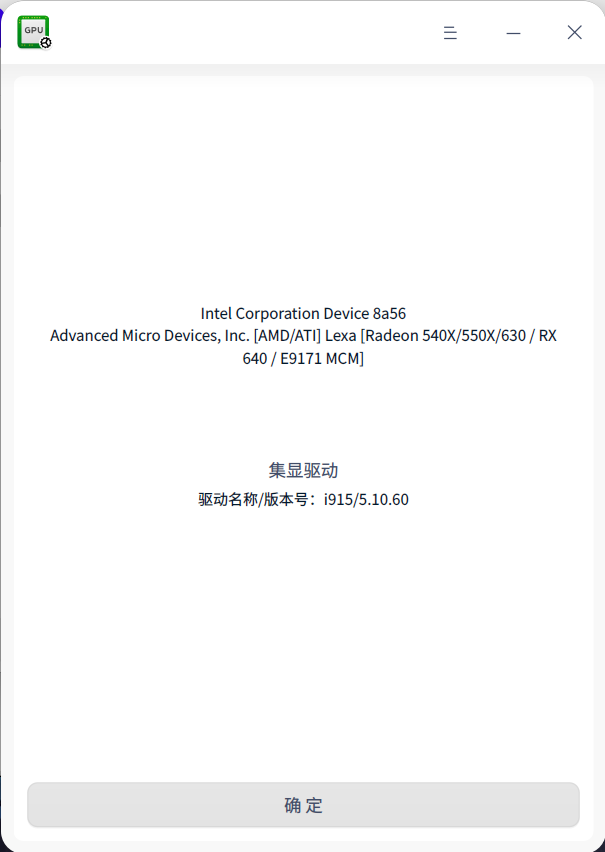

 deepin
 添加DRI_PRIME=1环境变量
deepin 添加DRI_PRIME=1环境变量
没有任何变化啊,export DRI_PRIME=1
deepin 没有任何变化啊,export DRI_PRIME=1
看看glxinfo | grep vendor和DRI_PRIME=1 glxinfo | grep vendor输出结果
deepin 看看glxinfo | grep vendor和DRI_PRIME=1 glxinfo | grep vendor输出结果
这是什么?涉及到我的知识盲区了
deepin 看看glxinfo | grep vendor和DRI_PRIME=1 glxinfo | grep vendor输出结果
OpenGL vendor string: AMD
OpenGL renderer string: Radeon 540X Series (POLARIS12, DRM 3.40.0, 5.10.60-amd64-desktop, LLVM 11.0.1)
OpenGL core profile version string: 4.6 (Core Profile) Mesa 20.3.4
OpenGL core profile shading language version string: 4.60
OpenGL core profile context flags: (none)
OpenGL core profile profile mask: core profile
OpenGL core profile extensions:
OpenGL version string: 4.6 (Compatibility Profile) Mesa 20.3.4
OpenGL shading language version string: 4.60
OpenGL context flags: (none)
OpenGL profile mask: compatibility profile
OpenGL extensions:
OpenGL ES profile version string: OpenGL ES 3.2 Mesa 20.3.4
OpenGL ES profile shading language version string: OpenGL ES GLSL ES 3.20
OpenGL ES profile extensions:
 deepin
 这种情况似乎是你没有安装独显驱动
下载显卡驱动管理器
如果安装失败请把你的显卡型号发出来
AMD+NVIDIA显卡组合目前适配如何?具体型号是AMD 4800H+NVIDIA 1650Ti,好像在双显卡切换上有问题,笔记本平时一直调用独显,功耗很大啊,显卡管理器里显示目前不适配此组合
deepin AMD+NVIDIA显卡组合目前适配如何?具体型号是AMD 4800H+NVIDIA 1650Ti,好像在双显卡切换上有问题,笔记本平时一直调用独显,功耗很大啊,显卡管理器里显示目前不适配此组合
好像还不行,只有英特尔的适配好点
deepin OpenGL vendor string: AMD
OpenGL renderer string: Radeon 540X Series (POLARIS12, DRM 3.40.0, 5.10.60-amd64-desktop, LLVM 11.0.1)
OpenGL core profile version string: 4.6 (Core Profile) Mesa 20.3.4
OpenGL core profile shading language version string: 4.60
OpenGL core profile context flags: (none)
OpenGL core profile profile mask: core profile
OpenGL core profile extensions:
OpenGL version string: 4.6 (Compatibility Profile) Mesa 20.3.4
OpenGL shading language version string: 4.60
OpenGL context flags: (none)
OpenGL profile mask: compatibility profile
OpenGL extensions:
OpenGL ES profile version string: OpenGL ES 3.2 Mesa 20.3.4
OpenGL ES profile shading language version string: OpenGL ES GLSL ES 3.20
OpenGL ES profile extensions:
应该没问题
是你添加环境变量的方法不对,export只是对当前shell和他的子进程有用
你先试试在输入变量后的shell运行应用看看有没有效果
要开机自动添加环境变量,你试试在
~/.config/environment.d/envvars.conf
里面写DRI_PRIME=1
~是主目录,文件管理器按ctrl+H显示隐藏文件

 deepin
 AMD+NVIDIA显卡组合目前适配如何?具体型号是AMD 4800H+NVIDIA 1650Ti,好像在双显卡切换上有问题,笔记本平时一直调用独显,功耗很大啊,显卡管理器里显示目前不适配此组合
看看 deepin 有没有 optimus-manager,可以注销切换显卡
另试试 deepin 能不能 PRIME render offload?好像是 nvidia 的官方支持,可以看 archwiki
Popular Events
More


 The settings menu needs to be translated into Russian.
希望能支持切换为独显,核显性能不足以播放4k视频