

 中文
中文 
bz74 deepin
2021-10-02 06:01 deepin 试一下在命令行方式依次运行下面的两个命令:
1. sudo apt update
2. sudo apt upgrade
Reply Like 0 View the author

 deepin
 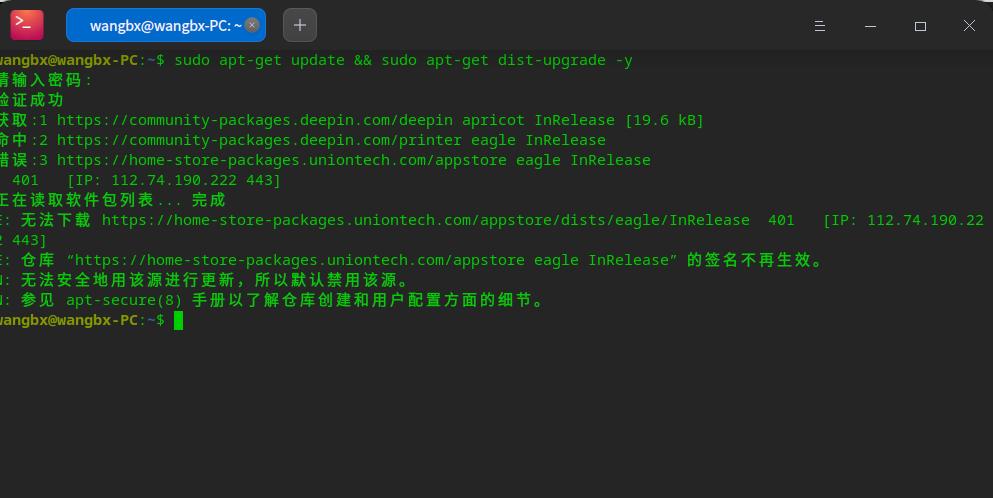 目前用的是20.2.2想升级下,通过设置里面的系统升级提示已是最新版本,怎么解决呢?
deepin 试一下在命令行方式依次运行下面的两个命令:
1. sudo apt update
2. sudo apt upgrade
deepin 试一下在命令行方式依次运行下面的两个命令:
1. sudo apt update
2. sudo apt upgrade
不行呢

 deepin
 修改下 /etc/apt/sources.list,下面三条够了
deb https://community-packages.deepin.com/deepin/ apricot main contrib non-free
deb [by-hash=force] https://mirrors.tuna.tsinghua.edu.cn/deepin/ apricot main contrib non-free
deb [by-hash=force] https://mirrors.aliyun.com/deepin/ apricot main contrib non-free
deepin 我的 也是这样 的,昨天晚上还是通过手动下载 安装更新成功的!
deepin 我的 也是这样 的,昨天晚上还是通过手动下载 安装更新成功的!
怎么手动下载安装更新?

 deepin
 这个是你太久没更新了,20.2.3 商店推送过一次更新,修改了商店仓库的地址,和 UOS 家庭版分仓库了。你这个报错的是家庭版的仓库,因为 Deepin 没有激活机制所以无法通过认证。
终端执行 sudo deepin-editor /etc/apt/sources.list.d/appstore.list,将源地址中的 home-store-packages 改为 com-store-packages,保存后执行 sudo apt update 应该就正常了。
 deepin
 那是不是说,我们都要去UOS,而不是Deepin?
Popular Events
More


 The settings menu needs to be translated into Russian.