

 中文
中文 
wecli deepin
2021-09-18 23:44 deepin It has been deleted!
 deepin
 deepin
 这是音量管理器吧

 deepin
 在网上搜 也有这个情况, 不是为什么我的一直cpu下不去.
deepin 这是音量管理器吧
是的

没遇到过这个问题。网上搜了下好像说是N卡的锅,可以试试:
1. 拉黑 snd_hda_intel 内核模块(可能导致没声音)
# 在root下编辑sound.blacklist.conf文件
sudo nano /etc/modprobe.d/sound.blacklist.conf
# 添加下面这行
blacklist snd_hda_intel
# CTRL+O ENTER CTRL+X 保存退出,然后重启电脑
2. 或者让pulseaudio在低优先级运行
# 在root下编辑daemon.conf文件
sudo nano /etc/pulse/daemon.conf
# 把这两个值都设成no
high-priority = no
realtime-scheduling = no
# CTRL+O ENTER CTRL+X 保存退出,然后重启电脑
deepin 没遇到过这个问题。网上搜了下好像说是N卡的锅,可以试试:
1. 拉黑 snd_hda_intel 内核模块(可能导致没声音)
# 在root下编辑sound.blacklist.conf文件
sudo nano /etc/modprobe.d/sound.blacklist.conf
# 添加下面这行
blacklist snd_hda_intel
# CTRL+O ENTER CTRL+X 保存退出,然后重启电脑
2. 或者让pulseaudio在低优先级运行
# 在root下编辑daemon.conf文件
sudo nano /etc/pulse/daemon.conf
# 把这两个值都设成no
high-priority = no
realtime-scheduling = no
# CTRL+O ENTER CTRL+X 保存退出,然后重启电脑
好的, 我试下方案2, 谢谢!
deepin 好的, 我试下方案2, 谢谢!
没有改善, 还是不行的
deepin 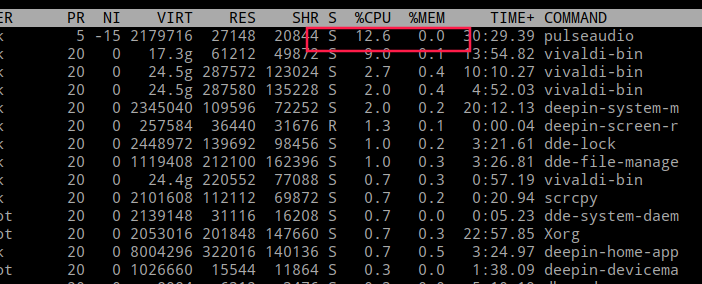
deepin linux的驱动 真。。。。
Popular Events
More


 The settings menu needs to be translated into Russian.
进程pulseaudio一直占用 cpu 10% , 肿么办, 杀掉又起啦了