

 中文
中文 
xiehj deepin
2021-09-14 16:56 deepin systemd-analyze time
systemd-analyze blame
请发下上面两个命令的输出看看呢。
Reply Like 2 View the author
 deepin
 systemd-analyze time
systemd-analyze blame
请发下上面两个命令的输出看看呢。

 deepin
 systemd-analyze time
systemd-analyze blame
请发下上面两个命令的输出看看呢。
看到哪项服务比较耗时,又非必要时,可以打开stacer,将服务开机启动关闭。
 deepin
  deepin
我的电脑启动速度这么慢,该怎么解决。

 deepin
 怎么看哪些程序占用时间长?
 deepin
我的电脑启动速度这么慢,该怎么解决。
前两个好像都可以禁用掉
deepin deepin 麻烦帮忙看看

deepin 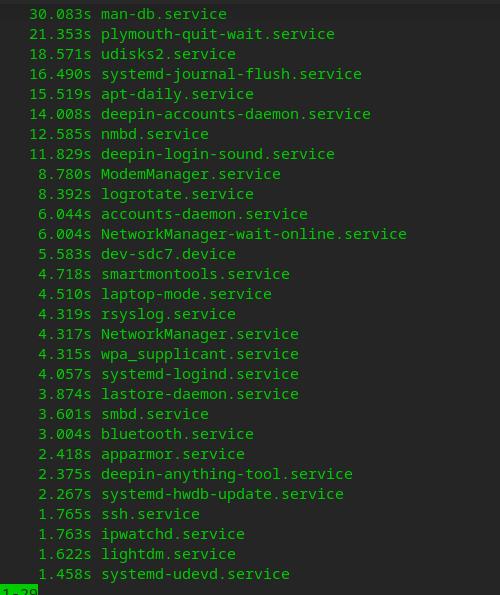
deepin grub 的延时启动 这个怎么设置?
deepin 前两个好像都可以禁用掉
这个哪里设置禁掉?
deepin deepin 这个哪里设置禁掉?
设置里面可以在更新里面关闭自动更新,更新里面高级可以关闭自动检测等等,设置里面声音可以关闭系统音效,就可以关闭好几个了服务了。然后可以参考这篇文章:https://www.linuxidc.com/Linux/2017-09/146700.htm , 了解哪些可以关闭,systemctl mask或者systemctl disable 可以禁用服务,你可以了解下二者的区别
deepin 设置里面可以在更新里面关闭自动更新,更新里面高级可以关闭自动检测等等,设置里面声音可以关闭系统音效,就可以关闭好几个了服务了。然后可以参考这篇文章:https://www.linuxidc.com/Linux/2017-09/146700.htm , 了解哪些可以关闭,systemctl mask或者systemctl disable 可以禁用服务,你可以了解下二者的区别
谢谢,前面几项耗时最长的哪个可以关闭?
deepin 

Popular Events
More


 The settings menu needs to be translated into Russian.
为什么deepin系统开机启动比较慢,有什么优化办法吗