

 中文
中文 
wecli deepin
2021-09-03 23:14 deepin It has been deleted!
 deepin
  deepin
 gpart也找不到U盘
deepin chen@chen-PC:~/Desktop$ sudo fdisk -l /dev/sd*
Disk /dev/sda: 465.8 GiB, 500107862016 bytes, 976773168 sectors
Disk model: TOSHIBA MQ01ABF0
Units: sectors of 1 * 512 = 512 bytes
Sector size (logical/physical): 512 bytes / 4096 bytes
I/O size (minimum/optimal): 4096 bytes / 4096 bytes
Disklabel type: gpt
Disk identifier: 6CA67627-C257-403E-87E4-CDB81E8749C2
Device Start End Sectors Size Type
/dev/sda1 2048 616447 614400 300M EFI System
/dev/sda2 616448 3762175 3145728 1.5G Linux filesystem
/dev/sda3 3762176 35219455 31457280 15G Linux filesystem
/dev/sda4 35219456 66676735 31457280 15G Linux filesystem
/dev/sda5 66676736 924344319 857667584 409G Linux filesystem
/dev/sda6 924344320 964190207 39845888 19G Linux filesystem
/dev/sda7 964190208 976773119 12582912 6G Linux swap
fdisk: cannot open /dev/sdb: 找不到介质
chen@chen-PC:~/Desktop$

 deepin
 换个接口试试
deepin 换个接口试试
试过了,没用
deepin deepin 试过了,没用
再换个系统试试这优盘
 deepin
 我的一直不认识U盘
deepin 再换个系统试试这优盘
使用的该U盘在这个电脑上安装的deepin系统
deepin 使用的该U盘在这个电脑上安装的deepin系统
你如果是以光盘镜像刻录方式做的U盘,一般的读写方式是不行的,可以用安装虚拟光驱查看文件,在用gparted进行格式化非光驱格式后才可以读写。
Popular Events
More


 The settings menu needs to be translated into Russian.
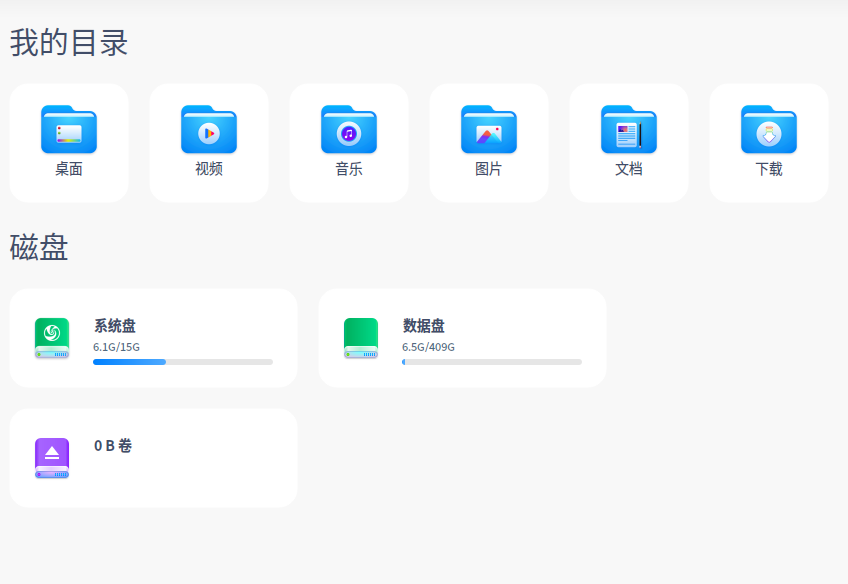
使用fdisk -l命令无法找到u盘,打开文件管理器显示u盘为0B卷,点击u盘显示需要格式化,格式化又无法成功,卡在1%,求教大神我该怎么办?