

 中文
中文 
cwbs deepin
2021-08-19 08:09 deepin 使用其他浏览器
Reply Like 0 View the author
 deepin
 使用其他浏览器

 deepin
 Chrome昨晚开始也遇到了这个问题点
deepin 是不是看不到最小化以及关闭的几个按钮了
 deepin
 论坛搜标题栏,可以通过添加设置文件解决标题栏过宽的问题
deepin https://bbs.deepin.org/forum.php?mod=viewthread&tid=197036
# 美化大额头
mkdir -p ~/.local/share/deepin/themes/deepin/light
cd ~/.local/share/deepin/themes/deepin/light/
sudo dedit titlebar.ini
在titlebar.ini中填写以下内容
[Active]
height=20     #自定义你希望的标题栏高度,建议20~24
backgroundColor=#ebebeb #自定义你想要的颜色
[Inactive]
height=20
backgroundColor=#ebebeb

 deepin
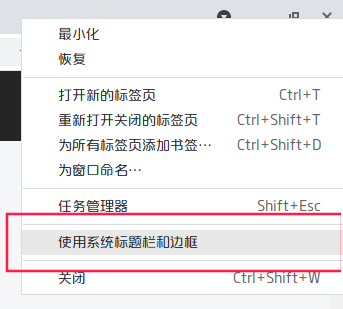
 Chrome不存在这问题,取消【使用系统标题栏和边框】的选中状态。
deepin Chrome最容易搞定。

 deepin
 我记得之前论坛有大佬弄过这个问题。
 deepin
 https://bbs.deepin.org/forum.php?mod=viewthread&tid=197036
# 美化大额头
mkdir -p ~/.local/share/deepin/themes/deepin/light
cd ~/.local/share/deepin/themes/deepin/light/
sudo dedit titlebar.ini
在titlebar.ini中填写以下内容
[Active]
height=20     #自定义你希望的标题栏高度,建议20~24
backgroundColor=#ebebeb #自定义你想要的颜色
[Inactive]
height=20
backgroundColor=#ebebeb
我试了对浏览器无效,对其他安装的第三方软件倒是有效
Popular Events
More


 The settings menu needs to be translated into Russian.
请问,浏览器标题栏太高,怎么解决?