

 中文
中文 
submgr deepin
2021-08-18 03:42 deepin  everything is ok in fullscreen mode, but i want same in regular using :(
Reply Like 0 View the author
 deepin
 everything is ok in fullscreen mode, but i want same in regular using :(

 deepin
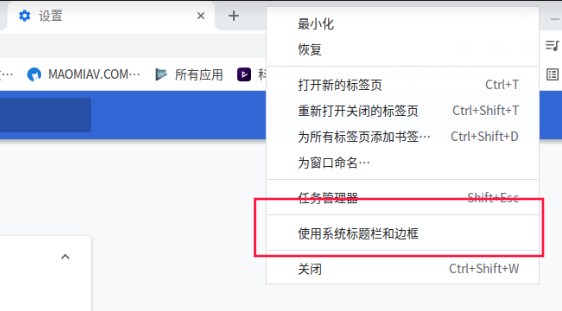
 For chrome, right click on the empty tab area, uncheck 'using system titlebar';
For firefox, right click on the toolbar, select 'customize toolbar'. Uncheck the titlbar option at the bottom;
For other applications, create folders:

 deepin
 The designers insist on this
solution here https://bbs.deepin.org/en/post/221063

 deepin
 右键点击标签空白处,把使用系统标题栏和边框去掉就可以了。懒得使用英文,你自己猜我在说啥。
Popular Events
More


 The settings menu needs to be translated into Russian.
Oh my god.. this window header... why its so big? Looks disgusting, is there any way to change it?