我是在虚拟机中安装的深度系统玩一下,本来准备装个安卓应用玩一下结果卡住了。后来在网上找到了这个方法解决了,你试一下有没有用,运行这个命令后要等很久,输入密码在页面上是不显示的其实已经输入进去了,输完密码直接回车键就可以了。
在终端中,运行sudo apt remove libreoffic*或sudo apt remove --purge libreoffice*试试
我是在虚拟机中安装的深度系统玩一下,本来准备装个安卓应用玩一下结果卡住了。后来在网上找到了这个方法解决了,你试一下有没有用,运行这个命令后要等很久,输入密码在页面上是不显示的其实已经输入进去了,输完密码直接回车键就可以了。
在终端中,运行sudo apt remove libreoffic*或sudo apt remove --purge libreoffice*试试
我是在虚拟机中安装的深度系统玩一下,本来准备装个安卓应用玩一下结果卡住了。后来在网上找到了这个方法解决了,你试一下有没有用,运行这个命令后要等很久,输入密码在页面上是不显示的其实已经输入进去了,输完密码直接回车键就可以了。
在终端中,运行sudo apt remove libreoffic*或sudo apt remove --purge libreoffice*试试
好的。谢谢,我先试一下看看
我是在虚拟机中安装的深度系统玩一下,本来准备装个安卓应用玩一下结果卡住了。后来在网上找到了这个方法解决了,你试一下有没有用,运行这个命令后要等很久,输入密码在页面上是不显示的其实已经输入进去了,输完密码直接回车键就可以了。
在终端中,运行sudo apt remove libreoffic*或sudo apt remove --purge libreoffice*试试
很遗憾啊,这条命令没办法运行,提示这个我也不会解决。。刚入坑
E: 无法获得锁 /var/lib/dpkg/lock - open (11: 资源暂时不可用)
E: 无法锁定管理目录(/var/lib/dpkg/),是否有其他进程正占用它?
很遗憾啊,这条命令没办法运行,提示这个我也不会解决。。刚入坑
E: 无法获得锁 /var/lib/dpkg/lock - open (11: 资源暂时不可用)
E: 无法锁定管理目录(/var/lib/dpkg/),是否有其他进程正占用它?
dpkg还在跑,说明没装完
WPS安装的时候如果网络不好容易卡住
安卓应用容易卡75%,因为任务队列里面有多个安卓应用,这个是只能一个一个装
如果还不行,强制重启再
sudo dpkg --configure -a
看看卡在哪
dpkg还在跑,说明没装完
WPS安装的时候如果网络不好容易卡住
安卓应用容易卡75%,因为任务队列里面有多个安卓应用,这个是只能一个一个装
如果还不行,强制重启再
sudo dpkg --configure -a
看看卡在哪
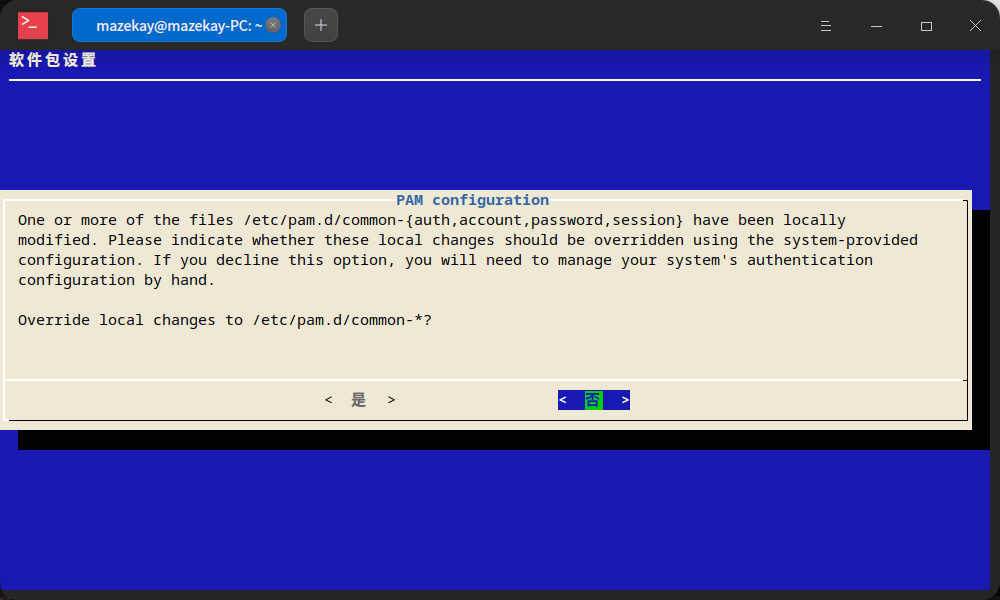
我刚刚强制重启之后输入了你说了代码,直接显示一个英文界面,问你是还是否。。
dpkg还在跑,说明没装完
WPS安装的时候如果网络不好容易卡住
安卓应用容易卡75%,因为任务队列里面有多个安卓应用,这个是只能一个一个装
如果还不行,强制重启再
sudo dpkg --configure -a
看看卡在哪
按是之后全部安装完了,好像解决了
Hello!
I need to take your attention to a serious security flaw of current version of deepin 20.2.2 login screen where you can enter ";" to bypass the the user password.
Can anyone help?
Else than this sometimes login screen fail to lock or there is no login screen when it is supposed to be asking login password for example when screen wakes up from suspension.
Hello!
I need to take your attention to a serious security flaw of current version of deepin 20.2.2 login screen where you can enter ";" to bypass the the user password.
Can anyone help?
Else than this sometimes login screen fail to lock or there is no login screen when it is supposed to be asking login password for example when screen wakes up from suspension.
Do you mean you can unlock the desktop by simply type ";"?
我刚刚强制重启之后输入了你说了代码,直接显示一个英文界面,问你是还是否。。
一般都选是
tab选下面OK Cancel选项
如果有*可选,用空格选中
一般都选是
tab选下面OK Cancel选项
如果有*可选,用空格选中
是的,现在解决了,但是有的软件不见了,之前的软件里面有网盘跟360什么的,这是换了一个软件库是吗?
Do you mean you can unlock the desktop by simply type ";"?
试了下,确实可以通过";"解锁,也可以绕过su r-o-o-t验证,希望官方尽快修复
Hello!
I need to take your attention to a serious security flaw of current version of deepin 20.2.2 login screen where you can enter ";" to bypass the the user password.
Can anyone help?
Else than this sometimes login screen fail to lock or there is no login screen when it is supposed to be asking login password for example when screen wakes up from suspension.
Thank you for your feedback, they have just fixed this bug and released a patch.
同样的问题,我的也被止住,75%就不动作了,也不能退出和关机、重启之类!希望官方早日解决,在系统中加入强制退出之类的功能,以方便广大小白!
Popular Events
More
下载的应用全部卡在75%安装这里,安卓的也是一样。有什么办法吗?