

 中文
中文 
deltacatxx deepin
2021-07-24 05:52 deepin FCITX5 ??????
OHHHHHHHHHHHHH
Reply Like 1 View the author
 deepin
 请来一次专门针对系统一直睿频运行、高耗电、风扇狂转问题的专项优化,谢谢!

 deepin
 FCITX5 ??????
OHHHHHHHHHHHHH

 deepin
 赞
 deepin
 赞👍

 deepin
 fcitx5下不能安装 搜狗输入法 等其他输入法吗
deepin fcitx5下不能安装 搜狗输入法 等其他输入法吗
不能,不过fcitx5本身就挺好用的
deepin 
话说官方打算出一套deepin风格的fictx5的皮肤吗?

 deepin
 升级内核成功,调用五笔拼音顺利。

 deepin
 请来一次专门针对系统一直睿频运行、高耗电、风扇狂转问题的专项优化,谢谢!
这个问题已经提交了,后边讨论一下
deepin
话说官方打算出一套deepin风格的fictx5的皮肤吗?
短期应该不会,我问一下
 deepin
dianji peizhi tanchu zhege , meiyou zhe jige bao
deepin
dianji peizhi tanchu zhege , meiyou zhe jige bao
这应该是fcitx旧版的提示吧,更新成新版要完全卸载旧版
 deepin
话说官方打算出一套deepin风格的fictx5的皮肤吗?
https://github.com/hosxy/Fcitx5-Material-Color
用的是这个皮肤吧 manjaro 上我用过
deepin 请来一次专门针对系统一直睿频运行、高耗电、风扇狂转问题的专项优化,谢谢!
问了开发,他们正在针对功耗这一块进行调研,暂时可以先将电源管理部分调成节能模式,或者使用tlp协助电源管理
 deepin
 问了开发,他们正在针对功耗这一块进行调研,暂时可以先将电源管理部分调成节能模式,或者使用tlp协助电源管理
调成节能模式以后屏幕亮度要强制降低,我不希望屏幕亮度降低
deepin 调成节能模式以后屏幕亮度要强制降低,我不希望屏幕亮度降低
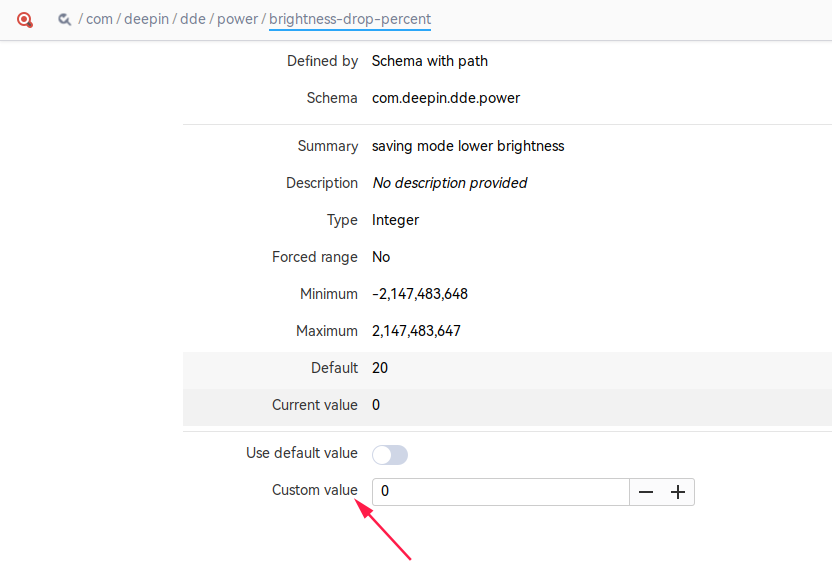
deepin
你这个界面怎么调出来的?
deepin 你这个界面怎么调出来的?
终端里执行
gsettings set com.deepin.dde.power brightness-drop-percent 0
就可以实现你的需求了
截图是用的 dconf-editor,可以用apt安装,使用要谨慎,别改乱了参数
 deepin
话说官方打算出一套deepin风格的fictx5的皮肤吗?
哇,一直想要这种类似于Windows和mac默认输入法风格的样式
 deepin
 支持了。用五笔输入法没作。
Popular Events
More


 The settings menu needs to be translated into Russian.
大家好,为了保证下个系统更新的质量,现在开展内测活动,请内部测试团队的成员们积极参加,谢谢!
更新说明:
1、升级stable内核版本到5.12.18
2、支持fcitx5输入法,可在仓库安装,具体使用方法如下:
· 卸载fcitx4,执行 sudo apt purge fcitx*
· 安装fcitx5输入法,执行 sudo apt install fcitx5
设置环境变量,向 /etc/environment 文件写入以下三行内容
· 在启动器中右键设置fcitx5开机启动
· 注销并重新登录,托盘处会出现fcitx5的托盘
在此框架下安装中文输入法的命令:
安装后在托盘位置右键输入法图标并选择重新启动
然后将拼音添加进去即可
*需要注意的是,fcitx5中文输入法默认词库很少,词库需要额外手动下载并放置在~/.local/share/fcitx5/pinyin/dictionaries/ 目录下。
这里推荐一个符合版权的词库 https://github.com/felixonmars/fcitx5-pinyin-zhwiki
返回旧版输入法方法:
然后在应用商店重新选择你想使用的输入法并安装配置即可。
测试流程
1、将系统修改为内部测试源,终端执行以下命令:sudo deepin-editor /etc/apt/sources.list
2、然后使用以下内容覆盖sources.list文件,然后保存并退出。
3、在终端执行以下命令:
sudo apt-get update && sudo apt-get dist-upgrade(可能需要注销重启)
注意
感谢
非常感谢各位内部测试团队成员的积极参与!