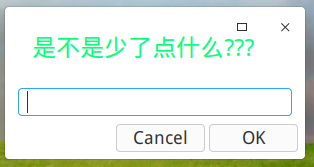
深度的微薄刚发了一个创建快捷方式desktop的视频
Tofloor
poster avatar
Hello
deepin
2020-05-07 19:55
Author
那个插件在那里下啊
Reply Favorite View the author
All Replies
1 / 2
To page
avatar
jingle
deepin
2020-05-07 21:30
#1
Reply View the author
avatar
Hello
deepin
2020-05-07 21:41
#2
https://bbs.deepin.org/post/193755
https://github.com/Dziban-dev/dde-appknitter

好东西啊!!!!!
Reply View the author
avatar
Hello
deepin
2020-05-07 21:42
#3
https://bbs.deepin.org/post/193755
https://github.com/Dziban-dev/dde-appknitter
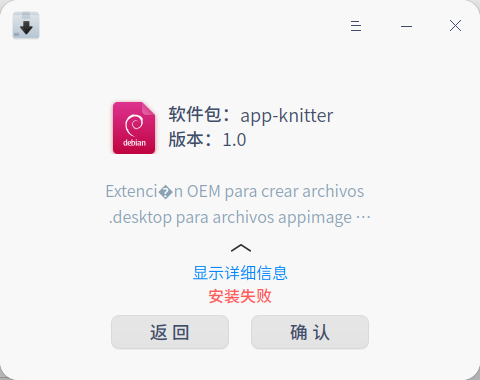
以后不用自己写快捷方式了
Reply View the author
avatar
Hello
deepin
2020-05-07 21:43
#4
https://bbs.deepin.org/post/193755
https://github.com/Dziban-dev/dde-appknitter

中文环境什么时候有啊
Reply View the author
Comments
jingle
2020-05-07 22:50
我和作者说了 快了
avatar
‌量子巡游者
Moderator
2020-05-07 22:06
#5
https://bbs.deepin.org/post/193755
https://github.com/Dziban-dev/dde-appknitter

(Reading database ... 271966 files and directories currently installed.)
Preparing to unpack .../appknitter_1.0_all.deb ...
Unpacking app-knitter (1.0) over (1.0) ...
An error occurred while applying changes: dpkg: dependency problems prevent configuration of app-knitter:
app-knitter depends on dde-file-manager-menu-oem; however:
  Package dde-file-manager-menu-oem is not installed.

dpkg: error processing package app-knitter (--install):
dependency problems - leaving unconfigured
Errors were encountered while processing:
app-knitter


Reply View the author
Comments
jingle
2020-05-07 22:50
sudo apt install -f
avatar
xiamingyu
deepin
2020-05-07 22:09
#6
有用过的没有,分享一下使用体验。
Reply View the author
avatar
wei_pan
deepin
2020-05-07 22:22
#7
https://bbs.deepin.org/post/193755
(Reading database ... 271966 files and directories currently installed.)
Preparing to unpack .../a ...

我也遇到相同的情况,但实际上已经安装成功了
Reply View the author
avatar
wei_pan
deepin
2020-05-07 22:22
#8
这个东西具体怎么用呢
Reply View the author
avatar
‌量子巡游者
Moderator
2020-05-07 22:25
#9
微博上有视频的
Reply View the author
avatar
‌量子巡游者
Moderator
2020-05-07 22:50
#10
https://bbs.deepin.org/post/193755
这个东西具体怎么用呢

第一步,输入快捷方式的名字第二步,选择软件启动路径
第三步,选择软件图标
第四步,菜单栏可以看到创建的快捷方式了!!
Reply View the author
avatar
盘灶车站
deepin
2020-05-07 22:53
#11
看了你的贴一进微博,靠,三个月不登,微博自己替我关注了三百多个鬼,全是发各种广告的营销号。
Reply View the author
avatar
‌量子巡游者
Moderator
2020-05-07 22:54
#12
https://bbs.deepin.org/post/193755
https://github.com/Dziban-dev/dde-appknitter


Reply View the author
avatar
ygq8988
deepin
2020-05-07 23:53
#13
mark一下,自己创建好累
Reply View the author
avatar
xmeng
deepin
2020-05-08 23:37
#14
我的用不了,报错,安装失败后也用sudo apt install -f修复了,在桌面右键那里打不开,在命令行直接启动脚本报错,


Reply View the author
avatar
忘记、过去
deepin
2020-05-09 00:46
#15
本帖最后由 zty199 于 2020-5-8 16:54 编辑

同楼上,运行的时候一样的错误。只有在系统语言设置为英语的时候才有用,但是创建出来的.desktop文件是空的,不知道哪里出问题了......
Reply View the author
avatar
强迫症晚期患者
deepin
2020-05-09 01:05
#16
深度官方也有这个工具https://github.com/linuxdeepin/desktop-entry-editor。好久没更了
Reply View the author
avatar
jingle
deepin
2020-05-09 01:08
#17
https://bbs.deepin.org/post/193755
同楼上,运行的时候一样的错误。只有在系统语言设置为英语的时候才有用,但是创建出来的.desktop文件是空的 ...

去github上面提issues吧
Reply View the author
avatar
忘记、过去
deepin
2020-05-09 01:15
#18
https://bbs.deepin.org/post/193755
去github上面提issues吧

额,在Ubuntu相关问题里找到解决方法了......

https://blog.csdn.net/rovast/article/details/78293746

修改 /etc/default/locale 为以下内容
LANG=en_US.UTF-8
LANGUAGE=zh_CN.utf8
LC_ALL=zh_CN.utf8
之后就可以用了,不是很懂为什么......
Reply View the author
avatar
panasony
deepin
2020-05-09 04:28
#19
B站也有哦!
Reply View the author
avatar
panasony
deepin
2020-05-09 04:31
#20
有图有真相
Reply View the author
1 / 2
To page