deepin V20安装报错could not find a distribution template for Deepin/n/a
Tofloor
poster avatar
ygq8988
deepin
2020-05-05 21:12
Author
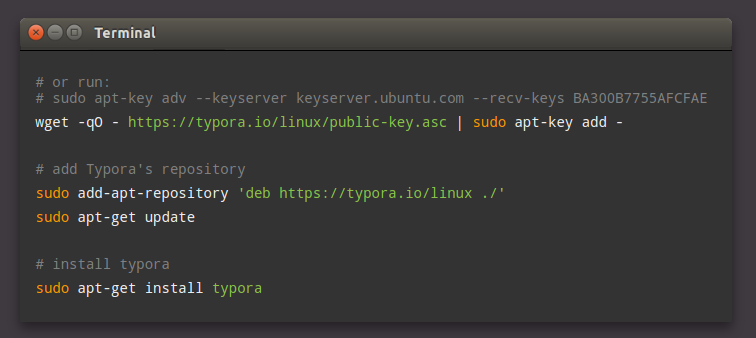
有大佬知道怎么解决吗?执行第二个命令报的错
Reply Favorite View the author
All Replies
avatar
xiamingyu
deepin
2020-05-05 22:00
#1
这软件用官方提供的方法安装就没痛快过。看看商店有没有,没有的话等等吧。或许可以试试同类软件moeditor 极简风格。
Reply View the author
avatar
ygq8988
deepin
2020-05-05 22:58
#2
https://bbs.deepin.org/post/193634
这软件用官方提供的方法安装就没痛快过。看看商店有没有,没有的话等等吧。或许可以试试同类软件moeditor  ...

还是用压缩包安装舒服。这样设置启动方法:Exec=/opt/apps/Typora/Typora %U --no-sandbox
Reply View the author
avatar
安洛
deepin
2020-05-06 00:49
#3
1. 修改 /etc/lsb-release,伪装成ubuntu:

DISTRIB_ID=Ubuntu

DISTRIB_RELEASE=15.10
DISTRIB_CODENAME=wily
DISTRIB-DESCRIPTION="Ubuntu wily"

转载自知乎。建议修改的时候将原文注释不要删除或者将原文件备份一份。
Reply View the author
avatar
ygq8988
deepin
2020-05-06 06:15
#4
https://bbs.deepin.org/post/193634
1. 修改 /etc/lsb-release,伪装成ubuntu:

DISTRIB_ID=Ubuntu

好的,以后遇到这样试一下,谢谢
Reply View the author
avatar
Feng Yu
deepin
2020-05-06 07:15
#5
报错你也贴出来到底是什么错误啊,不要让别人猜
Reply View the author
avatar
zhzhoh9
deepin
2020-05-06 09:13
#6
使用linux mint的安装方法就可以了
# or use
# sudo apt-key adv --keyserver keyserver.ubuntu.com --recv-keys BA300B7755AFCFAE
wget -qO - https://typora.io/linux/public-key.asc | sudo apt-key add -

# add Typora's repository
echo -e "\ndeb https://typora.io/linux ./" | sudo tee -a /etc/apt/sources.list
sudo apt-get update

# install typora
sudo apt-get install typora
Reply View the author