请教关于appimage格式软件的使用(能否建快捷方式?)
Tofloor
poster avatar
cnyangbaisong
deepin
2020-04-29 02:33
Author
这几天学习deepin系统的过程,了解了一下appimage格式的软件(相当于win里面的单个可执行文件,下载下来,给它可执行权限,无需安装,就可以直接使用,很方便),下载了几款appimage格式的软件,使用过后觉得挺好的,适合我这种小白。
对于这种格式软件的使用,想请教一下,能否为它在桌面或任务栏里建一个快捷方式,点直接运行,
如有哪位知道怎么操作,麻烦告知,谢谢!
Reply Favorite View the author
All Replies
avatar
neko
deepin
Ecological co-builder
Q&A Team
2020-04-29 02:45
#1
Reply View the author
avatar
jerry979
deepin
2020-04-29 04:29
#2
deepin 15.11不支持AppImageLauncher。可以自己写一个.desktop 文件
https://jerrywang.osland.me/2020/04/09/%E5%BA%94%E7%94%A8%E7%A8%8B%E5%BA%8F-%E8%9E%8D%E5%85%A5-deein-%E6%A1%8C%E9%9D%A2%E7%8E%AF%E5%A2%83/
Reply View the author
avatar
终南
deepin
2020-04-29 04:49
#3
帮你节选了一段Deepin折腾笔记里的内容,看看是否对你有帮助:

而所谓的启动项,本质就是一个后缀为“.desktop”的文件,可以在系统盘/usr/share/
applications/里看到。
但是,在/usr/share/applications/里创建启动项并不是最佳的位置。
最佳位置在主目录 ~/.local/share/applications 里。
下面以创建Minecraft(我的世界)为例讲解。
首先用编辑器创建文件 ~/.local/share/applications/Minecraft.desktop ,添加以下
内容:
[Desktop Entry]
Categories=Game;
Comment=Minecraft
Exec=/home/loaden/Zz/Minecraft/Minecraft.sh
Icon=minecraft
Name=Minecraft
Name[zh_CN]=我的世界
Terminal=false
Type=Application
X-Deepin-Vendor=user-custom
特别注意1:所有的路径都必须是绝对路径,而且不识别$HOME、~这些常见的bash变量。
特别注意2:Icon虽然可以用绝对路径的图标,但不能自适应大小。推荐把图标拷贝到~/.local
/share/icons/hicolor/的各个尺寸目录里,文件名为minecraft。
Minecraft.sh就是我的世界的启动脚本,内容如下:
#!/bin/bash
cd $HOME/Zz/Minecraft
java -jar HMCL.jar
Reply View the author
avatar
132******13
deepin
2020-04-29 05:30
#4
Reply View the author
avatar
186******46
deepin
2020-04-29 09:22
#5
https://bbs.deepin.org/post/193187
https://github.com/TheAssassin/AppImageLauncher/releases
安装AppImageLauncher

正解。
Reply View the author
avatar
yanfung
deepin
2020-04-29 09:58
#6
没有快捷的我都自已建一个XX.desktop
Reply View the author
avatar
cnyangbaisong
deepin
2020-04-29 17:03
#7
非常感谢大家的帮忙,谢谢!
Reply View the author
avatar
走钢丝
deepin
2020-04-29 17:23
#8
本帖最后由 lidanger 于 2020-4-29 10:09 编辑

论坛以前出现过两个 desktop 编辑工具:
https://github.com/FeihongKing/DesktopFileCreator
https://github.com/linuxdeepin/desktop-entry-editor

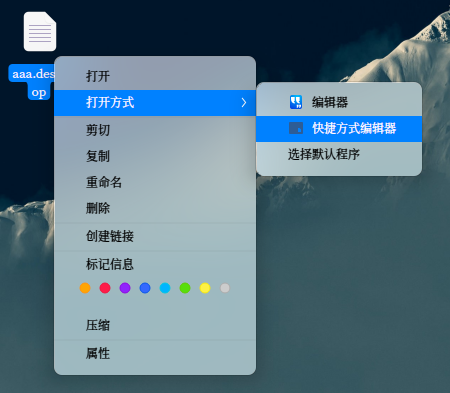
不过都是长时间没改了。前者是某个论坛大佬所做,后者是官方还没出的工具,就是比较简单,可以试试。


貌似只能编辑,所以需要先创建一个空 desktop 文件,然后右键编辑。


创建的 desktop 文件要在启动器显示应放在 ~/.local/share/applications 中。
官方小工具安装包见附件


Reply View the author
avatar
cnyangbaisong
deepin
2020-04-29 18:03
#9
https://bbs.deepin.org/post/193187
论坛以前出现过两个 desktop 编辑工具:
https://github.com/FeihongKing/DesktopFileCreator
https://gith ...

非常感谢,deepin论坛有你们真好!
Reply View the author