TeamViewer用不了
Tofloor
poster avatar
dheart
deepin
2020-04-28 17:12
Author
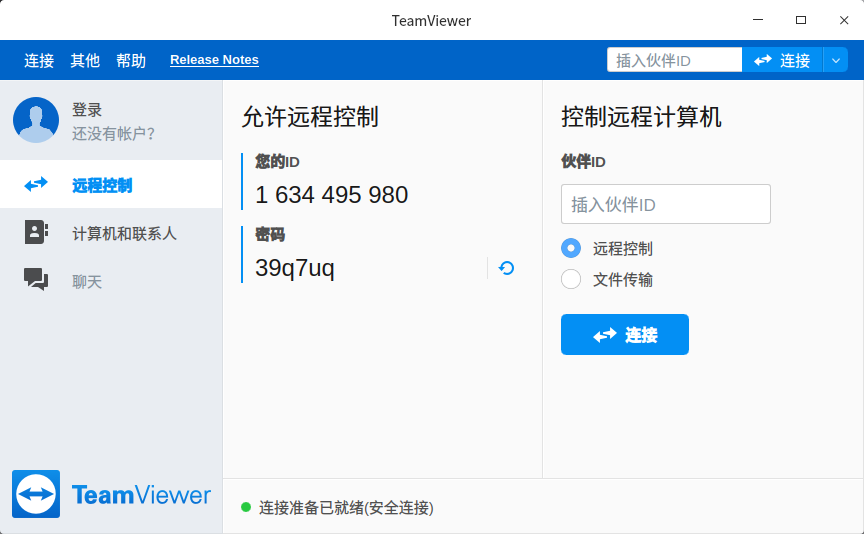
无论是商店下载还是官网下载的TeamViewer根本用不了
Reply Favorite View the author
All Replies
1 / 2
To page
avatar
dheart
deepin
2020-04-28 17:12
#1
v20 beta版
Reply View the author
avatar
残念
deepin
2020-04-28 18:15
#2
我这儿最新版可以使用

你试一下删除  ~/.config/teamviewer/
Reply View the author
avatar
jingle
deepin
2020-04-28 19:11
#3
我这边也可以用
Reply View the author
avatar
jingle
deepin
2020-04-28 19:11
#4

估计是没有连接上 你看下面还是红点
Reply View the author
Comments
mine0516
2020-05-06 02:48
看九楼给他提供建议,张屁股就骂人!
avatar
bright2020
deepin
2020-04-28 19:24
#5
同楼主,本机的ID根本不出来,说是没有连接,可是网络是好的呀。
Reply View the author
avatar
whooc
deepin
2020-04-28 19:58
#6
很正常,我经常这样,网络不好,我网络好的时候就出来了
Reply View the author
avatar
心平气和
deepin
2020-04-28 20:27
#7
等待一会就好了
Reply View the author
avatar
mine0516
deepin
2020-04-28 21:52
#8

去官网下载最新版
Reply View the author
Comments
zxj546700287
2020-04-29 19:31
眼瞎的,说了去官网下载了。。。没看清楚就瞎说
avatar
mine0516
deepin
2020-04-28 21:53
#9

去官网下载最新版
Reply View the author
avatar
mine0516
deepin
2020-04-28 22:11
#10

去官网下载最新版
Reply View the author
Comments
zxj546700287
2020-04-29 19:31
又一个眼瞎的,说了去官网下载了。。。没看清楚就瞎说
avatar
忘记、过去
deepin
2020-04-28 23:37
#11
teamviewer在deepin v20有显示bug,显示缩放不是1.0就会出现偏移......其他功能正常
Reply View the author
avatar
dheart
deepin
2020-04-29 19:26
#12
https://bbs.deepin.org/post/193125
估计是没有连接上 你看下面还是红点

试过好几次了
我虚拟机的windows的teamviewer一下子就打开了
Reply View the author
Comments
mine0516
2020-05-06 02:46
谁家裤门没拉把你露出里了
avatar
dheart
deepin
2020-04-29 19:26
#13
https://bbs.deepin.org/post/193125
去官网下载最新版

能看清我说的吗???我说了去官网下载了。。。。
Reply View the author
avatar
dheart
deepin
2020-04-29 19:27
#14
https://bbs.deepin.org/post/193125
去官网下载最新版

能看清我说的吗???我说了去官网下载了。。。。
Reply View the author
avatar
dheart
deepin
2020-04-29 19:28
#15
https://bbs.deepin.org/post/193125
估计是没有连接上 你看下面还是红点

退出都无法正常显示
Reply View the author
avatar
dheart
deepin
2020-04-29 19:30
#16
今天继续不行,快疯了,网络没问题,rm -rf .config/teamviewer也不行

Reply View the author
avatar
nohacks
deepin
2020-04-29 19:43
#17
本帖最后由 nohacks 于 2020-4-29 11:46 编辑

全自动安装teamviewer官方版本方法:
  1. sudo  apt-get install libqt5webkit5
  2. sudo  apt-get install qt56-teamviewer
  3. sudo  wget https://dl.teamviewer.cn/download/linux/version_15x/teamviewer_15.4.4445_amd64.deb&&dpkg -i teamviewer_15.4.4445_amd64.deb
Copy the Code
注意:需要在启动菜单里找到这个程序,右键里禁用屏幕缩放,不然显示会有问题
Reply View the author
avatar
nohacks
deepin
2020-04-29 19:48
#18
https://bbs.deepin.org/post/193125
今天继续不行,快疯了,网络没问题,rm -rf .config/teamviewer也不行

我之前也这样,后来重新安装系统
用终端 安装成功

  1.   sudo  apt-get install libqt5webkit5

  2.    sudo  apt-get install qt56-teamviewer

  3.    sudo  wget https://dl.teamviewer.cn/download/linux/version_15x/teamviewer_15.4.4445_amd64.deb&&dpkg -i teamviewer_15.4.4445_amd64.deb
Copy the Code
Reply View the author
avatar
不会开车有驾照
deepin
2020-04-29 19:49
#19
我这里可用,在使用中发现,打开后要等待好长一段时间才能联网成功,你的可能是同样的问题
Reply View the author
avatar
xiongweixp
deepin
2020-04-29 19:49
#20
在开始菜单的teamviewer图标右键,禁用缩放就可以了
Reply View the author
1 / 2
To page