【求助】安装英伟达显卡驱动后,深度影院无法使用了!
Tofloor
poster avatar
onlike
deepin
2020-04-28 14:36
Author
在安装好双显卡英伟达的显卡驱动后,发现v20里面的“影院”应用打开后无法使用,如下图:
“影院”打开后,中间变成了镂空的,而且不管怎么拖拽都没反应,只能“强制关闭”,请问怎么解决?
Reply Favorite View the author
All Replies
1 / 2
To page
avatar
onlike
deepin
2020-04-28 14:47
#1
在安装英伟达驱动前,是可以正常使用的。安装显卡的方式是汇总论坛的各个教程操作的,地址:
https://bbs.deepin.org/post/192957
现在的问题是,按照这个方法安装好英伟达驱动后,v20系统自带的“影院”应用就卡死了,无法打开使用。

求助,有没有可以修复“影院”的方法啊?
Reply View the author
avatar
wnmer
deepin
2020-04-28 21:35
#2
下载电影资源用vlc
Reply View the author
avatar
onlike
deepin
2020-04-28 22:39
#3
https://bbs.deepin.org/post/193118
下载电影资源用vlc

不一定是要下载资源啊,平时打开个视频啥的还是希望用系统自带的影院,感觉还行,现在有没有修复的方法吗
Reply View the author
avatar
houyawei
deepin
2020-04-28 22:54
#4
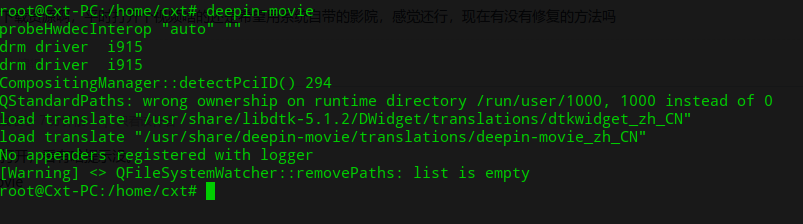
试着从终端打开,看有啥提示没。
deepin-movie
Reply View the author
avatar
onlike
deepin
2020-04-28 23:03
#5
https://bbs.deepin.org/post/193118
试着从终端打开,看有啥提示没。
deepin-movie


这个是运行结果。
Reply View the author
avatar
houyawei
deepin
2020-04-28 23:19
#6
本帖最后由 houyawei 于 2020-4-28 15:29 编辑
https://bbs.deepin.org/post/193118
这个是运行结果。

我的没有QStandardPaths: wrong ownership on runtime directory /run/user/1005, 1005 instead of 0
Reply View the author
avatar
onlike
deepin
2020-04-28 23:31
#7
https://bbs.deepin.org/post/193118
我的没有QStandardPaths: wrong ownership on runtime directory /run/user/1005, 1005 instead of 0
[joy ...

所以,咋办呢
Reply View the author
avatar
wnmer
deepin
2020-04-29 03:45
#8
https://bbs.deepin.org/post/193118
不一定是要下载资源啊,平时打开个视频啥的还是希望用系统自带的影院,感觉还行,现在有没有修复的方法吗 ...

我的意思是把电影下载后用vlc打开看
Reply View the author
avatar
onlike
deepin
2020-05-03 00:04
#9
自顶一下,请问现在有解决方法了吗??
还是很想修复一下这个“影院”播放器。。
Reply View the author
avatar
152******14
deepin
2020-05-03 00:41
#10
ifang@ifang-PC:~$ deepin-movie
probeHwdecInterop "auto" ""
drm driver  i915
drm driver  i915
CompositingManager::detectPciID() 208
load translate "/usr/share/libdtk-5.1.2/DWidget/translations/dtkwidget_zh_CN"
load translate "/usr/share/deepin-movie/translations/deepin-movie_zh_CN"
No appenders registered with logger
[Warning] <> QFileSystemWatcher::removePaths: list is empty
[Warning] <> QFileSystemWatcher::removePaths: list is empty
Reply View the author
avatar
onlike
deepin
2020-05-03 01:01
#11
https://bbs.deepin.org/post/193118
ifang@ifang-PC:~$ deepin-movie
probeHwdecInterop "auto" ""
drm driver  i915

啥意思啊??
没有“影院”了??
Reply View the author
avatar
wubozh
deepin
2020-05-03 01:48
#12
我也是。懒得弄了,干脆卸了装VLC
Reply View the author
avatar
152******14
deepin
2020-05-03 17:16
#13
https://bbs.deepin.org/post/193118
啥意思啊??
没有“影院”了??

不知道                              
Reply View the author
avatar
lbygljq
deepin
2020-05-23 04:01
#14
我的也是这个问题:
  1. ~$ deepin-movie
  2. probeHwdecInterop "auto" ""
  3. drm driver  i915
  4. drm driver  i915
  5. CompositingManager::detectPciID() 173
  6. No appenders registered with logger
  7. [Warning] <> QFileSystemWatcher::removePaths: list is empty
  8. [Warning] <> QFileSystemWatcher::removePaths: list is empty
Copy the Code
Reply View the author
avatar
neko
deepin
Ecological co-builder
Q&A Team
2020-05-23 05:10
#15
这个问题一直都有
Reply View the author
avatar
打击越
deepin
2020-05-23 06:24
#16
gsettings set com.deepin.deepin-movie composited 'DisableComposited'
Reply View the author
avatar
安洛
deepin
2020-05-23 06:37
#17
一直都有的问题,之前好像版主建议过安装其它播放器。
Reply View the author
avatar
liwl
deepin
2020-05-23 14:51
#18
通过nvidia-smi可以看到是deepin-movie运行在GPU上了。
可以通过deepin-movie -c 禁止运行在CPU上。
Reply View the author
avatar
liwl
deepin
2020-05-23 14:54
#19
https://bbs.deepin.org/post/193118
gsettings set com.deepin.deepin-movie composited 'DisableComposited'

你这个非常有效,貌似是禁止硬件加速
Reply View the author
avatar
liwl
deepin
2020-05-23 14:57
#20
17楼的命令,完全解决这个问题。楼主试一下,然后跟新帖子状态为:已解决。
造福别的同学
Reply View the author
1 / 2
To page