Home
Categories
WIKI
Topic
User
LANGUAGE:
中文
English
HDMI连接小米电视有声音没图像
Experiences and Insight
1407
views ·
9
replies ·
To
floor
Go
lewensheng
deepin
2020-04-26 17:44
Author
笔记本电脑,原来装的V15.11版本,连接小米电视后,电视能搜索到HDMI信号,但连接后电视只显示电脑桌面背景,其他什么都没有,没有任何反应,但电脑播放音乐电视有声音。后来装了最新的V20 Beta,问题依旧,不知道是什么原因。深度的系统用了几个月了,非常香,就这个小问题很遗憾。哪位大神帮忙解决一下?
Reply
Like 0
Favorite
View the author
All Replies
lewensheng
deepin
2020-04-26 19:36
#1
补充,原来装Windows7时使用一切正常。
ps:论坛人气好旺,一会儿功夫帖子就沉底了
Reply
Like 0
View the author
lewensheng
deepin
2020-04-27 00:11
#2
哪位遇到过类似问题吗
Reply
Like 0
View the author
levinit
deepin
2020-04-27 00:46
#3
我估计你这是双屏连接不是镜像模式吧,所以能看到桌面,在设置中找到显示器,改模式为镜像,这样电脑和外接屏幕就画面一样了。
Reply
Like 0
View the author
lewensheng
deepin
2020-04-27 04:06
#4
@levin,显示设置里只有四个选项:分辨率,亮度,屏幕缩放,刷新率,没找到模式
Reply
Like 0
View the author
s***1@gmail.com
deepin
2020-04-27 04:32
#5
从声音那设置一下,我这段时间一直用双屏幕,发现一插上HDMI,自动就把音频播放换到一个不知道什么的东东,手动选一下就好了。不知道你是不是我这种情况
Reply
Like 0
View the author
咿呀
deepin
2020-04-27 04:48
#6
切换声音输出口
Reply
Like 0
View the author
昨夜的星辰
deepin
2020-04-27 06:19
#7
可以试试super+p键,也就是键盘WIN徽标+P键,我也用的小米电视,用UOS的时候切换双屏模式反应会比较慢,但可以换
Reply
Like 0
View the author
wnmer
deepin
2020-04-27 09:46
#8
我猜你是不是只是屏幕扩展,在显示里把电视作为主输出。
Reply
Like 0
View the author
lewensheng
deepin
2020-04-27 20:01
#9
搞定了,不是声音的问题,声音可以输出到电视的,是屏幕选项的问题,按super+p键,默认是“屏幕扩展”,选择“屏幕复制”就显示正常了,声音也正常。谢谢!
大家一起看电视时无形中又宣传了deepin了,哈哈
Reply
Like 0
View the author
Please
sign
in first
Featured Collection
Change
[Tutorial] deepin25 WSL Offline Installation Guide
UOS AI 2.8 Released! Three New Intelligent Agents & Major Evolution
Solid Q&A | deepin 25 Common Questions – The Immutable System Edition
New Thread
Popular Events
More


 中文
中文 
 deepin deepin deepin deepin deepin
 deepin deepin
 deepin
 deepin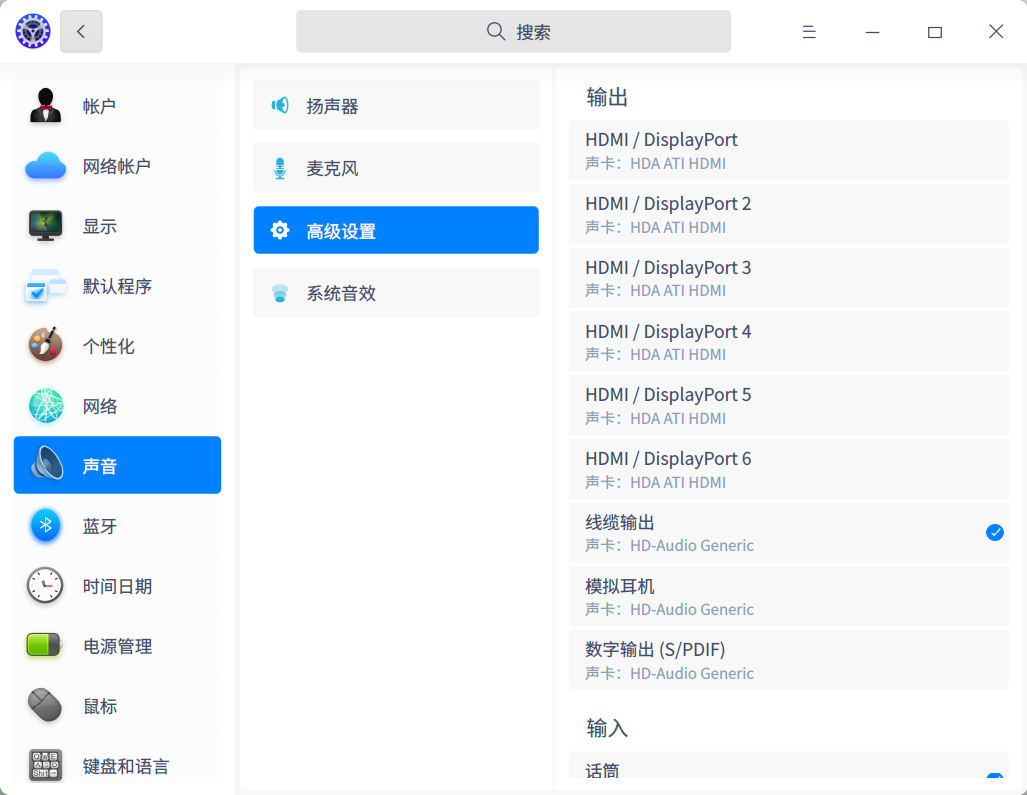

 deepin
  deepin deepin


