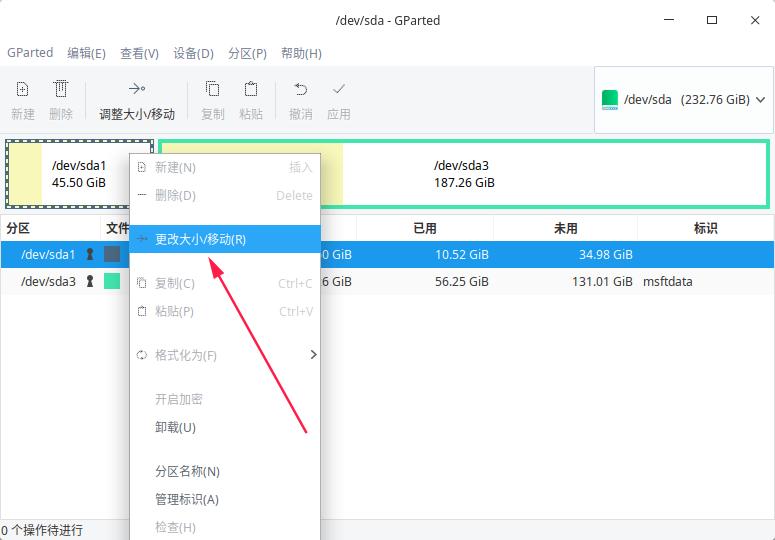
怎么调整根分区的大小?
Tofloor
poster avatar
deepincmg
deepin
2020-04-22 21:11
Author
本帖最后由 deepincmg 于 2020-4-22 17:54 编辑

70G太大了  浪费

20beta的启动U盘里没有live

Reply Favorite View the author
All Replies
avatar
电脑迷
deepin
2020-04-22 22:12
#1
The user is banned, and the content is hidden.

avatar
SamLukeYes
deepin
2020-04-22 22:22
#2
进live改
Reply View the author
avatar
zhoujun0451
deepin
2020-04-22 22:25
#3


自带分区工具,可以调整. 注意备份分区表
Reply View the author
avatar
deepincmg
deepin
2020-04-23 00:27
#4

怎么做   能说说吗
Reply View the author
avatar
deepincmg
deepin
2020-04-23 00:28
#5
https://bbs.deepin.org/post/192601
自带分区工具,可以调整. 注意备份分区表

你说的不行的    按钮灰色的
Reply View the author
avatar
走钢丝
deepin
2020-04-23 00:38
#6
https://bbs.deepin.org/post/192601
你说的不行的    按钮灰色的

下面有个卸载。。
Reply View the author
avatar
zhoujun0451
deepin
2020-04-23 00:43
#7
https://bbs.deepin.org/post/192601
下面有个卸载。。

你也可以进pe工具箱,  里面有一个分区助手, 那里面可以修改。
Reply View the author
avatar
deepincmg
deepin
2020-04-23 01:18
#8
本帖最后由 deepincmg 于 2020-4-22 17:23 编辑
https://bbs.deepin.org/post/192601
你也可以进pe工具箱,  里面有一个分区助手, 那里面可以修改。

用的diskgeinus   有文件系统错误   修复后才能调整大小    可我没找到怎么修复错误
Reply View the author
avatar
ghostry
deepin
2020-04-23 01:30
#9
按3楼说的进live,然后用4楼截图的工具修改.
Reply View the author
avatar
deepincmg
deepin
2020-04-23 01:32
#10
本帖最后由 deepincmg 于 2020-4-22 17:42 编辑
https://bbs.deepin.org/post/192601
按3楼说的进live,然后用4楼截图的工具修改.

什么是live
是这个吗

Reply View the author
avatar
ghostry
deepin
2020-04-23 02:04
#11
https://bbs.deepin.org/post/192601
什么是live
是这个吗

是 live ,不过我还没能用这个成功启动过.

一直在用ubuntu的live.
Reply View the author
avatar
deepincmg
deepin
2020-04-23 02:05
#12
https://bbs.deepin.org/post/192601
是 live ,不过我还没能用这个成功启动过.

一直在用ubuntu的live.

好的  谢谢
Reply View the author