Home
Categories
WIKI
Topic
User
LANGUAGE:
中文
English
V20 安装富士M268 DW 打印机成功后无法打印
Experiences and Insight
1819
views ·
2
replies ·
To
floor
Go
halwty
deepin
2020-04-19 16:26
Author
V20 安装富士M268 DW 打印机成功后无法打印 :方法:按系统界面添加打印机:
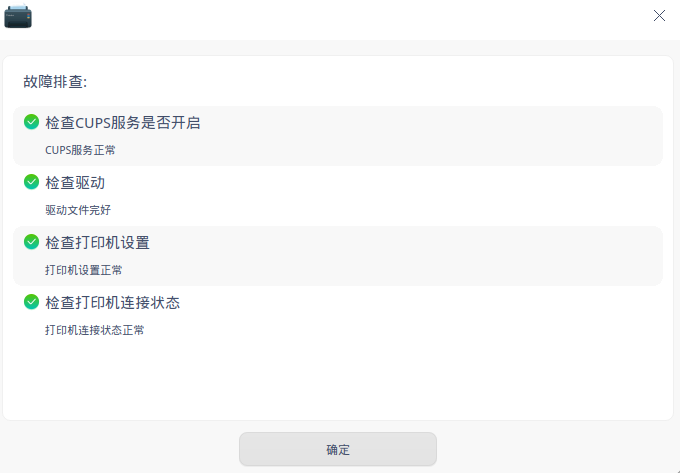
1.自动查找可以找到打印机,选择后,默认驱动安装后成功,无法打印测试页。
2.自动查找可以找到打印机,选择后,手动安装PPD 文件和其它富士其它型号后成功,也无法打印测试页。见相关图见附件
Reply
Like 0
Favorite
View the author
All Replies
voke
deepin
2020-04-26 18:49
#1
问题一样的,过去15版本是用其他驱动替代,但无法双面打印。20还在研究中
Reply
Like 0
View the author
voke
deepin
2020-04-26 20:50
#2
本帖最后由 voke 于 2020-4-26 13:00 编辑
已经解决了~
打开打印设置,注意不是打印管理器。
修改设备URI
原来的故障问题就解决了
Reply
Like 0
View the author
Please
sign
in first
Featured Collection
Change
[Tutorial] deepin25 WSL Offline Installation Guide
UOS AI 2.8 Released! Three New Intelligent Agents & Major Evolution
Solid Q&A | deepin 25 Common Questions – The Immutable System Edition
New Thread
Popular Events
More


 中文
中文 
 deepin deepin deepin deepin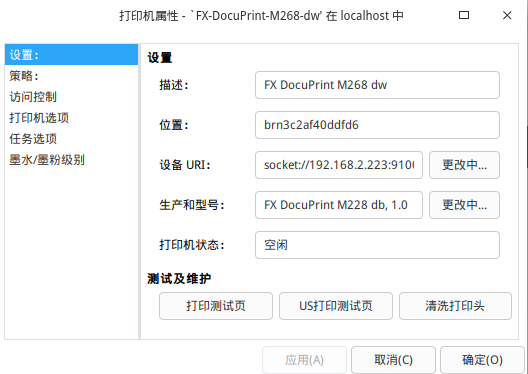


1.自动查找可以找到打印机,选择后,默认驱动安装后成功,无法打印测试页。
2.自动查找可以找到打印机,选择后,手动安装PPD 文件和其它富士其它型号后成功,也无法打印测试页。见相关图见附件