dde-dock运行任务栏不起来的报告的错误代码
Tofloor
poster avatar
WangZhongyun
deepin
2020-04-19 04:08
Author
PC:~/Desktop$ dde-dock
lock memory result: 0
load translate "/usr/share/libdtk-5.1.2/DWidget/translations/dtkwidget_zh_CN"
load translate "/usr/share/dde-dock/translations/dde-dock_zh_CN"
2020-04-17, 20:45:39.295 [Debug  ] [                                                         0]

dde-dock startup
2020-04-17, 20:45:39.344 [Debug  ] [                                                         0] void DockSettings::updateForbidPostions()
2020-04-17, 20:45:39.392 [Warning] [                                                         0] Connecting to deprecated signal QDBusConnectionInterface::serviceOwnerChanged(QString,QString,QString)
No appenders assotiated with category qt.qpa.xcb
[Warning] <> QXcbConnection: XCB error: 5 (BadAtom), sequence: 466, resource id: 0, major code: 20 (GetProperty), minor code: 0
2020-04-17, 20:45:39.447 [Debug  ] [                                                         0] using dock plugins dir: "/usr/lib/dde-dock/plugins"
2020-04-17, 20:45:39.660 [Debug  ] [                                                         0] "DockPlugin" init plugin:  "datetime"
2020-04-17, 20:45:39.661 [Debug  ] [                                                         0] load plugins item:  "datetime" "datetime" DatetimeWidget(0x16dcca0)
2020-04-17, 20:45:39.679 [Debug  ] [                                                         0] "DockPlugin" init plugin finished:  "datetime"
2020-04-17, 20:45:39.679 [Debug  ] [                                                         0] "DockPlugin" init plugin:  "keyboard"
2020-04-17, 20:45:39.684 [Debug  ] [                                                         0] "DockPlugin" init plugin finished:  "keyboard"
2020-04-17, 20:45:39.684 [Debug  ] [                                                         0] "DockPlugin" init plugin:  "multitasking"
2020-04-17, 20:45:39.685 [Debug  ] [                                                         0] load plugins item:  "multitasking" "multitasking" MultitaskingWidget(0x1358200)
2020-04-17, 20:45:39.685 [Debug  ] [                                                         0] "DockPlugin" init plugin finished:  "multitasking"
2020-04-17, 20:45:39.685 [Debug  ] [                                                         0] "DockPlugin" init plugin:  "netspeed"
2020-04-17, 20:45:39.686 [Debug  ] [                                                         0] load plugins item:  "netspeed" "netspeed" NetspeedWidget(0x135e840)
2020-04-17, 20:45:39.686 [Debug  ] [                                                         0] "DockPlugin" init plugin finished:  "netspeed"
2020-04-17, 20:45:39.687 [Debug  ] [                                                         0] "DockPlugin" init plugin:  "onboard"
2020-04-17, 20:45:39.688 [Debug  ] [                                                         0] load plugins item:  "onboard" "onboard" OnboardItem(0x1374b20)
2020-04-17, 20:45:39.688 [Debug  ] [                                                         0] "DockPlugin" init plugin finished:  "onboard"
2020-04-17, 20:45:39.688 [Debug  ] [                                                         0] "DockPlugin" init plugin:  "overlay-warning"
2020-04-17, 20:45:39.689 [Debug  ] [                                                         0] "DockPlugin" init plugin finished:  "overlay-warning"
2020-04-17, 20:45:39.689 [Debug  ] [                                                         0] "DockPlugin" init plugin:  "show-desktop"
2020-04-17, 20:45:39.689 [Debug  ] [                                                         0] load plugins item:  "show-desktop" "show-desktop" ShowDesktopWidget(0x16df210)
2020-04-17, 20:45:39.689 [Debug  ] [                                                         0] "DockPlugin" init plugin finished:  "show-desktop"
2020-04-17, 20:45:39.689 [Debug  ] [                                                         0] "DockPlugin" init plugin:  "shutdown"
2020-04-17, 20:45:39.693 [Debug  ] [                                                         0] load plugins item:  "shutdown" "shutdown" ShutdownWidget(0x145df10)
2020-04-17, 20:45:39.693 [Debug  ] [                                                         0] "DockPlugin" init plugin finished:  "shutdown"
2020-04-17, 20:45:39.693 [Debug  ] [                                                         0] "DockPlugin" init plugin:  "trash"
2020-04-17, 20:45:39.694 [Debug  ] [dapplication.cpp     Dtk::Widget:ApplicationPrivate::loadTranslator 270] load translate "/usr/share/libdtk-5.1.2/DWidget/translations/dtkwidget_zh_CN"
2020-04-17, 20:45:39.694 [Debug  ] [dapplication.cpp     Dtk::Widget:ApplicationPrivate::loadTranslator 270] load translate "/usr/share/dde-file-manager/translations/dde-file-manager_zh_CN"
2020-04-17, 20:45:39.695 [Debug  ] [                                                         0] true
2020-04-17, 20:45:39.696 [Debug  ] [                                                         0] load plugins item:  "trash" "trash" TrashWidget(0x15f3090)
2020-04-17, 20:45:39.696 [Debug  ] [                                                         0] "DockPlugin" init plugin finished:  "trash"
2020-04-17, 20:45:39.696 [Debug  ] [                                                         0] "DockPlugin" init plugin:  "tray"
2020-04-17, 20:45:39.699 [Warning] [                                                         0] QLayout: Attempting to add QLayout "" to HoldContainer "", which already has a layout
2020-04-17, 20:45:39.701 [Debug  ] [                                                         0] "DockPlugin" init plugin finished:  "tray"
段错误

这是怎么回事?要怎么解决呢?
Reply Favorite View the author
All Replies
avatar
走钢丝
deepin
2020-04-19 04:17
#1
重新装下?
sudo apt install dde-dock dde-dock-onboard-plugin dde-disk-mount-plugin --reinstall

Reply View the author
avatar
nolocus
deepin
2020-04-19 05:07
#2
你应该是装了论坛里的一些插件吧?  
你到这个目录里  /usr/lib/dde-dock/plugins/
把你安装的插件放到 那个目录下的 system-trays文件夹里面
然后终端里 运行sudo killall dde-dock..
..刚刚在那个贴回你了....
Reply View the author
avatar
WangZhongyun
deepin
2020-04-19 05:48
#3
https://bbs.deepin.org/post/192158
你应该是装了论坛里的一些插件吧?  
你到这个目录里  /usr/lib/dde-dock/plugins/
把你安装的插件放到 那个 ...

谢谢你,任务栏可以出来了,但任务栏原来的默认配置的插件也没有勾选项了。
Reply View the author
avatar
nolocus
deepin
2020-04-19 05:55
#4
https://bbs.deepin.org/post/192158
谢谢你,任务栏可以出来了,但任务栏原来的默认配置的插件也没有勾选项了。 ...

你移  你新添加的那个插件 其他的别动..
Reply View the author
avatar
WangZhongyun
deepin
2020-04-19 06:06
#5
https://bbs.deepin.org/post/192158
你移  你新添加的那个插件 其他的别动..

谢谢,我重装任务栏再把system-trays文件夹里的插件全删除后重启任务栏就似乎正常了。
Reply View the author
avatar
WangZhongyun
deepin
2020-04-19 06:09
#6
https://bbs.deepin.org/post/192158
重新装下?
sudo apt install dde-dock dde-dock-onboard-plugin dde-disk-mount-plugin --reinstall

谢谢,结合你的重装任务栏指令和另一位老师的删除多余任务栏插件的指导,终于搞出了任务栏
Reply View the author
avatar
nolocus
deepin
2020-04-19 06:19
#7
.... 别瞎删啊...
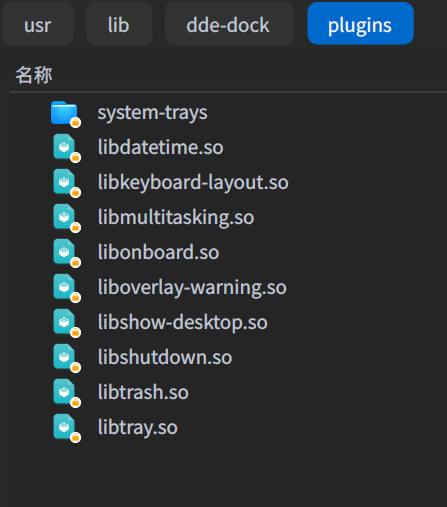
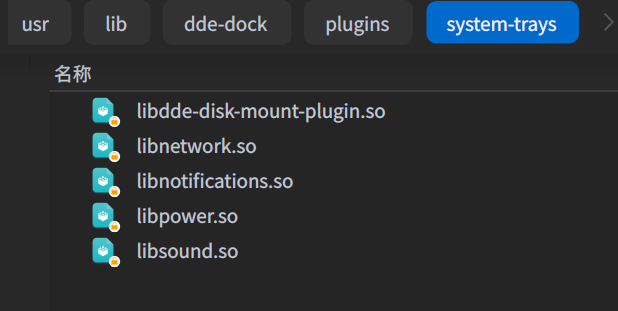
前面3个 和后面| 后面的  是 plugins  文件夹里的..

wifi,电池,音量,通知是system-trays  里面的插件负责的...

我这些都是默认的插件 你按这些来就行了..
如果想要安装插件 放在system-trays 里面就行了.
顺便附带一下.. plugins.zip
Reply View the author
avatar
WangZhongyun
deepin
2020-04-19 06:49
#8
https://bbs.deepin.org/post/192158
.... 别瞎删啊...
前面3个 和后面| 后面的  是 plugins  文件夹里的..

太谢谢了,详细指导,我已下载复原好了。
Reply View the author
avatar
神末shenmo
deepin
Spark-App
Q&A Team
2020-04-19 07:23
#9
WangZhongyun 发表于 2020-4-18 22:49
太谢谢了,详细指导,我已下载复原好了。

没猜错的话是任务栏网速插件
这个需要重新编译
Reply View the author
avatar
WangZhongyun
deepin
2020-04-19 21:13
#10
https://bbs.deepin.org/post/192158
没猜错的话是任务栏网速插件
这个需要重新编译

待这网速插件重新编译好后,请通知我重新安装deepin15.11升级测试看看
Reply View the author
avatar
神末shenmo
deepin
Spark-App
Q&A Team
2020-04-20 00:06
#11
https://bbs.deepin.org/post/192158
待这网速插件重新编译好后,请通知我重新安装deepin15.11升级测试看看

https://bbs.deepin.org/post/192227
我打好包了,20直接安装
Reply View the author
avatar
jingle
deepin
2020-04-20 00:22
#12
估计是添加了什么插件了吧
Reply View the author
avatar
WangZhongyun
deepin
2020-04-20 01:49
#13
https://bbs.deepin.org/post/192158
https://bbs.deepin.org/post/192227#689947
我打好包了,20 ...

谢谢,我试试。原来deepin15.11能用的插件都不行了。一装那些任何一个插件就会消失任务栏,卸载插件后任务栏就出来了。
Reply View the author
avatar
WangZhongyun
deepin
2020-04-20 01:49
#14
https://bbs.deepin.org/post/192158
估计是添加了什么插件了吧

是的,卸装才能出来任务栏
Reply View the author
avatar
WangZhongyun
deepin
2020-04-20 01:55
#15
本帖最后由 WangZhongyun 于 2020-4-19 21:09 编辑
https://bbs.deepin.org/post/192158
https://bbs.deepin.org/post/192227#689947
我打好包了,20 ...

依你打包来源,我原来因担心自己安装的插件放到/usr/lib/dde-dock/plugins/会导致任务栏消失而把这个插件放到/usr/lib/dde-dock/plugins/system-trays/后虽然可以用,但因其显示窗口太小而显示不全,我把插件又删除了。后来索性把插件放到/usr/lib/dde-dock/plugins/是正常的。好的,谢谢了。
Reply View the author