Home
Categories
WIKI
Topic
User
LANGUAGE:
中文
English
Win7重装后添加Deepin系统菜单,出现GRUB界面,请大神帮忙?
Experiences and Insight
1123
views ·
5
replies ·
To
floor
Go
平哥
deepin
2020-04-16 02:26
Author
电脑Window7系统重装后,按照
https://bbs.deepin.org/post/44261
https://bbs.deepin.org/post/133725#
两种模式添加Deepin系统引导菜单。选择Deepin系统进入后就到Grub界面。
然后论坛搜索解决方案,输入以下命令可以选择进入系统。
期间报了一个错误提示:Moudle gfxmenu isn't loaded
但是不影响进入系统。
成功登录进入deepin系统后,通过终端输入命令:
sudo upgrade-grub
sudo grub-install /dev/sda
重启之后还是会进入到Grub界面,请问各位大神,具体是什么问题,应该怎么修复,谢谢!
Reply
Like 0
Favorite
View the author
All Replies
uiyivihb
deepin
2020-04-16 02:50
#1
deepin有个系统修复工具,你下载后引导修复一下,看看能不能行。
Reply
Like 0
View the author
FG111
deepin
2020-04-16 04:43
#2
去/ boot/efi/EFI/下面看看,有没有deepin和ubuntu文件夹,有的话进去检查下grub. config文件,看里面的root参数是否设置为deepin/所在分区,ubuntu里面文件直接删了,把deepin文件夹里的东西复制进去
Reply
Like 0
View the author
thesun
deepin
2020-04-16 05:06
#3
本帖最后由 thesun 于 2020-4-15 21:10 编辑
可以参考一下
search --set=root /boot/grub/grub.cfg
linux /vmlinuz root=/dev/sda1
initrd /initrd
boot
提示找不到vmlinuz和initrd的话,先用 ls / 查看下vmlinuzt和vmlinuz可能有数字的后缀,自己替换下进系统后重新生成配置文件
grub-mkconfig -o /boot/grub/grub.cfg
Reply
Like 0
View the author
momolili
deepin
2020-04-16 05:14
#4
你选择硬盘接口为ACHI 进入deepin 然后执行 sudo update-grub2 然后重启 硬盘接口改为 raid on 然后 ok
Reply
Like 0
View the author
平哥
deepin
2020-04-16 23:59
#5
试了一下大家的建议,好像还是不行。
在grub>界面,我试了一下set,看到root和prefix都不是grub.cfg文件中的配置。
应该是启动Deepin时,C:/Boot/grub/grub.cfg配置文件没有被加载或者读取导致的。
不知道问题出现什么地方了。
Reply
Like 0
View the author
Please
sign
in first
Featured Collection
Change
[Tutorial] deepin25 WSL Offline Installation Guide
UOS AI 2.8 Released! Three New Intelligent Agents & Major Evolution
Solid Q&A | deepin 25 Common Questions – The Immutable System Edition
New Thread
Popular Events
More


 中文
中文 
 deepin deepin
  deepin
  deepin deepin deepin
  deepin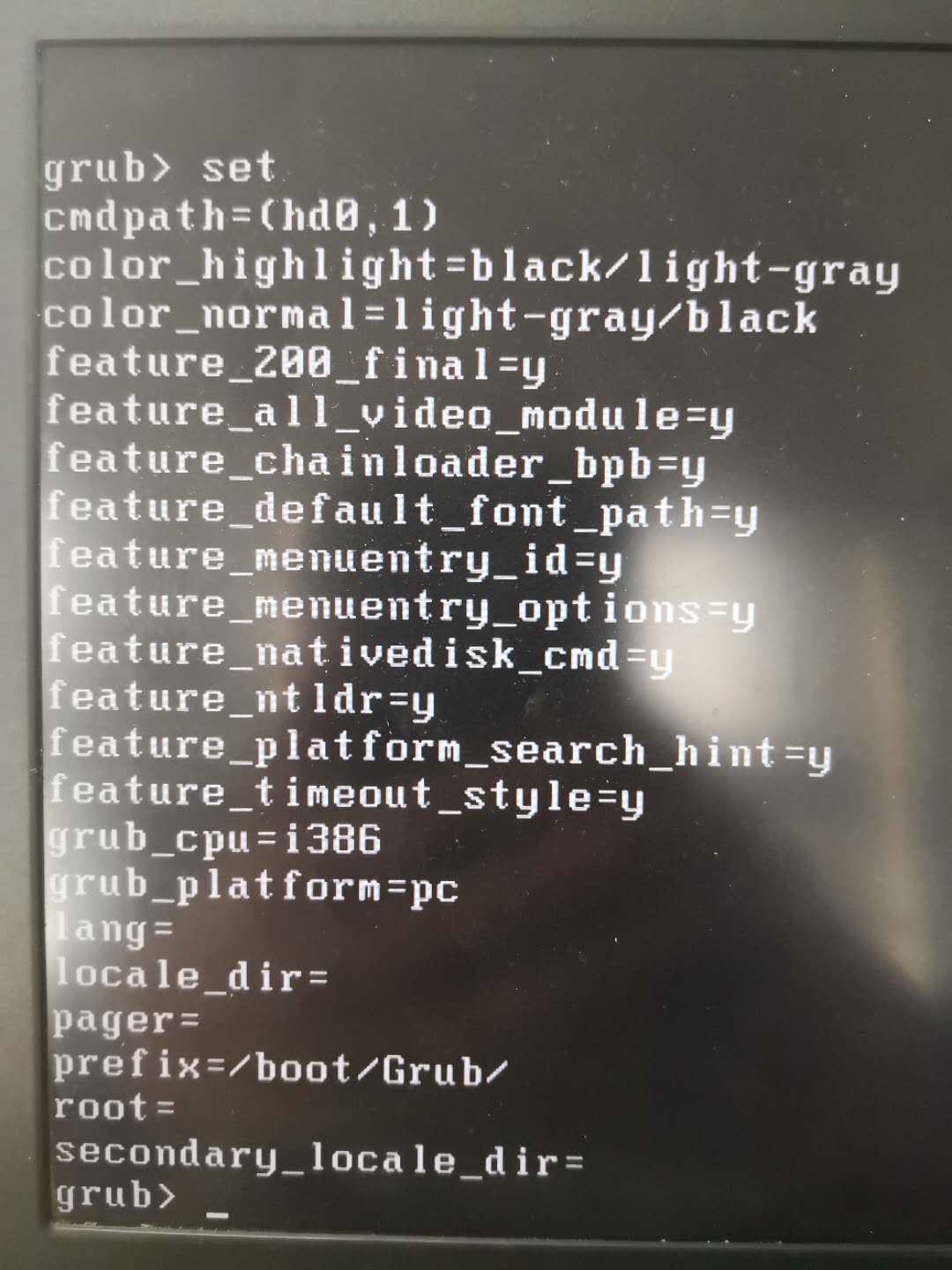


https://bbs.deepin.org/post/44261
https://bbs.deepin.org/post/133725#
两种模式添加Deepin系统引导菜单。选择Deepin系统进入后就到Grub界面。
然后论坛搜索解决方案,输入以下命令可以选择进入系统。
期间报了一个错误提示:Moudle gfxmenu isn't loaded
但是不影响进入系统。
成功登录进入deepin系统后,通过终端输入命令:
sudo upgrade-grub
sudo grub-install /dev/sda
重启之后还是会进入到Grub界面,请问各位大神,具体是什么问题,应该怎么修复,谢谢!