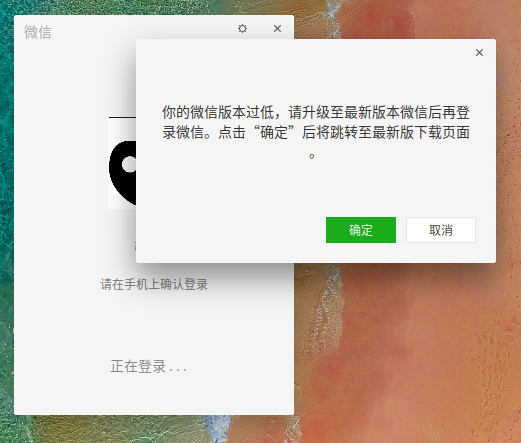
微信登陆不了啦!
Tofloor
poster avatar
弓长俊
deepin
2020-03-06 02:28
Author
什么 垃圾东西 !登陆时提示“你的微信版本过低,请升级至最新版本微信后再登陆微信。点击确定后将跳转至最新版下载页面”,点“确定”没反应,点"取消"也登陆不上去。


Reply Favorite View the author
All Replies
avatar
my2id
deepin
2020-03-06 04:28
#1
https://bbs.deepin.org/post/188449#
Reply View the author
avatar
拽个气球飞上天
deepin
2020-03-08 04:38
#2
今天下午,微信点了没反应。
卸载,重新安装,还是没反应。
Reply View the author
avatar
观摩
deepin
2020-03-08 05:08
#3
https://bbs.deepin.org/post/189485
今天下午,微信点了没反应。
卸载,重新安装,还是没反应。

删除
  1. .deepinwine/DeepinWeChat
Copy the Code
Reply View the author
avatar
拽个气球飞上天
deepin
2020-03-08 05:15
#4

https://bbs.deepin.org/post/188449#
装的这个微信。

你这个方法,我试下。
Reply View the author
avatar
拽个气球飞上天
deepin
2020-03-08 05:20
#5
https://bbs.deepin.org/post/189485
https://bbs.deepin.org/post/188449#

3q!
###帖子限制终结者###
Reply View the author
avatar
拽个气球飞上天
deepin
2020-03-08 16:21
#6

测试,正常
3Q!
Reply View the author
avatar
deepin-lzc
deepin
2020-03-08 17:17
#7
更新系统的地方更新
Reply View the author
avatar
观摩
deepin
2020-03-08 17:50
#8

也是经常出问题摸索出来的经验。

不需要重装,其他都不需要做,只需要删除那个目录即可
Reply View the author
avatar
拽个气球飞上天
deepin
2020-03-08 20:25
#9
https://bbs.deepin.org/post/189485
也是经常出问题摸索出来的经验。

不需要重装,其他都不需要做,只需要删除那个目录即可 ...


###帖子限制终结者###
Reply View the author
avatar
137******13
deepin
2020-03-10 19:06
#10
步骤:
1. 安装深度官方商店的微信
2. 启动一次就行,不需要登录
3. 下载微信官方最新的微信安装包
4. 到下载目录里面执行命令
  1.    env WINEPREFIX=~/.deepinwine/Deepin-WeChat deep-wine WeChatSetup.exe
Copy the Code

WeChatSetup.exe是你下载包的名称

5. 启动微信,就可以了

注意: 测试发现,微信不支持双显示器,我是双显示器,能启动微信,不能看到界面,拔掉一个显示器,重新启动微信就好了
Reply View the author