哈哈,内核 升到5.4.0.0 了
Tofloor
poster avatar
chdkd
deepin
2020-03-01 04:13
Author
哈哈,内核 升到5.4.0.0 了,值得庆贺!
应用都一切正常。deepin太稳定了,赞!
Reply Favorite View the author
All Replies
2 / 2
To page
avatar
chdkd
deepin
2020-03-04 04:55
#21
5.4.0-4安装了,也正常启动,今天看了下,src下usr/src/linux-headers(uname)的目录下5.4.0.4 的内容太少了,明天去看看虚拟机上可用的5.2.17下的目录是否与4。15一样的,如果是,研究下怎么扩headers的内容
Reply View the author
avatar
lzy1397
deepin
2020-03-04 09:12
#22
内核升级到5.6了,结果无线没了,又重新装的mcb4322驱动,最后搞定了,也没发现有啥变化,屏幕亮度不能调节问题还是存在,显卡是ati hd 5850。
Reply View the author
avatar
bingdev
deepin
2020-03-04 17:28
#23
Reply View the author
avatar
superfreeboy
deepin
2020-03-05 04:36
#24
嗯 编译gcc很费时 最好直接9.20 要不升级内核后 虚拟机比较麻烦
Reply View the author
avatar
solo880
deepin
2020-03-05 06:05
#25
本帖最后由 solo880 于 2020-3-4 22:08 编辑

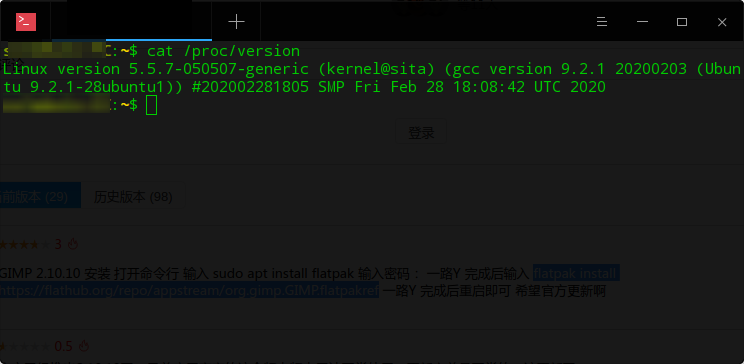
5.5.7 打卡

Reply View the author
avatar
chdkd
deepin
2020-03-07 04:33
#26
哈哈,升级到5.4.6 ,vmware workstation 活了!
Reply View the author
avatar
chdkd
deepin
2020-03-07 04:38
#27
下载https://kernel.ubuntu.com/~kernel-ppa/mainline/v5.4.6/里面Build for amd64 succeeded 里面的1,2,4,6这4个文件,
用sudo dpgk -i *.deb 升级到5.4.6内核
然后 用 git clone https://github.com/mkubecek/vmware-host-modules.git
cd vmware-host-modules
git checkout workstation-15.5.1
make
make install
成功就活了VMWARE workstation-15.5.1
Reply View the author
avatar
139******14
deepin
2020-03-08 16:32
#28
https://bbs.deepin.org/post/189325
在执行make编译GCC时,有些费时,请耐心等待。在一台Intel Xeon 2.30GHz的48核128GB内存机器上花费228分钟 ...

我实体机i5 7200U 16G内存 编译也差不多4个小时
Reply View the author
avatar
chdkd
deepin
2020-03-08 21:19
#29
怎么会。我笔记本i3 2370m,8G内存,编译了才2个多小时?
Reply View the author
avatar
tzho
deepin
2020-03-09 01:33
#30
我的macbook air升級內核後,wifi不見了
Reply View the author
avatar
houyawei
deepin
2020-03-11 18:39
#31
我用的这个https://xanmod.org/
Reply View the author
avatar
chdkd
deepin
2020-03-15 20:53
#32
试了下,这个内核版本,可以用,各办公应用是正常的,但worksatation不能用,与预想一样的,因此又删了5,5.8的版本了
Reply View the author
Comments
houyawei
2020-03-15 21:54
这个5.5.8确实用不了虚拟机,virtual box不行
2 / 2
To page