

 中文
中文 

28******22@qq.com deepin
2020-02-22 22:54 deepin 本帖最后由 actan 于 2020-2-22 14:58 编辑
研究了一下,估计很简单 ,几条命令就搞定了,我还以为要给办公室电脑换个大屏呢
主要依赖于xrandr 和cvt 2和命令
xrandr用来查询,设置分辨率
cvt用来新建分辨率
1. 先运行 xrandr 列出来当前的显示信息
Screen 0: minimum 320 x 200, current 1600 x 900, maximum 16384 x 16384
DisplayPort-0 disconnected (normal left inverted right x axis y axis)
HDMI-0 connected primary 1600x900+0+0 (normal left inverted right x axis y axis) 443mm x 249mm
1600x900 60.00*+ 75.00
1920x1080 60.00 59.94
1280x1024 70.00 60.02
1440x900 59.90
1360x768 59.95
1152x864 75.00
1280x720 60.00 59.94
1024x768 75.03 70.07 60.00
832x624 74.55
800x600 72.19 75.00 60.32 56.25
640x480 75.00 72.81 60.00 59.94
720x400 70.08
DVI-0 disconnected (normal left inverted right x axis y axis)
DVI-1 disconnected (normal left inverted right x axis y axis)
可以看出来最高支持 16384 x 16384,不过我没试更大的,因为超过我现在的显示器最佳分辨率看着也不方便
2. 用cvt新建我想要的分辨率 1920*1080,刷新率设 60
cvt 1920 1080 60
返回分辨率设置信息:
# 1920x1080 59.96 Hz (CVT 2.07M9) hsync: 67.16 kHz; pclk: 173.00 MHz
3.新建我想要的mode
xrandr --newmode "1920x1080_60.00" 173.00 1920 2048 2248 2576 1080 1083 1088 1120 -hsync +vsync
就是把xrandr --newmode 后面嗖上cvt返回的设置信息
4. 添加我想要的mode
xrandr --addmode HDMI-0 1920x1080_60.00
如果不报错即证明支持
5. 生效!
xrandr --output HDMI-0 --mode 1920x1080_60.00
HDMI-0是我想要输出的设置,第一步就查出来的
至此,完美!
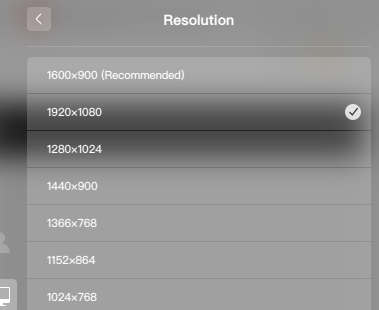
研究了一下,估计很简单
,几条命令就搞定了,我还以为要给办公室电脑换个大屏呢主要依赖于xrandr 和cvt 2和命令
xrandr用来查询,设置分辨率
cvt用来新建分辨率
1. 先运行 xrandr 列出来当前的显示信息
Screen 0: minimum 320 x 200, current 1600 x 900, maximum 16384 x 16384
DisplayPort-0 disconnected (normal left inverted right x axis y axis)
HDMI-0 connected primary 1600x900+0+0 (normal left inverted right x axis y axis) 443mm x 249mm
1600x900 60.00*+ 75.00
1920x1080 60.00 59.94
1280x1024 70.00 60.02
1440x900 59.90
1360x768 59.95
1152x864 75.00
1280x720 60.00 59.94
1024x768 75.03 70.07 60.00
832x624 74.55
800x600 72.19 75.00 60.32 56.25
640x480 75.00 72.81 60.00 59.94
720x400 70.08
DVI-0 disconnected (normal left inverted right x axis y axis)
DVI-1 disconnected (normal left inverted right x axis y axis)
可以看出来最高支持 16384 x 16384,不过我没试更大的,因为超过我现在的显示器最佳分辨率看着也不方便
2. 用cvt新建我想要的分辨率 1920*1080,刷新率设 60
cvt 1920 1080 60
返回分辨率设置信息:
# 1920x1080 59.96 Hz (CVT 2.07M9) hsync: 67.16 kHz; pclk: 173.00 MHz
3.新建我想要的mode
xrandr --newmode "1920x1080_60.00" 173.00 1920 2048 2248 2576 1080 1083 1088 1120 -hsync +vsync
就是把xrandr --newmode 后面嗖上cvt返回的设置信息
4. 添加我想要的mode
xrandr --addmode HDMI-0 1920x1080_60.00
如果不报错即证明支持
5. 生效!
xrandr --output HDMI-0 --mode 1920x1080_60.00
HDMI-0是我想要输出的设置,第一步就查出来的
至此,完美!
Reply Like 0 View the author


现在用向日葵远程办公中..蛋疼的是办公室显示器最大分辨率才1600*900,家里的电脑分辨率是1920*1080
全屏吧整个显示都发虚,不全屏吧桌面使用不全,小窗口看时间长眼睛疼
反正办公室显示器也没开着是黑屏,求大神指点怎么把办公室的deepin分辨率设置大些,最好和家里的一样
不知是否可行?