Home
Categories
WIKI
Topic
User
LANGUAGE:
中文
English
重装win10后引导进行deepin系统出现问题怎么解决?
Experiences and Insight
624
views ·
11
replies ·
To
floor
Go
jsszjj
deepin
2020-02-16 19:00
Author
1、我原来的计算机安装的是WIN 10,后来觉得学习一下deepin系统,就在原硬盘划出一个区装了deepin系统15.11,使用一段时间,使用很好,没有问题。
Reply
Like 0
Favorite
View the author
All Replies
jsszjj
deepin
2020-02-16 19:07
#1
2、我办 公用的是WI N 10, 有次用
Reply
Like 0
View the author
jsszjj
deepin
2020-02-16 19:08
#2
软件出现了问题,想要到wi n10安全 模式中修复系统,
Reply
Like 0
View the author
jsszjj
deepin
2020-02-16 19:11
#3
进不了win10安 全 模 式。
Reply
Like 0
View the author
jsszjj
deepin
2020-02-16 19:13
#4
唉,发个贴子,就这几个字,一直显示有不良信息,不能发表。
3、在win10高级启动模式中,只有关闭电源一个选项,通过运行msc onfig,发现启动项都不可以选择,估计是装deepin系统中改变了win10的启动项。
Reply
Like 0
View the author
jsszjj
deepin
2020-02-16 19:14
#5
什么 鬼东西,又发不了。只好一个一个试。
4、只好格式化win10操作系统重装,一切OK 。
Reply
Like 0
View the author
jsszjj
deepin
2020-02-16 19:15
#6
5、但发现开机只能进win10,进不了deepin系统。
Reply
Like 0
View the author
jsszjj
deepin
2020-02-16 19:17
#7
6、在baidu上搜了下如何加启动项进deepin 系统,终于找到一个贴子,可以简单加启动yingdao可以在本论坛找一下,采用boot ice)
Reply
Like 0
View the author
jsszjj
deepin
2020-02-16 19:17
#8
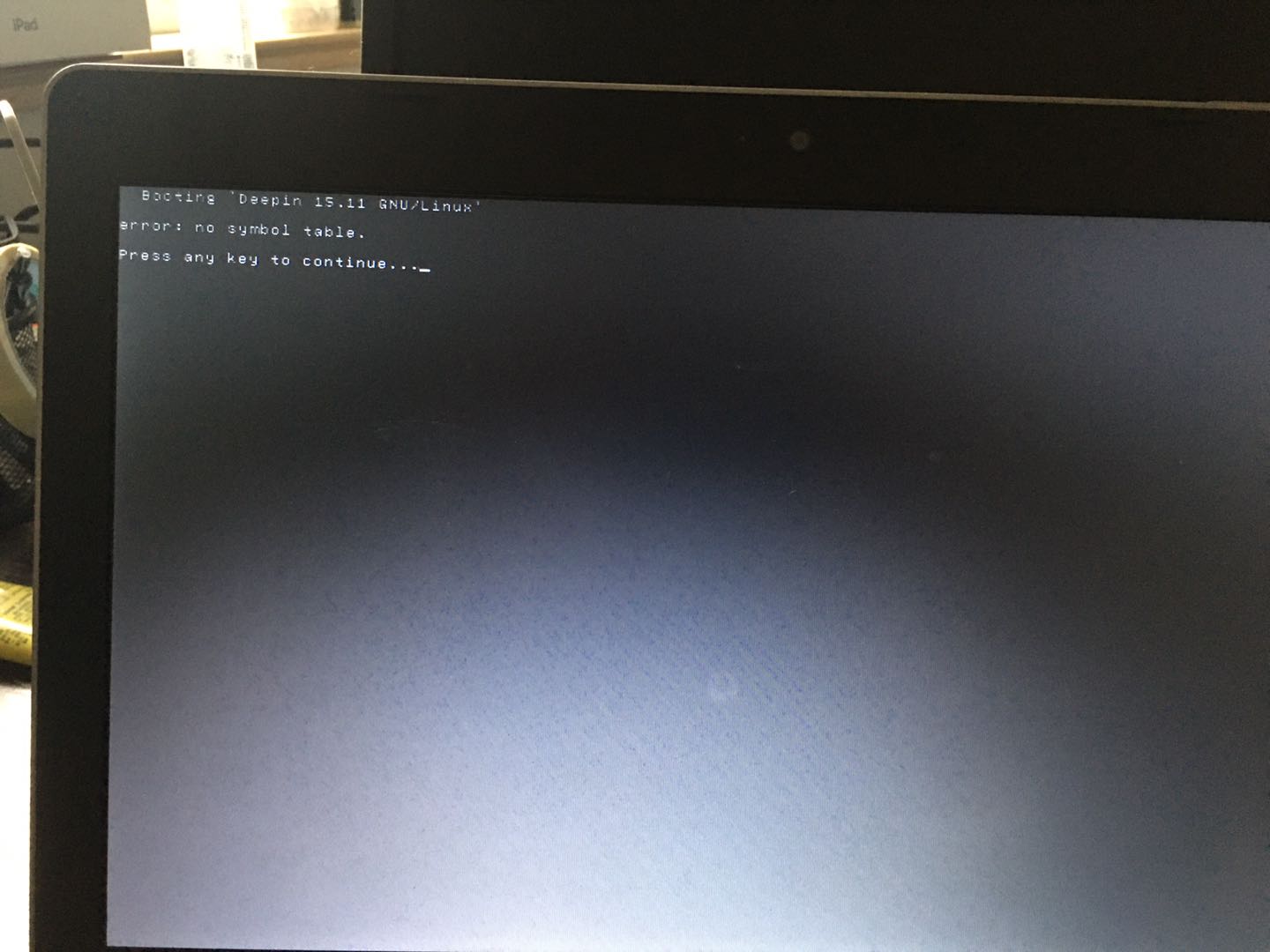
7、但是在选择进入deepin系统时,出现了如下的问题,但是不影响进行deepin系统,怎么解决?
Reply
Like 0
View the author
jsszjj
deepin
2020-02-16 19:18
#9
Reply
Like 0
View the author
jsszjj
deepin
2020-02-16 19:19
#10
发个贴子不容易啊,都是不良信息,我也是醉了。
Reply
Like 0
View the author
superendermansm
deepin
2020-02-16 22:28
#11
啥话也说不了,看链接:
http://www.shenmo.tech:666/?p=245
Reply
Like 0
View the author
Please
sign
in first
Featured Collection
Change
[Tutorial] deepin25 WSL Offline Installation Guide
UOS AI 2.8 Released! Three New Intelligent Agents & Major Evolution
Solid Q&A | deepin 25 Common Questions – The Immutable System Edition
New Thread
Popular Events
More


 中文
中文 
 deepin deepin deepin deepin deepin deepin deepin deepin deepin deepin deepin deepin
  deepin
  deepin


