终于发现QQ图片转圈的原因了
Tofloor
poster avatar
lflflf
deepin
2020-02-13 18:06
Author
用wine5.0的日志输出发现取图片的时候会有域名解析失败,原来是IPV6打开了导致的。关闭ipv6,重新打开QQ,取图片转圈问题解决

sudo sysctl -w net.ipv6.conf.all.disable_ipv6=1
sudo sysctl -w net.ipv6.conf.default.disable_ipv6=1
sudo sysctl -w net.ipv6.conf.lo.disable_ipv6=1


另外选择wine5.0安装QQ9.2.3已经可以完美运行,但可以不能在深度上运行,因为拖盘不能兼容wine只优化了deepin-wine。
Reply Favorite View the author
All Replies
3 / 4
To page
avatar
祖建
deepin
2020-02-23 19:35
#41
QQ正常了,可是怎么我的应用商店加载不了评论了?
Reply View the author
avatar
liuran001
deepin
2020-02-24 01:04
#42
https://bbs.deepin.org/post/188959
如果你不想禁用ipv6的话可以看看这篇博客https://blog.csdn.net/qq_37806908/article/details/104389641
...

好的,谢谢了
先把ipv6禁用了看看
Reply View the author
avatar
liuran001
deepin
2020-02-24 01:05
#43
https://bbs.deepin.org/post/188959
可以  配置IPV4优先

没必要关掉.

看上面,我试了,还是不行
Reply View the author
avatar
houyawei
deepin
2020-03-07 01:56
#44
https://bbs.deepin.org/post/188959
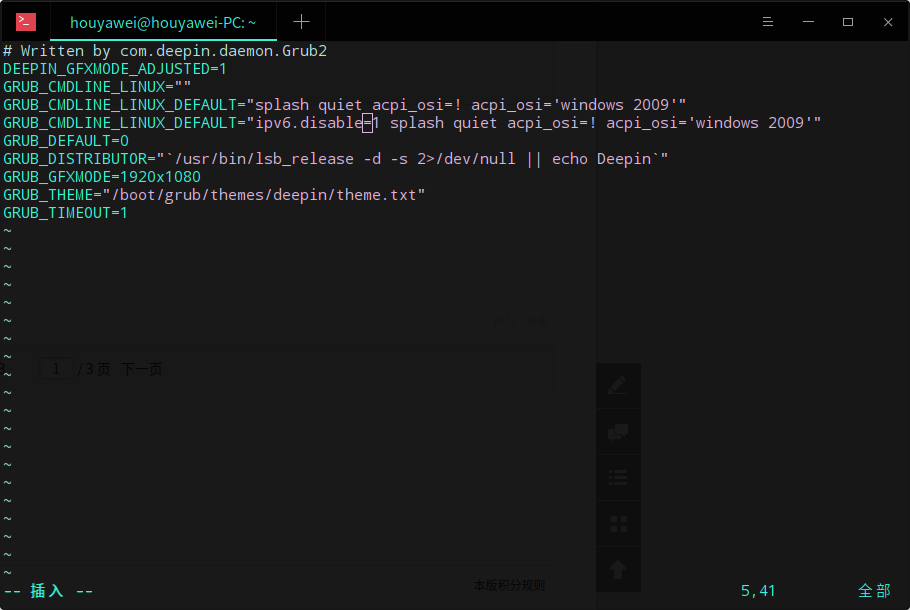
可以通过grub来关闭ipv6:
sudo vim /etc/default/grub
GRUB_CMDLINE_LINUX_DEFAULT="quiet spalsh"

解决了,感谢。另外提醒一些双显卡用户,如果你之前修改过GRUB,在splash quiet 后一定记得添加acpi_osi=! acpi_osi='windows 2009'
否则系统无法正常引导


sudo vim /etc/default/grub
GRUB_CMDLINE_LINUX_DEFAULT="splash quiet acpi_osi=! acpi_osi='windows 2009'"
GRUB_CMDLINE_LINUX_DEFAULT="ipv6.disable=1 splash quiet acpi_osi=! acpi_osi='windows 2009'"
sudo update-grub
Reply View the author
avatar
wenzhizhong
deepin
2020-03-08 21:53
#45
https://bbs.deepin.org/post/188959
可以  配置IPV4优先

没必要关掉.

https://bbs.deepin.org/user/9141  谢谢!
https://blog.ghostry.cn/doc/docs/ubuntu/ubuntu-1bq1plhnchufl
Reply View the author
avatar
ghostry
deepin
2020-03-09 17:44
#46
https://bbs.deepin.org/post/188959
@ghostry  谢谢!
https://blog.ghostry.cn/doc/docs/ubuntu/ubuntu-1bq1plhnchufl

厉害,竟然把我的文库扒出来了.
Reply View the author
avatar
临之
deepin
2020-03-09 22:36
#47
难怪。。。TIM也有同样问题
Reply View the author
avatar
wenzhizhong
deepin
2020-03-13 09:08
#48
本帖最后由 wenzhizhong 于 2020-3-13 01:09 编辑
https://bbs.deepin.org/post/188959
厉害,竟然把我的文库扒出来了.

谢谢啦。

不过,有个问题,您的方式第一次重启后,qq已经能正确显示。但是后面开机qq又显示不了了,又得恢复/etc/gai.conf 里面的注释了,重启一下。重新去掉注释重启,又能正常显示了。您有没有更好的方式呢?没见网上有说明是啥原因。
Reply View the author
avatar
houyawei
deepin
2020-03-15 22:54
#49
老哥们,开机引导不要禁用ipv6,否则xDroid里面的APP无法连接到网络,我也是今天才知道原因
Reply View the author
avatar
angelfind
deepin
2020-03-18 18:51
#50
mark 一下
Reply View the author
avatar
MicroSir
deepin
2020-03-18 21:15
#51
不建议用qq还是用tim
Reply View the author
avatar
heyjl
deepin
2020-03-21 00:57
#52
https://bbs.deepin.org/post/188959
可以  配置IPV4优先

没必要关掉.

设置完成,重启没见到效果呢
Reply View the author
avatar
豆浆包子
deepin
2020-03-21 08:18
#53
QQ完美解决。TIM还是不行。
Reply View the author
avatar
犇牛
deepin
2020-03-22 05:46
#54
有效果 不错
Reply View the author
avatar
犇牛
deepin
2020-03-24 00:32
#55
不错,很有效,谢谢分享
Reply View the author
avatar
soul_deepin
deepin
2020-04-03 19:12
#56
牛逼 牛逼~~~
Reply View the author
avatar
ghostry
deepin
2020-04-05 18:54
#57
https://bbs.deepin.org/post/188959
谢谢啦。

不过,有个问题,您的方式第一次重启后,qq已经能正确显示。但是后面开机qq又显示不了了,又得 ...

不清楚.我已经转arch了.

而且也不用qq.
Reply View the author
avatar
Feng Yu
deepin
2020-04-05 19:17
#58
禁用个ipv6而已,改什么grub?改sysctl.conf或sysctl.conf.d就行了

而且这个根本不是核心问题,肯定是你的ipv6配置有问题,你应该检查你的路由设置
Reply View the author
avatar
jingle
deepin
2020-04-18 17:36
#59
感谢分享
Reply View the author
avatar
mahuan
deepin
2020-05-14 04:19
#60
关闭 ipv6,看个人权衡利弊吧?
Reply View the author
3 / 4
To page