[App Sharing] uu远程的官方内测通道来了
Tofloor
poster avatar
kero990
deepin
16 hours ago
Author

UU远程在周六开启了内测下载,我看论坛没什么人发,发出来大家可以试试。

以下内容来自于 UU 远程内测微信群

Linux PC 端来啦,支持主控 / 被控,适用于 Ubuntu 18.04 及以上版本~
命令行安装:wget -O install.sh https://uuyc.163.com/install.sh && sudo sh install.sh
更多下载安装方式:https://page.weixin.qq.com/smartpage/p/b1_AdQAYgYXAA49f2vPV1sQDOfbGl9?p=1jigjo

安装脚本似乎会强制校验是不是ubuntu18以上版本,如果大家脚本安装失败,这里提取了下载的地址

https://api.nrd.nie.163.com/api/v1/release/dl/8?channel=gwqd

目前只有x86_x64架构,这里有一个问卷,可以填写你用什么系统以及希望推出什么架构。

https://wyuumnq.dingwei.netease.com/survey/rzurer/paper


我正在测试使用box64等兼容工具在arm64上能否运行。

另外虽然官方声称支持ubuntu18,但deb使用了zstd压缩格式,我记得这种deb压根在ubuntu18装不上,当然debian10和v20也可能装不上,我猜官方压根没在ubuntu18测试过。

Reply Favorite View the author
All Replies
avatar
𰻞𰻝面
deepin
16 hours ago
#1

安装失败:

Running dpkg

Preparing libxres1 (amd64)

Unpacking libxres1 (amd64)

Installing libxres1 (amd64)

Preparing apparmor (amd64)

Unpacking apparmor (amd64)

Installing apparmor (amd64)

Running dpkg

Preparing to configure apparmor (amd64)

Configuring apparmor (amd64)

Installed apparmor (amd64)

Preparing to configure libxres1 (amd64)

Configuring libxres1 (amd64)

Installed libxres1 (amd64)

Selecting previously unselected package uuyc.

(Reading database ... 190398 files and directories currently installed.)

Preparing to unpack .../nrd-uuyc_4.48.5.34977-1_amd64.deb ...

uuyc_upgrade_preinst stage=start action=install order=service_before_clients

uuyc_upgrade_preinst stage=stop_service result=skipped reason=service_unavailable

uuyc_upgrade_preinst stage=complete result=success

Unpacking uuyc (4.48.5.34977-1) ...

Setting up uuyc (4.48.5.34977-1) ...

Processing triggers for deepin-home-appstore-daemon (9.1.9) ...

Processing triggers for desktop-file-utils (0.28-1) ...

Processing triggers for deepin-desktop-theme (1.1.31) ...

Processing triggers for hicolor-icon-theme (0.17-2) ...

An error occurred while applying changes:

An error occurred while applying changes: Traceback (most recent call last):

File "", line 27, in

File "", line 21, in directory

RuntimeError: unsafe storage directory owner or permissions

dpkg: error processing package uuyc (--install):

installed uuyc package post-installation script subprocess returned error exit status 1

Detected locale "C" with character encoding "ANSI_X3.4-1968", which is not UTF-8.

Qt depends on a UTF-8 locale, and has switched to "C.UTF-8" instead.

If this causes problems, reconfigure your locale. See the locale(1) manual

for more information.

Errors were encountered while processing:

uuyc

Reply View the author
avatar
kero990
deepin
16 hours ago
#2
𰻞𰻝面:

安装失败:

Running dpkg

Preparing libxres1 (amd64)

Unpacking libxres1 (amd64)

Installing libxres1 (amd64)

Preparing apparmor (amd64)

Unpacking apparmor (amd64)

Installing apparmor (amd64)

Running dpkg

Preparing to configure apparmor (amd64)

Configuring apparmor (amd64)

Installed apparmor (amd64)

Preparing to configure libxres1 (amd64)

Configuring libxres1 (amd64)

Installed libxres1 (amd64)

Selecting previously unselected package uuyc.

(Reading database ... 190398 files and directories currently installed.)

Preparing to unpack .../nrd-uuyc_4.48.5.34977-1_amd64.deb ...

uuyc_upgrade_preinst stage=start action=install order=service_before_clients

uuyc_upgrade_preinst stage=stop_service result=skipped reason=service_unavailable

uuyc_upgrade_preinst stage=complete result=success

Unpacking uuyc (4.48.5.34977-1) ...

Setting up uuyc (4.48.5.34977-1) ...

Processing triggers for deepin-home-appstore-daemon (9.1.9) ...

Processing triggers for desktop-file-utils (0.28-1) ...

Processing triggers for deepin-desktop-theme (1.1.31) ...

Processing triggers for hicolor-icon-theme (0.17-2) ...

An error occurred while applying changes:

An error occurred while applying changes: Traceback (most recent call last):

File "", line 27, in

File "", line 21, in directory

RuntimeError: unsafe storage directory owner or permissions

dpkg: error processing package uuyc (--install):

installed uuyc package post-installation script subprocess returned error exit status 1

Detected locale "C" with character encoding "ANSI_X3.4-1968", which is not UTF-8.

Qt depends on a UTF-8 locale, and has switched to "C.UTF-8" instead.

If this causes problems, reconfigure your locale. See the locale(1) manual

for more information.

Errors were encountered while processing:

uuyc
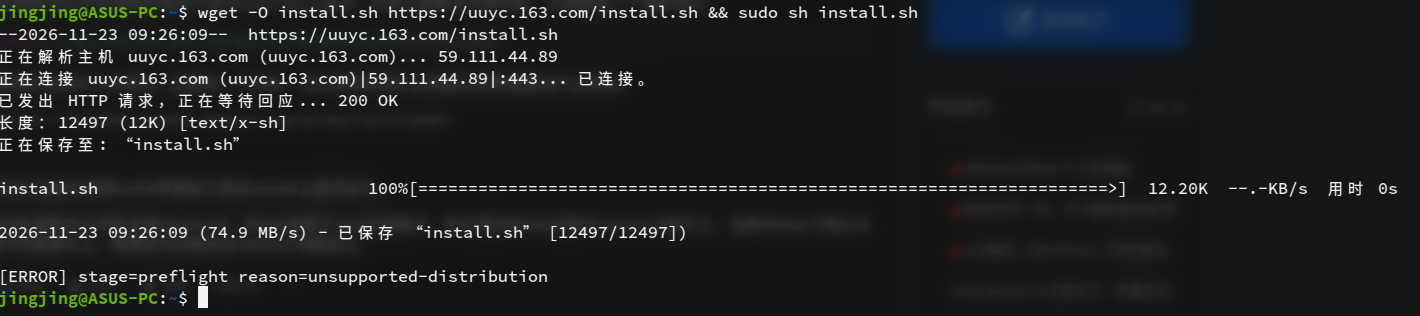
刚才发帖把install.sh的地址吞了,你再试试官方的安装脚本呢。

Reply View the author
avatar
𰻞𰻝面
deepin
16 hours ago
#3
kero990:

刚才发帖把install.sh的地址吞了,你再试试官方的安装脚本呢。

一样不行,不支持Deepin
1795397187988.png

Reply View the author
avatar
chiyue188
deepin
16 hours ago
#4

直接下载deb包让workbuddy装,正常安装登陆,能远控其他设备,文件传输也是正常,但其他windows设备点击进入桌面一直显示”正在传输画面“,包括手机来远控它也是这个毛病,另外windows需要升级到最新版才能显示出linux的远程设备。目前测试下来就这么些。

Reply View the author
avatar
chiyue188
deepin
16 hours ago
#5
chiyue188:

直接下载deb包让workbuddy装,正常安装登陆,能远控其他设备,文件传输也是正常,但其他windows设备点击进入桌面一直显示”正在传输画面“,包括手机来远控它也是这个毛病,另外windows需要升级到最新版才能显示出linux的远程设备。目前测试下来就这么些。

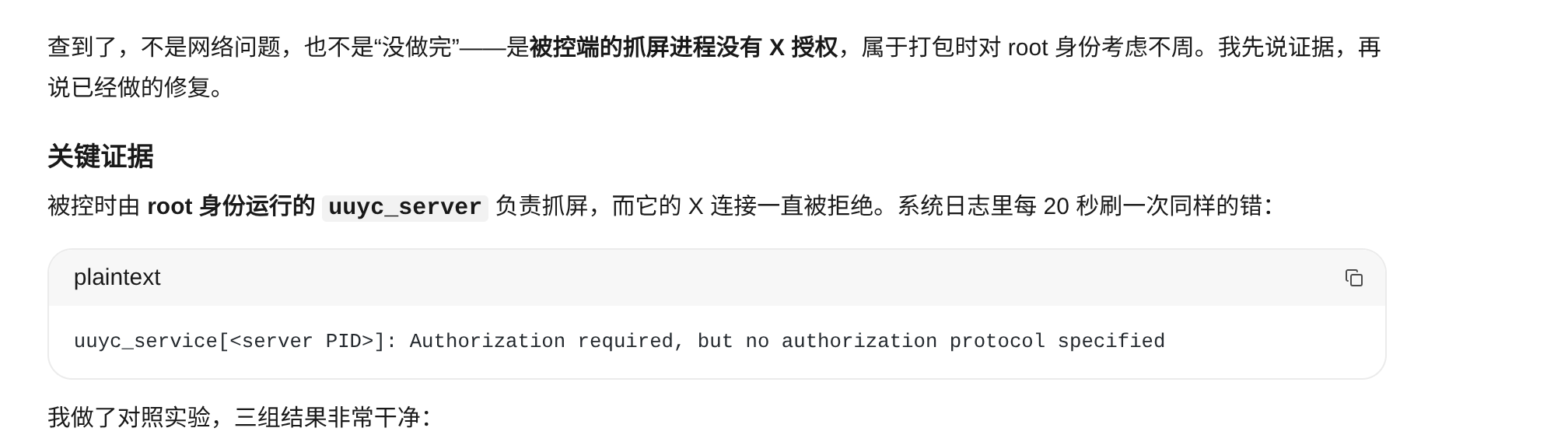
问题已经让workbuddy解决,说是权限问题,现在已经可以和windows端一样正常使用。
image.png

Reply View the author
avatar
Μαησεωφ
deepin
14 hours ago
#6
chiyue188:

问题已经让workbuddy解决,说是权限问题,现在已经可以和windows端一样正常使用。
image.png

不需要这一步修复,安装后重启电脑就一切正常了。

Reply View the author
avatar
Μαησεωφ
deepin
14 hours ago
#7

用deb安装包安装,注意需要重启电脑后才能当被控端,实际体验下来可以把ToDesk一脚踢开了。applaud

Reply View the author
avatar
观摩
deepin
12 hours ago
#8
Μαησεωφ:

用deb安装包安装,注意需要重启电脑后才能当被控端,实际体验下来可以把ToDesk一脚踢开了。applaud

早就放弃todesk了,宁愿用向日葵也不用todesk

Reply View the author
avatar
UltraBlue
deepin
6 hours ago
#9

手搓的linux版被控端

链接: https://pan.baidu.com/s/1_tNxPLV-E2xPkE7mfLPeeQ?pwd=s56k 提取码: s56k

Reply View the author
avatar
风吹过的绿洲
deepin
an hour ago
#10

支持wayland模式吗?目前向日葵和todesk都不支持。

Reply View the author