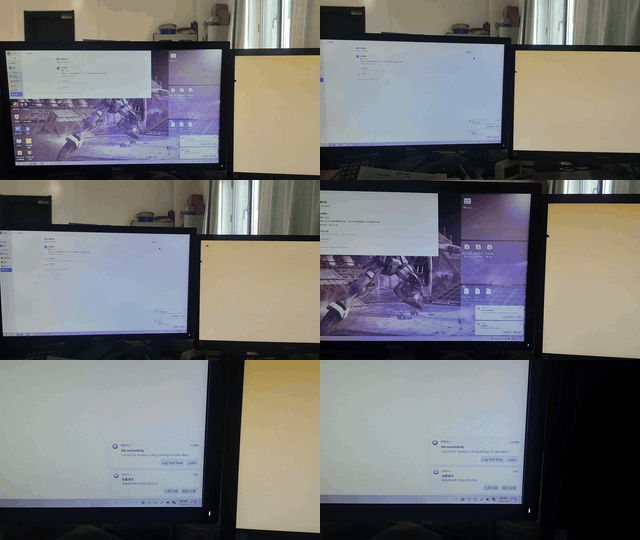
显卡上有两个显示器接口。没有升级前,接两个显示器能正常使用。升级到25.3后出现两个显示器的分辨率频繁切换,只能注销或者重启。有时会出现主显示器正常,副显示器分辨率只能设定1024*768的情况。多次重启后,偶尔会能够正常使用。
设备信息如下:
System:
Kernel: 6.18.56-amd64-desktop-rolling arch: x86_64 bits: 64 Desktop: Deepin v: 25
Distro: Deepin 25 crimson
Machine:
Type: Desktop System: Dell product: OptiPlex 7070 v: N/A serial:
Mobo: Dell model: 0NRKPK v: A03 serial: UEFI: Dell v: 1.35.0
date: 09/04/2025
CPU:
Info: 6-core model: Intel Core i5-9500 bits: 64 type: MCP cache: L2: 1.5 MiB
Speed (MHz): avg: 900 min/max: 800/4400 cores: 1: 900 2: 900 3: 900 4: 900 5: 900 6: 900
Graphics:
Device-1: Intel CoffeeLake-S GT2 [UHD Graphics 630] driver: i915 v: kernel
Device-2: AMD Oland [Radeon HD 8570 / R5 430 OEM R7 240/340/430 Radeon 520 OEM] driver: amdgpu
v: kernel
Display: x11 server: X.Org v: 21.1.16 with: Xwayland v: 24.1.11 driver: X:
loaded: amdgpu,modesetting unloaded: fbdev,vesa dri: radeonsi gpu: amdgpu

resolution: 1920x1080\~60Hz
API: EGL v: 1.5 drivers: iris,kms_swrast,radeonsi,swrast platforms: gbm,x11,surfaceless,device
API: OpenGL v: 4.6 compat-v: 4.5 vendor: amd mesa v: 24.3.0-1deepin9 renderer: AMD Radeon R7
200 Series (radeonsi oland LLVM 17.0.6 DRM 3.64 6.18.56-amd64-desktop-rolling)
Audio:
Device-1: Intel Cannon Lake PCH cAVS driver: snd_hda_intel
Device-2: AMD Oland/Hainan/Cape Verde/Pitcairn HDMI Audio [Radeon HD 7000 Series]
driver: snd\_hda\_intel
API: ALSA v: k6.18.56-amd64-desktop-rolling status: kernel-api
Server-1: PipeWire v: 1.6.4 status: active
Network:
Device-1: Intel Ethernet I219-LM driver: e1000e
IF: eno1 state: up speed: 1000 Mbps duplex: full mac:
RAID:
Hardware-1: Intel SATA Controller [RAID mode] driver: ahci
Drives:
Local Storage: total: 1.84 TiB used: 402.47 GiB (21.4%)
ID-1: /dev/sda vendor: Intel model: SSDSC2KG960G8 size: 894.25 GiB
ID-2: /dev/sdb vendor: Western Digital model: WD10EZEX-08WN4A0 size: 931.51 GiB
ID-3: /dev/sdc vendor: SanDisk model: Ultra USB 3.0 size: 57.28 GiB type: USB
Partition:
ID-1: / size: 258.82 GiB used: 55.31 GiB (21.4%) fs: ext4 dev: /dev/sda7
ID-2: /opt size: 258.82 GiB used: 55.31 GiB (21.4%) fs: overlay source: ERR-102
ID-3: /usr size: 258.82 GiB used: 55.31 GiB (21.4%) fs: overlay source: ERR-102
Swap:
Alert: No swap data was found.
Sensors:
System Temperatures: cpu: 38.0 C pch: 49.0 C mobo: N/A gpu: amdgpu temp: 46.0 C
Fan Speeds (rpm): N/A
Info:
Processes: 319 Uptime: 9m Memory: total: 8 GiB available: 7.52 GiB used: 2.78 GiB (37.0%)
Client: Unknown Client: deepin-home inxi: 3.3.31
[Version]
SystemName=Deepin
SystemName[zh_CN]=深度操作系统
ProductType=Desktop
ProductType[zh_CN]=桌面
EditionName=Community
EditionName[en_US]=Community
EditionName[zh_CN]=社区版
MajorVersion=25
MinorVersion=25.3.0
OsBuild=31338.100.100
/etc/apt/sources.list:deb https://community-packages.deepin.com/beige/ crimson main commercial community
/etc/apt/sources.list.d/appstore.list:deb https://com-store-packages.uniontech.com/appstore-V25 crimson appstore
/etc/apt/sources.list.d/microsoft-edge.sources:X-Repolib-Name: Microsoft Edge
/etc/apt/sources.list.d/microsoft-edge.sources:Types: deb
/etc/apt/sources.list.d/microsoft-edge.sources:URIs: https://packages.microsoft.com/repos/edge-stable
/etc/apt/sources.list.d/microsoft-edge.sources:Suites: stable
/etc/apt/sources.list.d/microsoft-edge.sources:Components: main
/etc/apt/sources.list.d/microsoft-edge.sources:Architectures: amd64
/etc/apt/sources.list.d/microsoft-edge.sources:Signed-By: /usr/share/keyrings/microsoft-edge.gpg
/etc/apt/sources.list.d/driver.list:deb https://community-packages.deepin.com/driver-25/ snipe non-free
这是出问题时的截图
只接一个显示器时就没有问题。
我发你微信加我下,拉研发一起看下,需要麻烦提供下日志信息。
Featured Collection
Popular Ranking
Popular Events


 中文

 deepin deepin
 deepin deepin


 Adding a Dancing Spectrum Bar to the Deepin Taskbar | deepin-spectrum
显卡上有两个显示器接口。没有升级前,接两个显示器能正常使用。升级到25.3后出现两个显示器的分辨率频繁切换,只能注销或者重启。有时会出现主显示器正常,副显示器分辨率只能设定1024*768的情况。多次重启后,偶尔会能够正常使用。
设备信息如下:
System:
Kernel: 6.18.56-amd64-desktop-rolling arch: x86_64 bits: 64 Desktop: Deepin v: 25
Machine:
Type: Desktop System: Dell product: OptiPlex 7070 v: N/A serial:
Mobo: Dell model: 0NRKPK v: A03 serial: UEFI: Dell v: 1.35.0
CPU:
Info: 6-core model: Intel Core i5-9500 bits: 64 type: MCP cache: L2: 1.5 MiB
Speed (MHz): avg: 900 min/max: 800/4400 cores: 1: 900 2: 900 3: 900 4: 900 5: 900 6: 900
Graphics:
Device-1: Intel CoffeeLake-S GT2 [UHD Graphics 630] driver: i915 v: kernel
Device-2: AMD Oland [Radeon HD 8570 / R5 430 OEM R7 240/340/430 Radeon 520 OEM] driver: amdgpu
Display: x11 server: X.Org v: 21.1.16 with: Xwayland v: 24.1.11 driver: X:
API: EGL v: 1.5 drivers: iris,kms_swrast,radeonsi,swrast platforms: gbm,x11,surfaceless,device
API: OpenGL v: 4.6 compat-v: 4.5 vendor: amd mesa v: 24.3.0-1deepin9 renderer: AMD Radeon R7
Audio:
Device-1: Intel Cannon Lake PCH cAVS driver: snd_hda_intel
Device-2: AMD Oland/Hainan/Cape Verde/Pitcairn HDMI Audio [Radeon HD 7000 Series]
API: ALSA v: k6.18.56-amd64-desktop-rolling status: kernel-api
Server-1: PipeWire v: 1.6.4 status: active
Network:
Device-1: Intel Ethernet I219-LM driver: e1000e
IF: eno1 state: up speed: 1000 Mbps duplex: full mac:
RAID:
Hardware-1: Intel SATA Controller [RAID mode] driver: ahci
Drives:
Local Storage: total: 1.84 TiB used: 402.47 GiB (21.4%)
ID-1: /dev/sda vendor: Intel model: SSDSC2KG960G8 size: 894.25 GiB
ID-2: /dev/sdb vendor: Western Digital model: WD10EZEX-08WN4A0 size: 931.51 GiB
ID-3: /dev/sdc vendor: SanDisk model: Ultra USB 3.0 size: 57.28 GiB type: USB
Partition:
ID-1: / size: 258.82 GiB used: 55.31 GiB (21.4%) fs: ext4 dev: /dev/sda7
ID-2: /opt size: 258.82 GiB used: 55.31 GiB (21.4%) fs: overlay source: ERR-102
ID-3: /usr size: 258.82 GiB used: 55.31 GiB (21.4%) fs: overlay source: ERR-102
Swap:
Alert: No swap data was found.
Sensors:
System Temperatures: cpu: 38.0 C pch: 49.0 C mobo: N/A gpu: amdgpu temp: 46.0 C
Fan Speeds (rpm): N/A
Info:
Processes: 319 Uptime: 9m Memory: total: 8 GiB available: 7.52 GiB used: 2.78 GiB (37.0%)
Client: Unknown Client: deepin-home inxi: 3.3.31
[Version]
SystemName=Deepin
SystemName[zh_CN]=深度操作系统
ProductType=Desktop
ProductType[zh_CN]=桌面
EditionName=Community
EditionName[en_US]=Community
EditionName[zh_CN]=社区版
MajorVersion=25
MinorVersion=25.3.0
OsBuild=31338.100.100
/etc/apt/sources.list:deb https://community-packages.deepin.com/beige/ crimson main commercial community
/etc/apt/sources.list.d/appstore.list:deb https://com-store-packages.uniontech.com/appstore-V25 crimson appstore
/etc/apt/sources.list.d/microsoft-edge.sources:X-Repolib-Name: Microsoft Edge
/etc/apt/sources.list.d/microsoft-edge.sources:Types: deb
/etc/apt/sources.list.d/microsoft-edge.sources:URIs: https://packages.microsoft.com/repos/edge-stable
/etc/apt/sources.list.d/microsoft-edge.sources:Suites: stable
/etc/apt/sources.list.d/microsoft-edge.sources:Components: main
/etc/apt/sources.list.d/microsoft-edge.sources:Architectures: amd64
/etc/apt/sources.list.d/microsoft-edge.sources:Architectures: amd64
/etc/apt/sources.list.d/microsoft-edge.sources:Signed-By: /usr/share/keyrings/microsoft-edge.gpg
/etc/apt/sources.list.d/driver.list:deb https://community-packages.deepin.com/driver-25/ snipe non-free