有线网卡故障 RTL8111/8168/8411 修复
Tofloor
poster avatar
long1030255014
deepin
2019-11-25 00:06
Author
在这之前我先逼逼两句,离开deepin 已经两年多了,因为学习和工作环境换到了其他系统,前几天朋友想学习linux。我立马想到的是推荐他使用deepin 。由于deepin生态越来越好,华为也与deepin 合作,在笔记本预装了deepin。我想,作为老用户是时候回来了。
装上deepin后发现有线网卡驱动时好时坏,根据我以往的折腾经验,判断是网卡驱动导致的。
我的网卡是RTL8111/8168/8411,官方会自动安装r8169驱动。导致驱动不兼容。

解决方案
查看网卡驱动是否和我一样


$ lspci | grep -i ethernet
04:00.1 Ethernet controller: Realtek Semiconductor Co., Ltd. RTL8111/8168/8411 PCI Express Gigabit Ethernet Controller (rev 12)


卸载8169驱动
$ sudo rmmod r8169


安装官方8168驱动
unzip r8168-8.047.05.zip
cd r8168-8.047.05/
sudo ./autorun.sh


官网 https://www.realtek.com/en/component/zoo/category/network-interface-controllers-10-100-1000m-gigabit-ethernet-pci-express-software


Reply Favorite View the author
All Replies
long1030255014
deepin
2019-11-25 00:09
#1
我好像投错分区了
Reply View the author
wangzt111337
deepin
2019-11-30 04:08
#2
请问一下,deepin的显卡驱动能单独安装吗?
Reply View the author
long1030255014
deepin
2019-12-03 03:11
#3
https://bbs.deepin.org/post/185734
请问一下,deepin的显卡驱动能单独安装吗?

不是有个默认的驱动管理器吗,你不喜欢可以卸载了自己下
Reply View the author
speedturtle
deepin
2020-03-29 01:06
#4
深度现在还是默认用着r8169驱动吗?
Reply View the author
wei215
deepin
2020-03-29 21:27
#5
我的电脑是联想 80T8 笔记本电脑,网卡是瑞昱 RTL8168/8111/8112 Gigabit Ethernet Controller / 联想,安装好系统后无法上网,是什么情况?请指教,谢谢。
Reply View the author
DeepinOS
deepin
2020-03-30 05:37
#6
https://bbs.deepin.org/post/185734
我的电脑是联想 80T8 笔记本电脑,网卡是瑞昱 RTL8168/8111/8112 Gigabit Ethernet Controller / 联想,安 ...

你先在终端运行
ifconfig -a 命令看一下有几个网卡接口
连上网线再运行一下看有几个网卡接口

因为不能上网的故障可能有很多,加入局域网内没有dhcp服务器,没有ip也不能上网
Reply View the author
wei215
deepin
2020-04-11 19:38
#7
https://bbs.deepin.org/post/185734
你先在终端运行
ifconfig -a 命令看一下有几个网卡接口
连上网线再运行一下看有几个网卡接口

好复杂的,我这种菜鸟难弄了,却又非常喜欢国产系统。
Reply View the author
springzfx
deepin
2020-04-11 20:42
#8
楼主可以了解下r8168和r8169的区别
Reply View the author
kileboy
deepin
2020-09-09 06:11
#9
我的无线网卡偶尔也会经常掉@ long1030255014
名称:
Wireless 8265 / 8275
制造商:
Intel Corporation
类型:
Wireless interface
版本:
78
总线信息:
pci@0000:03:00.0
功能:
pm msi pciexpress bus_master cap_list ethernet physical wireless
驱动:
iwlwifi
驱动版本:
5.7.7-amd64-desktop
逻辑名称:
wlp3s0
物理地址:
68:ec:c5:ce:90:82
中断:
139
内存地址:
a4000000-a4001fff
位宽:
64 bits
时钟频率:
33MHz
广播:
yes
固件:
36.77d01142.0
IP:
192.168.1.4
延迟:
0
连接:
yes
组播:
yes
物理ID:
0
Reply View the author
x49349606
deepin
2021-05-11 07:09
#10

按照方法,我的电脑不行。。愁死了。

Reply View the author
flymxwm
deepin
2021-06-11 00:33
#11
x49349606

按照方法,我的电脑不行。。愁死了。


bz2包  下载到U盘,拷贝到主目录


tar -xjf r8168-8.048.03.tar.bz2

cd r8168-8.048.03

sudo ./autorun.sh 

Reply View the author
字母N
deepin
2021-12-26 02:26
#12

同意以上做法,,感谢.我在最新的uos也遇到同样问题,按照此项做法,最后多做了一步: 在设置---网络---有线网络--有线网卡--加号按钮,新增一个有线连接才弄好.

Reply View the author
wzping9
deepin
2022-03-26 17:33
#13

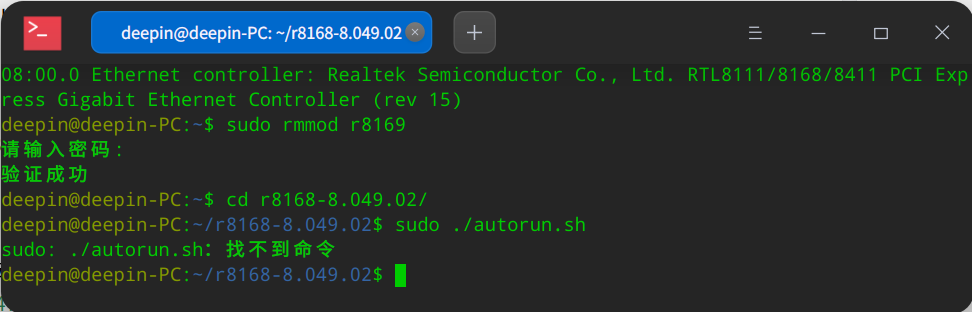
截图_deepin-terminal_20220326091851.png
这是啥情况哦,还请楼主帮忙看看教一下呗

驱动在官网上下载下载的,格式为bz2,然后解压在主目录下面,咋搞哦

Reply View the author