

 中文
中文 
zccrs deepin
2025-10-28 15:32 deepin 666
Reply Like 0 View the author
 deepin
 666

 deepin
  太赞了
太赞了

神末大佬:龙芯系统也没有问题吧?
安装报错。龙电脑。


 deepin
 安装报错。龙电脑。
deepin 安装报错。龙电脑。
龙芯明天能推上去,一个 apm 一个 amber-pm-loongnix
Wine环境暂时没有,因为太杂乱了,可以用 amber-pm-convert --base amber-pm-loongnix 转几个旧世界包
龙芯明天能推上去,一个 apm 一个 amber-pm-loongnix
Wine环境暂时没有,因为太杂乱了,可以用 amber-pm-convert --base amber-pm-loongnix 转几个旧世界包
明白了,慢慢搞,不着急。

 deepin
这儿说的deb文件是指哪个deb文件?deepin-wine8-stable?还是企业微信的deb
deepin
这儿说的deb文件是指哪个deb文件?deepin-wine8-stable?还是企业微信的deb
企业微信

 deepin
 deepin 20.9 ,很喜欢3.9版本的微信,星火安装的是3.9.10.19,安装完后启动扫描提示版本过低。
我把win下的是3.9.12.19的同名文件夹直接复制过来,现在还需要修改哪里才能启动呢?

我直接修改文件夹为3.9.10.19的不能启动,桌面的链接不对?

 deepin
 可以在容器内运行吗?
在debian13 容器内可以安装,然后使用apm安装了amber-pm-deepin25和cajviewer,但是不知道怎么运行
。
sudo apm run cajviewer报错,[ERROR]: Package not installed: cajviewer
deepin 可以在容器内运行吗?
在debian13 容器内可以安装,然后使用apm安装了amber-pm-deepin25和cajviewer,但是不知道怎么运行
。
sudo apm run cajviewer报错,[ERROR]: Package not installed: cajviewer
不是所有容器都可以运行
如果你没有在使用debian,可以用其他的发行呀,APM支持deb/rpm/arch的
deepin 不是所有容器都可以运行
如果你没有在使用debian,可以用其他的发行呀,APM支持deb/rpm/arch的
服务器上用,只能用容器。
有没有推荐可以用的容器?
deepin 服务器上用,只能用容器。
有没有推荐可以用的容器?
一般来说应该装debian直接用星火就可以了
 deepin
 转化成功了,但本机安装出现这个问题怎么解决
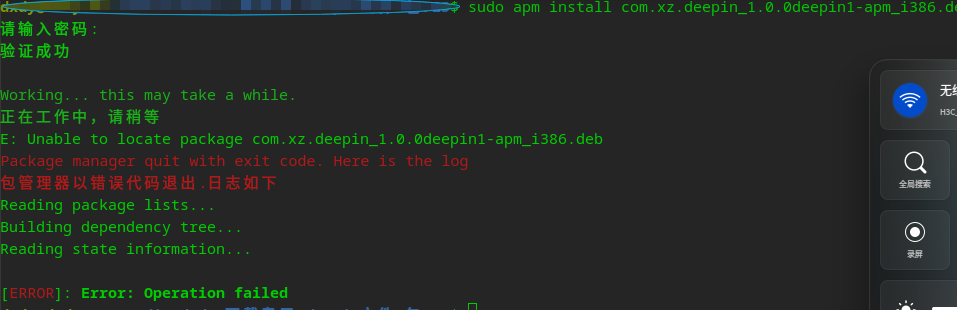
deepin 转化成功了,但本机安装出现这个问题怎么解决
直接拖入或者把 install 换成 ssaudit
需要deb包的完整路径,否则会认为是包名,去仓库里找了
deepin 直接拖入或者把 install 换成 ssaudit
需要deb包的完整路径,否则会认为是包名,去仓库里找了
/amber-ce-tools/bin-override/sudo: line 3: /usr/bin/sudo: No such file or directory
chattr: Operation not supported while reading flags on /media/dxdy/下载专用/deepin文件/包/25/com.xz.deepin_1.0.0deepin1-apm_i386.deb
忽略ACE,使用主机安装 com.xz.deepin
Working... this may take a while.
正在工作中,请稍等
E: Unable to correct problems, you have held broken packages.
Package manager quit with exit code. Here is the log
包管理器以错误代码退出.日志如下
Reading package lists...
Building dependency tree...
Reading state information...
Some packages could not be installed. This may mean that you have
requested an impossible situation or if you are using the unstable
distribution that some required packages have not yet been created
or been moved out of Incoming.
The following information may help to resolve the situation:
The following packages have unmet dependencies:
com.xz.deepin:i386 : Depends: amber-pm-bookworm-deepin-wine6-stable:i386 but it is not installable
初始dry-run测试失败,尝试更新后重试...
从服务器获取配置和镜像列表...
####################################################################################################### 100.0%
[INFO]: apm.list update done
####################################################################################################### 100.0%
[INFO]: apt-fast.conf update done
Get:1 https://d.spark-app.store/amd64-apm InRelease [1912 B]
Fetched 1912 B in 0s (7112 B/s)
Reading package lists... Done
Building dependency tree... Done
Reading state information... Done
All packages are up to date.
Working... this may take a while.
正在工作中,请稍等
E: Unable to correct problems, you have held broken packages.
Package manager quit with exit code. Here is the log
包管理器以错误代码退出.日志如下
Reading package lists...
Building dependency tree...
Reading state information...
Some packages could not be installed. This may mean that you have
requested an impossible situation or if you are using the unstable
distribution that some required packages have not yet been created
or been moved out of Incoming.
The following information may help to resolve the situation:
The following packages have unmet dependencies:
com.xz.deepin:i386 : Depends: amber-pm-bookworm-deepin-wine6-stable:i386 but it is not installable
dry-run测试仍然失败,放弃安装
软件包未在主机安装:com.xz.deepin
安装异常!抛出错误
OMG-IT-GOES-WRONG
chattr: Operation not supported while reading flags on /media/dxdy/下载专用/deepin文件/包/25/com.xz.deepin_1.0.0deepin1-apm_i386.deb
[ERROR]: Error: Operation failed
deepin /amber-ce-tools/bin-override/sudo: line 3: /usr/bin/sudo: No such file or directory
chattr: Operation not supported while reading flags on /media/dxdy/下载专用/deepin文件/包/25/com.xz.deepin_1.0.0deepin1-apm_i386.deb
忽略ACE,使用主机安装 com.xz.deepin
Working... this may take a while.
正在工作中,请稍等
E: Unable to correct problems, you have held broken packages.
Package manager quit with exit code. Here is the log
包管理器以错误代码退出.日志如下
Reading package lists...
Building dependency tree...
Reading state information...
Some packages could not be installed. This may mean that you have
requested an impossible situation or if you are using the unstable
distribution that some required packages have not yet been created
or been moved out of Incoming.
The following information may help to resolve the situation:
The following packages have unmet dependencies:
com.xz.deepin:i386 : Depends: amber-pm-bookworm-deepin-wine6-stable:i386 but it is not installable
初始dry-run测试失败,尝试更新后重试...
从服务器获取配置和镜像列表...
####################################################################################################### 100.0%
[INFO]: apm.list update done
####################################################################################################### 100.0%
[INFO]: apt-fast.conf update done
Get:1 https://d.spark-app.store/amd64-apm InRelease [1912 B]
Fetched 1912 B in 0s (7112 B/s)
Reading package lists... Done
Building dependency tree... Done
Reading state information... Done
All packages are up to date.
Working... this may take a while.
正在工作中,请稍等
E: Unable to correct problems, you have held broken packages.
Package manager quit with exit code. Here is the log
包管理器以错误代码退出.日志如下
Reading package lists...
Building dependency tree...
Reading state information...
Some packages could not be installed. This may mean that you have
requested an impossible situation or if you are using the unstable
distribution that some required packages have not yet been created
or been moved out of Incoming.
The following information may help to resolve the situation:
The following packages have unmet dependencies:
com.xz.deepin:i386 : Depends: amber-pm-bookworm-deepin-wine6-stable:i386 but it is not installable
dry-run测试仍然失败,放弃安装
软件包未在主机安装:com.xz.deepin
安装异常!抛出错误
OMG-IT-GOES-WRONG
chattr: Operation not supported while reading flags on /media/dxdy/下载专用/deepin文件/包/25/com.xz.deepin_1.0.0deepin1-apm_i386.deb
[ERROR]: Error: Operation failed
把你这个包的control里面的架构换成all或者amd64即可
deepin 把你这个包的control里面的架构换成all或者amd64即可
/amber-ce-tools/bin-override/sudo: line 3: /usr/bin/sudo: No such file or directory
忽略ACE,使用主机安装 com.xz.deepin
Reading package lists... Done
Building dependency tree... Done
Reading state information... Done
Note, selecting 'com.xz.deepin' instead of '/home/dxdy/Desktop/新建文件夹2/com.xz.deepin_1.0.0deepin1-apm_all.deb'
The following NEW packages will be installed:
com.xz.deepin
0 upgraded, 1 newly installed, 0 to remove and 0 not upgraded.
Inst com.xz.deepin (1.0.0deepin1-apm local-deb [all])
Conf com.xz.deepin (1.0.0deepin1-apm local-deb [all])
(Reading database ... 21578 files and directories currently installed.)
Preparing to unpack .../com.xz.deepin_1.0.0deepin1-apm_all.deb ...
Unpacking com.xz.deepin (1.0.0deepin1-apm) ...
dpkg: error processing archive /home/dxdy/Desktop/新建文件夹2/com.xz.deepin_1.0.0deepin1-apm_all.deb (--install):
unable to open '/var/lib/apm/com.xz.deepin/files/core/opt/apps/com.xz.deepin/entries/applications/com.xz.deepin.desktop.dpkg-new': No such device or address
非卸载,跳过清理
Processing triggers for apm (1.1.2) ...
----------------Running APM Dstore Patch----------------
----------------Finished----------------
Errors were encountered while processing:
/home/dxdy/Desktop/新建文件夹2/com.xz.deepin_1.0.0deepin1-apm_all.deb
Reading package lists...
Building dependency tree...
Reading state information...
The following NEW packages will be installed:
com.xz.deepin
0 upgraded, 1 newly installed, 0 to remove and 0 not upgraded.
Need to get 0 B/329 MB of archives.
After this operation, 338 MB of additional disk space will be used.
Get:1 /home/dxdy/Desktop/新建文件夹2/com.xz.deepin_1.0.0deepin1-apm_all.deb com.xz.deepin all 1.0.0deepin1-apm [329 MB]
(Reading database ... 21578 files and directories currently installed.)
Preparing to unpack .../com.xz.deepin_1.0.0deepin1-apm_all.deb ...
Unpacking com.xz.deepin (1.0.0deepin1-apm) ...
dpkg: error processing archive /home/dxdy/Desktop/新建文件夹2/com.xz.deepin_1.0.0deepin1-apm_all.deb (--unpack):
unable to open '/var/lib/apm/com.xz.deepin/files/core/opt/apps/com.xz.deepin/entries/applications/com.xz.deepin.desktop.dpkg-new': No such device or address
非卸载,跳过清理
Errors were encountered while processing:
/home/dxdy/Desktop/新建文件夹2/com.xz.deepin_1.0.0deepin1-apm_all.deb
E: Sub-process /usr/bin/dpkg returned an error code (1)
[INFO]: Operation successful
----------------Running APM Dstore Patch----------------
----------------Finished----------------
Popular Ranking
ChangePopular Events
More


 The settings menu needs to be translated into Russian.
APM 1.0.10 支持了解析多层 Base Layer 并按顺序叠加的功能,因此多个扩展组件可以按顺序加载成运行环境,因此我们可以快捷地转制 Wine 软件包而不占用过量空间
经过转制,统信兼容引擎/Wine运行器标准的软件包可被一键转制成支持安装到任意Linux发行版运行的APM包
目前支持的 Wine环境:
转制方法
若安装过星火应用商店,只需执行
sudo aptss install apm -y若您正在使用 Debian / fedora 或者 Arch ,需前往 https://gitee.com/amber-ce/amber-pm/releases/ 下载安装对应发行版的安装包
目前 APM 支持
上安装和运行
安装后,需重启电脑或注销桌面后重新登录来完成安装
可从深度商店/星火应用商店下载对应的软件包
aptss download 包名即可下载 此处用企业微信作为例子也可使用自己打包的 Wine 包。对于统信Wine兼容引擎,可使用 deepin-wine 系列。对于 Wine运行器,可使用 deepin-wine 系列和 spark-wine 系列
使用指令
dpkg -I 拖入文件即可查看文件的依赖信息注意到使用了 deepin-wine8-stable
执行
sudo apm install amber-pm-bookworm-deepin-wine8-stable -y配置对应的Wine环境(amber-pm-bookworm-对应的wine环境的名字)执行
amber-pm-convert --base amber-pm-bookworm-deepin-wine8-stable 把deb文件拖进来即可开始全自动转换转换后,可获得apm deb包。 该软件包可使用
sudo apm install安装到任意支持了APM的Linux发行上,欢迎分享并上传到 APM 商店中同时,任意APM包也支持直接使用投稿器投递到星火应用商店