刚装上deepin,分区问题。
Tofloor
poster avatar
小刀
deepin
2016-11-03 22:46
Author
刚装上deepin,安装分区的时候,分了1个主分区,挂载/,2个逻辑分区,一个挂载了/home,另一个什么都没挂,进入系统后,能看到最后一个的分区,但没有办法使用,只显示lost+fount,小白不懂,什么意思,请教。
Reply Favorite View the author
All Replies
avatar
左心房的痛
deepin
2016-11-03 23:01
#1
将最后一个分区mount一下就可以用了,linux是以文件方式来管理磁盘文件的

Reply View the author
avatar
小刀
deepin
2016-11-04 00:03
#2
https://bbs.deepin.org/post/45217
将最后一个分区mount一下就可以用了,linux是以文件方式来管理磁盘文件的

怎么样弄,能说得详细一点吗?
Reply View the author
avatar
小刀
deepin
2016-11-04 00:06
#3
本帖最后由 mzxujun 于 2016-11-3 16:07 编辑
https://bbs.deepin.org/post/45217
将最后一个分区mount一下就可以用了,linux是以文件方式来管理磁盘文件的

打开计算机能看到磁盘,但是不能使用。以前也装过双系统,那时win下的ntfs的分区都能直接使用啊
Reply View the author
avatar
边城浪子1777
deepin
2016-11-04 00:13
#4
我是一个主分区/    其它都是逻辑分区 sawp  为内存的2倍,boot 1024   , HOME 剩下的全部。
Reply View the author
avatar
左心房的痛
deepin
2016-11-04 01:40
#5
本帖最后由 wanzhende 于 2016-11-3 17:50 编辑
https://bbs.deepin.org/post/45217
打开计算机能看到磁盘,但是不能使用。以前也装过双系统,那时win下的ntfs的分区都能直接使用啊 ...
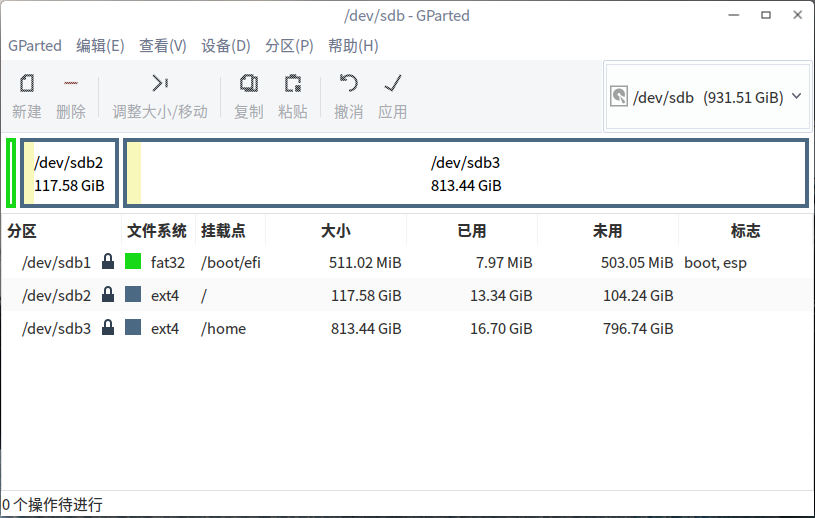
磁盘是什么格式??打开GParted看看分区格式,格式化之后,可以在/media目录创建个文件夹使用mount对磁盘进行挂载,mount命令只是临时挂载,写到/etc/fstab里面可以系统自动挂载


Reply View the author