跪求告知深度怎么安装iNodeClient校园网啊
Tofloor
poster avatar
ss******97@vip.qq.com
deepin
2016-10-29 07:24
Author
谢谢各位大佬了,感激不尽
Reply Favorite View the author
All Replies
avatar
jingle
deepin
2016-10-29 17:05
#1
Reply View the author
avatar
wangyingtao
deepin
2016-10-29 17:11
#2
网上搜的:http://blog.163.com/effeee@126/blog/static/11462939820131281016204/

使用iNodeClient吧。首先下载编译好的二进制包:
http://download.csdn.net/detail/effeee/5094683

下载二进制包后解压

cd /your/dir  

tar xvf iNodeClient.tar.gz  


解压后运行install.sh脚本即可。

如果是主流的发行版比如Ubuntu,CentOS等,这样一般就可以使用。

下面是Gentoo Linux的解决方案:

问题1:在运行脚本install.sh时会报错


这是由于Gentoo Linux对服务的管理和Ubuntu不一致,这里只需将78,79行注释,第90行更改成

/etc/init.d/iNodeAuthService start  


问题2:运行客户端报错
直接运行iNodeClient后报错如下:


这里可以看出是链接库出的问题,可以用命令ldd查看链接库的依赖

ldd ./iNodeClient | grep "not found"  


切换到目录/usr/lib下,找到相同的库做链接


[plain] view plaincopy
sudo ln -s libjpeg.so.8 libjpeg.so.62  


sudo ln -s libtiff.so.5 libtiff.so.3  

即可解决。
问题3:找不到系统配置文件


阅读install.sh可以知道配置文件在目录/etc/iNodeClient下,文件名为inodesys.conf

配置文件的内容为

INSTALL_DIR=your/dir  


问题4:启动报错line 2: cd: /etc/sysconfig/network-scripts: No such file or directory
这是由于Gentoo下没有相应目录,新建这目录即可,也可以修改脚本。

最后服务启动成功。

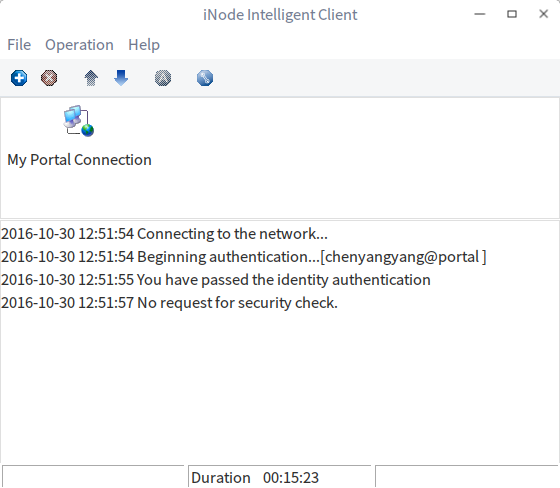
运行客户端:

新建链接


输入账号密码后连接。

输出提示信息:


2012-09-01 21:06:31  Connecting to the network...  
2012-09-01 21:06:31  Beginning authentication... [120312****]  
2012-09-01 21:06:33  You have passed the identity authentication  

然后运行命令:

sudo /etc/init.d/net.eth0 start  


最后将服务iNodeAuthService加入rc-update自动启动服务。


sudo rc-update add iNodeAuthService default  


联网成功。
Reply View the author
avatar
jerryjiang
deepin
2016-10-29 17:50
#3
当初在在14.2的时候按照http://tiankonguse.com/record/record.php?id=25    http://www.th7.cn/system/lin/201505/103724.shtml教程能完美上网不掉网,但是现在15.3不行。按照https://bbs.deepin.org/post/38861#inode 这教程也是不行,能提示验证身份通过,但是就是没有网络流量。
Reply View the author
avatar
ss******97@vip.qq.com
deepin
2016-10-30 20:58
#4
https://bbs.deepin.org/post/45018
网上搜的:http://blog.163.com/effeee@126/blog/static/11462939820131281016204/

使用iNodeClient吧。首 ...

下载软件要积分啊。。
Reply View the author
avatar
ss******97@vip.qq.com
deepin
2016-10-30 20:58
#5
https://bbs.deepin.org/post/45018
当初在在14.2的时候按照http://tiankonguse.com/record/record.php?id=25    http://www.th7.cn/system/lin ...

好的谢谢,我试一下
Reply View the author
avatar
5***3@qq.com
deepin
2016-10-30 21:08
#6
我的可以用
Reply View the author
avatar
5***3@qq.com
deepin
2016-10-30 21:12
#7
如果是你的是32位系统的话,按照网上的教程没有问题。如果是64位的系统的话,需要安装32位的兼容库才行。
我按照网上的一些方法试过安装32位兼容库,但后来在一些版本中不能成功。所以我一直按照以下方法安装。
1、sudo apt-get install wine
是为了安装32位兼容包
2、运行iNode,提示缺那个包就装那个包
sudo apt-get install libgtk-2.0:i386
3、sudo apt-get install gtk2-engines-murrine
这里说一下,我们用的是portal验证的。
Reply View the author