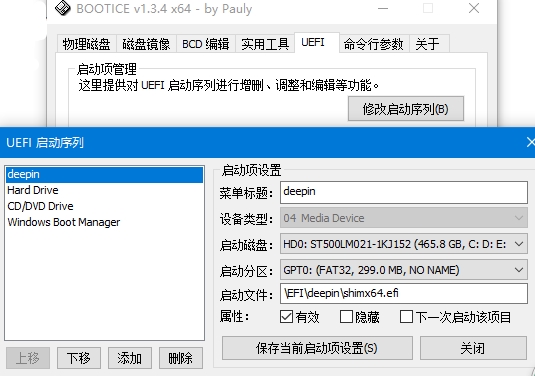
开机跳过grub直接进入windows该怎么解决?
Tofloor
poster avatar
echoup
deepin
2016-09-26 02:01
Author
系统是win8.1,快速启动已关闭。
每次开机都是自动进入windows,不进入grub引导。只有按F9进入boot manager才可以选择deepin系统。。。
我想每次开机直接进入deepin系统,该怎么解决这个问题啊?感激不尽!!!
Reply Favorite View the author
All Replies
avatar
comzhong
deepin
2016-09-26 02:31
#1
把deepin启动项放第一


Reply View the author
avatar
echoup
deepin
2016-09-26 03:34
#2
https://bbs.deepin.org/post/43989
把deepin启动项放第一

好的 我去试试
Reply View the author
avatar
howieli
deepin
2017-03-12 21:01
#3
https://bbs.deepin.org/post/43989
把deepin启动项放第一

请问,我这种添加了之后,重启就又成原样了,是什么原因?
Reply View the author
avatar
nich0las
deepin
2017-03-12 22:56
#4
可以在bios里面设置,把deepin启动项放在第一,然后保存,重启
Reply View the author
avatar
deepinf
deepin
2017-07-31 16:35
#5
可能是grub2没有安装成功,可以用Ubuntu等其他启动盘进入系统(liveCD模式),然后挂载deepin系统在mnt目录下,之后安装grub2到sda,网上搜一下,有教程的。我的15.4.1就有这样的问题。
Reply View the author
avatar
deepinwang
deepin
2017-07-31 17:03
#6
换EasyUEFI看看呢?
Reply View the author
avatar
mrrong
deepin
2017-07-31 19:24
#7
是不是双硬盘?
Reply View the author
avatar
y***i@gmail.com
deepin
2017-07-31 22:28
#8
进bios,把deepin的启动项放在第一个,就好了,然后deepin自带的启动项会包含win的,就可以双系统了
Reply View the author