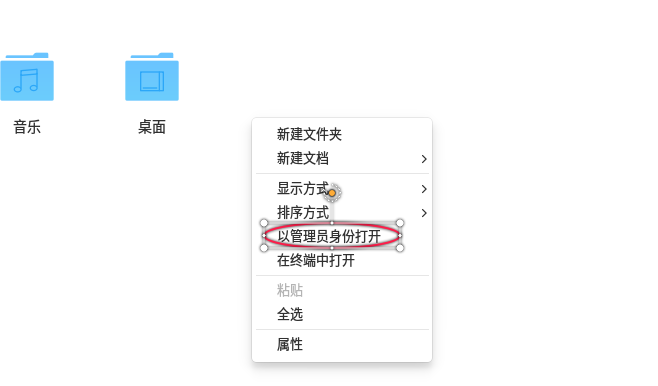
希望DDE file manager能支持root模式运行
Tofloor
poster avatar
iblis
deepin
2016-09-21 22:00
Author
重新安装Deepin 15.3后,发现原来的nautilus没了,貌似Deepin要用DDE file manager取代老牌的nautilus。DDE file manager确实比nautilus方便,但是美中不足的是不支持root模式,没法用来改系统配置,不得已又装上了nautilus。
Reply Favorite View the author
All Replies
avatar
u855697021
deepin
2016-09-21 22:12
#1
不建议添加,root用户不应当被滥用,很容易出问题
真的需要以root操作,应该在命令行用sudo提权,用ls查看文件
Reply View the author
avatar
左心房的痛
deepin
2016-09-21 22:36
#2
nautilus的“以管理员身份打开”?我觉得这个功能的确可以考虑加入,必竟使用时还是需要输入密码的
Reply View the author
avatar
jingle
deepin
2016-09-22 00:24
#3
以管理员身份打开 下次推送更新就有了,内网已经实现了
Reply View the author
avatar
cy89120
deepin
2016-09-22 00:36
#4
https://bbs.deepin.org/post/43773
以管理员身份打开 下次推送更新就有了,内网已经实现了

有没有添加书签的功能???
Reply View the author
avatar
左心房的痛
deepin
2016-09-22 00:42
#5
本帖最后由 wanzhende 于 2016-9-21 16:47 编辑
https://bbs.deepin.org/post/43773
以管理员身份打开 下次推送更新就有了,内网已经实现了

右键能否像windows一样可以在注册表中按文件扩展名来自定义??比如 .html文件,普通打开是网页中预览,右击选择“编辑”则是修改代码(通过调用系统默认文本处理工具打开),右击选择“打印”则实现打印功能,类似的需求应该不少,例如图片文件,直接打开是预览,右击可以用GIMP进行图像处理

目前深度文件管理器,选中文件后单击右键有“打开方式”的二级菜单(这点处理比鹦鹉螺要好),但是上次打开的文件关联并没有记录或自动出现在二级菜单内,还需要再点击“其它”再弹出一个对话框选择后才能以希望的方式打开,这样体验有些繁锁,希望能加以改进


Reply View the author
avatar
Lyvnee
deepin
2016-09-22 00:56
#6

Reply View the author
avatar
zfane
deepin
2016-09-22 18:42
#7
Lyvnee 发表于 2016-9-21 16:56

怎么弄出来的
Reply View the author
avatar
liyujiang
deepin
2016-09-22 20:20
#8
简单,在dde文件管理器命令前加上【gksudo】新建快捷方式即可
Reply View the author
avatar
macaiyun0629
deepin
2016-09-22 23:53
#9
sudo dde-file-manager
Reply View the author
avatar
makkon
deepin
2016-09-23 10:09
#10
本帖最后由 makkon 于 2016-9-23 15:33 编辑

Please excuse us, you have a  File Manager.
1.Where two windows?
2. Where all the best that there is in nautilus?
Where?  And never will be.
如果你能原谅我们,我是诚实的。
Reply View the author