求助,第一次装Linux,连不上Wfi,具体如下
Tofloor
poster avatar
185******08
deepin
2016-09-21 21:39
Author
本帖最后由 gusen 于 2016-9-21 13:39 编辑

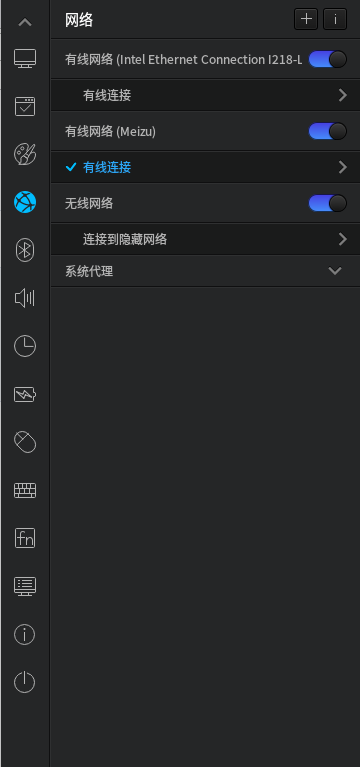
电脑是ThinkPad X240开机后搜不到任何wifi,通过按键关闭再开启wifi后可以搜到周围所有wifi,但是连不上
并提示

然后就只能搜到刚才连接失败的那一个wifi,但是仍然连接不上


Reply Favorite View the author
All Replies
1 / 2
To page
avatar
185******08
deepin
2016-09-21 23:49
#1
Reply View the author
avatar
liujianfeng
deepin
2016-09-22 01:01
#2
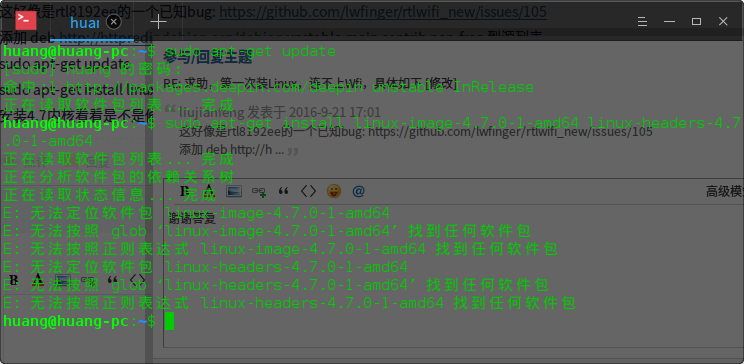
这好像是rtl8192ee的一个已知bug: https://github.com/lwfinger/rtlwifi_new/issues/105
添加 deb http://httpredir.debian.org/debian unstable main contrib non-free 到源列表
sudo apt-get update
sudo apt-get install linux-image-4.7.0-1-amd64 linux-headers-4.7.0-1-amd64
安装4.7内核看看是不是修复了
Reply View the author
avatar
185******08
deepin
2016-09-22 01:18
#3
https://bbs.deepin.org/post/43772
这好像是rtl8192ee的一个已知bug: https://github.com/lwfinger/rtlwifi_new/issues/105
添加 deb http://h ...

谢谢答复,
添加 deb http://httpredir.debian.org/debian unstable main contrib non-free 到源列表
是什么意思。。?不懂
Reply View the author
avatar
ddb_01
deepin
2016-09-22 01:33
#4
编辑 /etc/apt/sources.list 文件,添加到这个文件中。
然后再执行下面几条命令。
Reply View the author
avatar
liujianfeng
deepin
2016-09-22 01:35
#5
https://bbs.deepin.org/post/43772
谢谢答复,
添加 deb http://httpredir.debian.org/debian unstable main contrib non-free 到源列表
是 ...

sudo gedit /etc/apt/sources.list
加上这一行
记得装了内核之后就删掉这一行,debian的源无法跟deepin的在一起更新升级
Reply View the author
avatar
185******08
deepin
2016-09-22 16:34
#6
https://bbs.deepin.org/post/43772
sudo gedit /etc/apt/sources.list
加上这一行
记得装了内核之后就删掉这一行,debian的源无法跟deepin的 ...
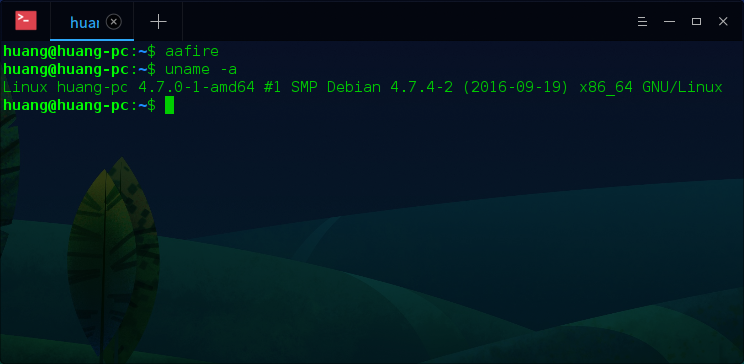
好像还是不行。。。
Reply View the author
avatar
185******08
deepin
2016-09-22 16:36
#7
https://bbs.deepin.org/post/43772
好像还是不行。。。


还是搜不到wifi,用的是手机USB共享。。
Reply View the author
avatar
185******08
deepin
2016-09-22 16:45
#8
https://bbs.deepin.org/post/43772
sudo gedit /etc/apt/sources.list
加上这一行
记得装了内核之后就删掉这一行,debian的源无法跟deepin的 ...


试了这个方法,wifi可以用了 ,嗨起来

Reply View the author
avatar
liujianfeng
deepin
2016-09-22 17:01
#9
https://bbs.deepin.org/post/43772
试了这个方法,wifi可以用了 ,嗨起来

居然是这个
Reply View the author
avatar
185******08
deepin
2016-09-22 17:07
#10
liujianfeng 发表于 2016-9-22 09:01
居然是这个

重启又不行了。。刚开机能连上默认的一个wifi但上不了网,但是连不上其他WiFi,再然后搜不到任何WiFi。。。。
Reply View the author
avatar
liujianfeng
deepin
2016-09-22 17:09
#11
麻烦在传下正常时候的 feedback, 你这网卡驱动是 rtl8192ee, ath9k的参数应该不会有影响
Reply View the author
avatar
185******08
deepin
2016-09-22 17:31
#12
https://bbs.deepin.org/post/43772
麻烦在传下正常时候的 feedback, 你这网卡驱动是 rtl8192ee, ath9k的参数应该不会有影响 ...

deepin-feedback-cli-Deepin-15.3-all-20160922-092448.tar.gz
重启了3次,wifi一直不正常,所以先上传了不正常的时候feedback

Reply View the author
avatar
liujianfeng
deepin
2016-09-22 17:47
#13
sudo -i
echo "options rtl8192ee fwlps=0" | tee -a /etc/modprobe.d/rtl8192ee.conf
关掉powersave试试看
Reply View the author
avatar
185******08
deepin
2016-09-22 17:50
#14
liujianfeng 发表于 2016-9-22 09:47
sudo -i
echo "options rtl8192ee fwlps=0" | tee -a /etc/modprobe.d/rtl8192ee.conf
关掉powersave试试看 ...

关掉powersave怎么搞?直接把这行命令打上去就ok了吗
Reply View the author
avatar
liujianfeng
deepin
2016-09-22 17:59
#15
https://bbs.deepin.org/post/43772
关掉powersave怎么搞?直接把这行命令打上去就ok了吗

对,执行上面的命令就行
Reply View the author
avatar
Experience
deepin
2016-09-22 18:01
#16
本帖最后由 Experience 于 2016-9-22 10:03 编辑

请问你的笔记本的无线网卡是什么型号的
Reply View the author
avatar
185******08
deepin
2016-09-22 18:06
#17
liujianfeng 发表于 2016-9-22 09:59
对,执行上面的命令就行

还是不行~
Reply View the author
avatar
185******08
deepin
2016-09-22 18:12
#18
Experience 发表于 2016-9-22 10:01
请问你的笔记本的无线网卡是什么型号的

应该是rtl8192ee吧
Reply View the author
avatar
Experience
deepin
2016-09-22 18:17
#19
https://bbs.deepin.org/post/43772
应该是rtl8192ee吧

你自己去下载驱动然后自己去编译安装试一试
Reply View the author
avatar
185******08
deepin
2016-09-22 18:20
#20
Experience 发表于 2016-9-22 10:17
你自己去下载驱动然后自己去编译安装试一试

刚上手linux,,,表示这个方法好难,,,完全不搞,,
Reply View the author
1 / 2
To page