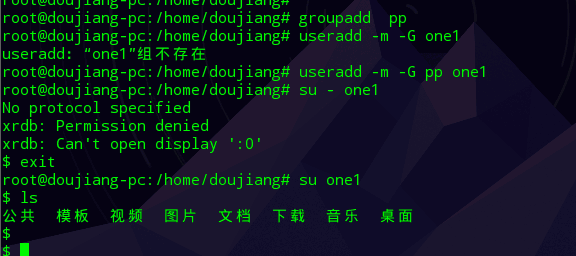
命令不支持
Tofloor
poster avatar
doujiang
deepin
2016-09-14 08:56
Author
感觉deepin命令支持不全面啊,不知道各位前辈有没有这样的感觉
Reply Favorite View the author
All Replies
2 / 3
To page
avatar
aurthur
deepin
2016-09-15 05:17
#21
https://bbs.deepin.org/post/43341
没事没事。谢谢你

updatedb这个命令并不是单独使用的。它得与crontab定时任务之类的业务情景一起使用
Reply View the author
avatar
doujiang
deepin
2016-09-15 05:49
#22
https://bbs.deepin.org/post/43341
updatedb这个命令并不是单独使用的。它得与crontab定时任务之类的业务情景一起使用 ...

我才练习呢,就是发现这个不能直接用,然后就出了那个错误,我也没改任何文件就那个样子很难为情啊
Reply View the author
avatar
doujiang
deepin
2016-09-15 06:06
#23
https://bbs.deepin.org/post/43341
sudo apt-get install screenfetch

dde-file-manager
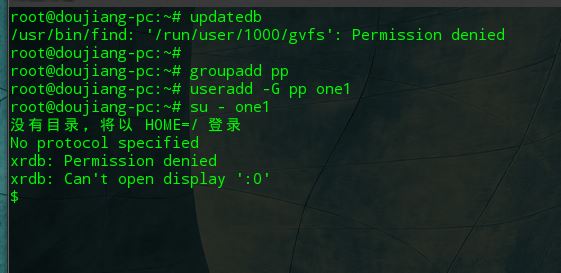
麻烦问下这个怎么解决,加了参数-m也一样


这个帖子另一个前辈的可以


Reply View the author
avatar
aurthur
deepin
2016-09-15 06:13
#24
https://bbs.deepin.org/post/43341
麻烦问下这个怎么解决,加了参数-m也一样

你是在deepin下进行的吗?
Reply View the author
avatar
doujiang
deepin
2016-09-15 06:14
#25
https://bbs.deepin.org/post/43341
你是在deepin下进行的吗?

是啊,deepin15.2
Reply View the author
avatar
aurthur
deepin
2016-09-15 06:17
#26

哦,我上午回复的那个是在CentOS下测试的。等我测试下再给答复
Reply View the author
avatar
177******36
deepin
2016-09-15 06:34
#27
楼主说的问题,我这里也出现了。登陆用户是安装系统时创建的。一些reboot啊,halt命令啊,都提示找不到

  1. szyzln@L2016:~$ reboot
  2. bash: reboot: 未找到命令
  3. szyzln@L2016:~$
Copy the Code


Reply View the author
avatar
doujiang
deepin
2016-09-15 06:35
#28
https://bbs.deepin.org/post/43341
哦,我上午回复的那个是在CentOS下测试的。等我测试下再给答复

centos是可以支持的,在fedora下也可以ubuntu没测试
Reply View the author
avatar
doujiang
deepin
2016-09-15 06:36
#29
https://bbs.deepin.org/post/43341
楼主说的问题,我这里也出现了。登陆用户是安装系统时创建的。一些reboot啊,halt命令啊,都提示找不到

这个我也不懂诶
Reply View the author
avatar
MattD
deepin
2016-09-15 06:37
#30
https://bbs.deepin.org/post/43341
楼主说的问题,我这里也出现了。登陆用户是安装系统时创建的。一些reboot啊,halt命令啊,都提示找不到

/sbin和/usr/sbin下的命令压根就不在普通用户的$PATH里面,当然提示你找不到。
Reply View the author
avatar
177******36
deepin
2016-09-15 06:42
#31
https://bbs.deepin.org/post/43341
/sbin和/usr/sbin下的命令压根就不在普通用户的$PATH里面,当然提示你找不到。 ...

刚刚我看了下PATH环境变量。确实是这样子的。
但这个用户是系统安装时创建的,属于sudo组。不支持系统命令说不过去
Reply View the author
avatar
doujiang
deepin
2016-09-15 06:46
#32
https://bbs.deepin.org/post/43341
全面的标准是什么?

没有啊,就是感觉我练习不够用啊
Reply View the author
avatar
MattD
deepin
2016-09-15 06:53
#33
https://bbs.deepin.org/post/43341
刚刚我看了下PATH环境变量。确实是这样子的。
但这个用户是系统安装时创建的,属于sudo组。不支持系统命 ...

sudo的作用是什么?临时提权而非永久性授权。
而/sbin和/usr/sbin下面的命令是不应开放权限的具有一定危险性的命令。如果你是服务器管理员,你的连线用户随随便便就能reboot,就能mkfs,那Linux的安全性也太可笑了。


    来自:Mozilla/5.0 (X11; Linux x86_64; rv:48.0) Gecko/20100101 Firefox/48.0  (zh-CN)
    ——2016/9/14 下午10:53:07
    Reply View the author
    avatar
    sudo_free
    deepin
    2016-09-15 06:56
    #34
    这种练习方法也是神了

    初次接触Linux系统的话,建议从日常操作开始练,容易记得住
    Reply View the author
    avatar
    177******36
    deepin
    2016-09-15 06:56
    #35
    https://bbs.deepin.org/post/43341
    sudo的作用是什么?临时提权而非永久性授权。
    而/sbin和/usr/sbin下面的命令是不应开放权限的具有一定危 ...

    命令都找不到,谈什么临时提权。
    Reply View the author
    avatar
    MattD
    deepin
    2016-09-15 06:59
    #36
    https://bbs.deepin.org/post/43341
    命令都找不到,谈什么临时提权。

    请问你试过sudo reboot吗?试过再来回复,谢谢!


      来自:Mozilla/5.0 (X11; Linux x86_64; rv:48.0) Gecko/20100101 Firefox/48.0  (zh-CN)
      ——2016/9/14 下午10:59:21
      Reply View the author
      avatar
      aurthur
      deepin
      2016-09-15 07:06
      #37
      https://bbs.deepin.org/post/43341
      楼主说的问题,我这里也出现了。登陆用户是安装系统时创建的。一些reboot啊,halt命令啊,都提示找不到

      这几个命令是给系统管理员用的。不要把它加到普通用户环境变量中去,危险。
      有些霸道的命令不是给普通用户用的。用sudo临时授权用下就可以了
      Reply View the author
      avatar
      177******36
      deepin
      2016-09-15 07:08
      #38
      https://bbs.deepin.org/post/43341
      请问你试过sudo reboot吗?试过再来回复,谢谢!

      哈哈。我错了
      Reply View the author
      avatar
      MattD
      deepin
      2016-09-15 07:25
      #39
      https://bbs.deepin.org/post/43341
      麻烦问下这个怎么解决,加了参数-m也一样

      顺手帮你看了一下,根源找到了,是/etc/profile.d/xft-resources.sh这个脚本导致的。
      我先想到的是/etc/skel下面的某个配置文件调用了xrdb,但是翻了一遍没翻到。然后不死心尝试了下给新用户指定zsh,没有复现问题,那么就可以肯定是bash调用的某个初始化文件在作祟。
      方向确定下来以后,又排除了用户级配置文件的问题,那么可以想到根源肯定在系统级配置上。于是翻看/etc/bash.bashrc,/etc/profile等文件,最终发现/etc/profile会调用/etc/profile.d下面的脚本,顺藤摸瓜,找到了这个可疑的脚本,且具有可执行权限。
      原因找到以后解决方法就好办了,把这个脚本移走即可。因为/etc/profile里面是写死了执行/etc/profile.d/*.sh,单纯去掉可执行权限不生效。


        来自:Mozilla/5.0 (X11; Linux x86_64; rv:48.0) Gecko/20100101 Firefox/48.0  (zh-CN)
        ——2016/9/14 下午11:25:57
        Reply View the author
        avatar
        MattD
        deepin
        2016-09-15 07:29
        #40
        顺便说一下,强制调用/etc/profile.d/*.sh脚本的配置如下:
        1. if [ -d /etc/profile.d ]; then
        2.   for i in /etc/profile.d/*.sh; do
        3.     if [ -r $i ]; then
        4.       . $i
        5.     fi
        6.   done
        7.   unset i
        8. fi
        Copy the Code

        如果不想移走那个脚本,也可以注释掉这段配置。


          来自:Mozilla/5.0 (X11; Linux x86_64; rv:48.0) Gecko/20100101 Firefox/48.0  (zh-CN)
          ——2016/9/14 下午11:29:19
          Reply View the author
          2 / 3
          To page