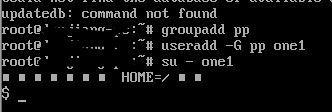
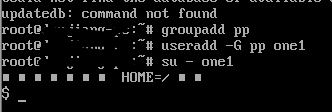
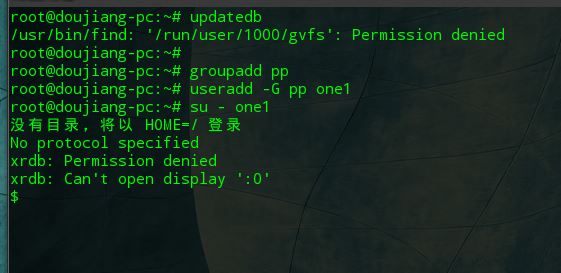
命令不支持
Tofloor
poster avatar
doujiang
deepin
2016-09-14 08:56
Author
感觉deepin命令支持不全面啊,不知道各位前辈有没有这样的感觉
Reply Favorite View the author
All Replies
1 / 3
To page
avatar
aurthur
deepin
2016-09-14 09:06
#1
请举个例子,列出一条没有支持的命令?
Reply View the author
avatar
doujiang
deepin
2016-09-14 09:24
#2
https://bbs.deepin.org/post/43341
请举个例子,列出一条没有支持的命令?

updatedb

ls -l缩写ll

还有我遇到一个特别奇怪的问题,这个在另一个发行版linux系统是直接可以运行的


Reply View the author
avatar
aurthur
deepin
2016-09-14 09:40
#3
本帖最后由 aurthur 于 2016-9-14 01:51 编辑
https://bbs.deepin.org/post/43341
updatedb

ls -l缩写ll

大哥,ll不是标准的Linux命令,只是一个别名。要在环境变量文件中加入alias ll='ls -l',这样就会显示长列表,如果想要把隐藏文件也列出来就是alias ll='ls -la'.
至于updatedb,得先执行命令sudo apt-get install locate.安装完成后就可以了。
Reply View the author
avatar
doujiang
deepin
2016-09-14 18:49
#4
https://bbs.deepin.org/post/43341
大哥,ll不是标准的Linux命令,只是一个别名。要在环境变量文件中加入alias ll='ls -l',这样就会显示长列 ...

那最后那个呢

Reply View the author
avatar
aurthur
deepin
2016-09-14 18:50
#5

哪一个?
Reply View the author
avatar
aurthur
deepin
2016-09-14 19:14
#6

我还是没有发现有最后一个,在哪呢?
Reply View the author
avatar
doujiang
deepin
2016-09-14 19:40
#7
https://bbs.deepin.org/post/43341
我还是没有发现有最后一个,在哪呢?

就是那个切换用户的
Reply View the author
avatar
aurthur
deepin
2016-09-14 19:43
#8
https://bbs.deepin.org/post/43341
就是那个切换用户的

你只是创建了个用户,并没有创建用户的HOME 目录,也就没有配置文件,就是这种情况了。useradd时加个 -m 参数
Reply View the author
avatar
aurthur
deepin
2016-09-14 19:50
#9
本帖最后由 aurthur 于 2016-9-14 11:52 编辑
https://bbs.deepin.org/post/43341
你只是创建了个用户,并没有创建用户的HOME 目录,也就没有配置文件,就是这种情况了。useradd时加个 -m  ...

对不起,错了。我刚用你的命令进行了测试完全没有问题,你自己再试下
Reply View the author
avatar
doujiang
deepin
2016-09-14 21:05
#10
https://bbs.deepin.org/post/43341
对不起,错了。我刚用你的命令进行了测试完全没有问题,你自己再试下


难道真的是我人品有问题么
Reply View the author
avatar
aurthur
deepin
2016-09-14 21:11
#11
https://bbs.deepin.org/post/43341
难道真的是我人品有问题么

你这都已经是root了,怎么还会提示没有权限。你是不是动过/etc/sudoes文件?
Reply View the author
avatar
aurthur
deepin
2016-09-14 21:16
#12
本帖最后由 aurthur 于 2016-9-14 13:18 编辑

你叫窦江,我有一同学也叫这名。连云港的哥们
Reply View the author
avatar
doujiang
deepin
2016-09-14 21:36
#13
https://bbs.deepin.org/post/43341
你这都已经是root了,怎么还会提示没有权限。你是不是动过/etc/sudoes文件? ...

没啊新系统啊
Reply View the author
avatar
doujiang
deepin
2016-09-14 21:37
#14
https://bbs.deepin.org/post/43341
你叫窦江,我有一同学也叫这名。连云港的哥们

我不叫这个呀,只是我名字和这个很像就叫豆浆啦
Reply View the author
avatar
aurthur
deepin
2016-09-14 22:17
#15
是我错了,昨夜太晚了,没注意看,看到了一堆的输出就以为是成功了。结果是错误提示。
Reply View the author
avatar
Delas_Kipapkok
deepin
2016-09-14 22:45
#16
求教,15.3对应screenfetch的命令是啥?
还有文件管理器在终端里的命令名称是啥?我在终端里输入nautilus说是命令错误~
Reply View the author
avatar
jingle
deepin
2016-09-14 23:03
#17
https://bbs.deepin.org/post/43341
求教,15.3对应screenfetch的命令是啥?
还有文件管理器在终端里的命令名称是啥?我在终端里输入nautilus说 ...

sudo apt-get install screenfetch

dde-file-manager
Reply View the author
avatar
Delas_Kipapkok
deepin
2016-09-14 23:09
#18
https://bbs.deepin.org/post/43341
sudo apt-get install screenfetch

dde-file-manager

感谢叮管,原来还要安装,哈哈~
Reply View the author
avatar
doujiang
deepin
2016-09-15 04:58
#19
https://bbs.deepin.org/post/43341
求教,15.3对应screenfetch的命令是啥?
还有文件管理器在终端里的命令名称是啥?我在终端里输入nautilus说 ...

我也不会呀
Reply View the author
avatar
doujiang
deepin
2016-09-15 04:58
#20
https://bbs.deepin.org/post/43341
是我错了,昨夜太晚了,没注意看,看到了一堆的输出就以为是成功了。结果是错误提示。 ...

没事没事。谢谢你
Reply View the author
1 / 3
To page