Home
Categories
WIKI
Topic
User
LANGUAGE:
中文
English
深度文件管理器中启动程序dock中不显示图标
Apps Section
929
views ·
3
replies ·
To
floor
Go
sinux
deepin
2016-09-13 00:24
Author
本帖最后由 sinux 于 2016-9-12 16:29 编辑
0深度文件管理器v1.2
1打开深度文件管理器
2浏览到某个程序的安装目录,在本例中是phpstorm
3双击该程序的启动脚本,在本例中是phpstorm.sh
4弹出框中点击运行
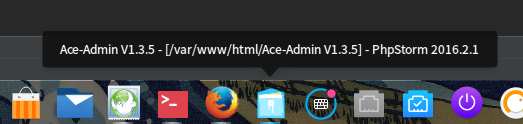
5预期的phpstorm tab没有出现,而是合并进文件管理器的tab
使用其他文件管理器无此问题
Reply
Like 0
Favorite
View the author
All Replies
jingle
deepin
2016-09-13 00:54
#1
新版dock应该时显示正常的。
Reply
Like 0
View the author
sinux
deepin
2016-09-13 23:43
#2
https://bbs.deepin.org/post/43240
新版dock应该时显示正常的。
经实测,15.3中问题依旧
$ lsb_release -a
No LSB modules are available.
Distributor ID: Deepin
Description: Deepin 15.3
Release: 15.3
Codename: unstable
Copy the Code
Reply
Like 0
View the author
sinux
deepin
2016-09-14 01:13
#3
另外,在深度文件管理器里面怎么更改文件读写权限?似乎只能开终端了?
Reply
Like 0
View the author
Please
sign
in first
Featured Collection
Change
Nuntia - Modern IMAP/SMTP mail client for Deepin (Beta tester wanted!)
[Tutorial] deepin25 WSL Offline Installation Guide
UOS AI 2.8 Released! Three New Intelligent Agents & Major Evolution
Solid Q&A | deepin 25 Common Questions – The Immutable System Edition
New Thread
Popular Ranking
Change
Adding a Dancing Spectrum Bar to the Deepin Taskbar | deepin-spectrum
Popular Events
More


 中文

 deepin deepin
 deepin

 deepin
 deepin


 Adding a Dancing Spectrum Bar to the Deepin Taskbar | deepin-spectrum
0深度文件管理器v1.2
1打开深度文件管理器
2浏览到某个程序的安装目录,在本例中是phpstorm
3双击该程序的启动脚本,在本例中是phpstorm.sh
4弹出框中点击运行
5预期的phpstorm tab没有出现,而是合并进文件管理器的tab
使用其他文件管理器无此问题