关于默认Qt5 程序主题丑的问题
Tofloor
poster avatar
L56675
deepin
2016-09-01 07:10
Author
本帖最后由 L56675 于 2016-8-31 23:34 编辑

Qt5 的主题也算是一个Bug 吧,在绝大多数非KDE 5 的桌面(例如Gnome、DDE等)的Qt5 程序默认用的都是Fusion 这一Fallback 主题 ,导致与当前桌面主题不符显得黑违和。解决方法如下:
1) 安装 qt5-styleplugins and qt5ct
2) 在终端输入sudo gedit /etc/environment在下面空行添加
QT_QPA_PLATFORMTHEME=qt5ct
3)重启系统
4) 在终端运行运行 qt5ct,在风格那栏选择你想要换的主题(Breeze、GTK+等)
5) 保存后关闭窗口,再在终端输入sudo -i
6)输入qt5ct 重复4的步骤,这样可以让调用 Root 权限的Qt5 应用也有主题这样Qt5 程序就不再丑了


正确调用主题的Qt5 程序看起来应该是这样的


Reply Favorite View the author
All Replies
1 / 2
To page
avatar
132******13
deepin
2016-09-07 20:44
#1
顶起来。。亲测有效
有个小贴士:如果选择GTK+主题那qt程序的主题就和系统主题一致了
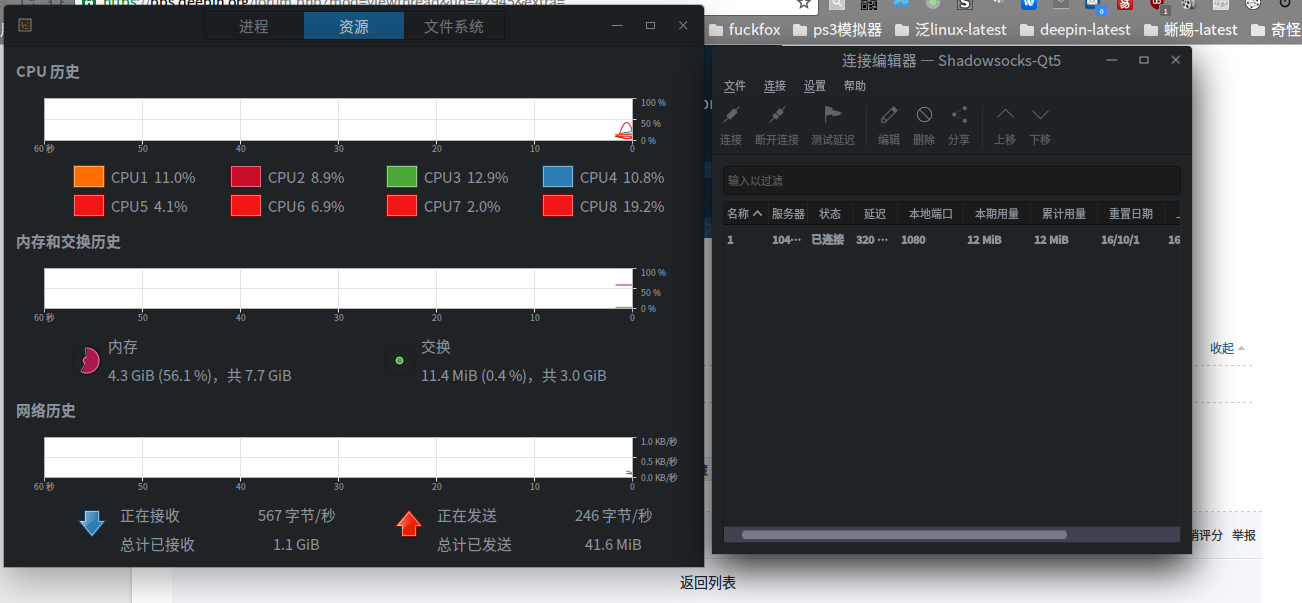
(不过深度自己写的组件不受系统主题影响,它自己的主题不能更改)
Reply View the author
avatar
rekols
deepin
2016-09-08 02:52
#2
深度以后也有自己的方案吧。
Reply View the author
avatar
132******13
deepin
2016-09-08 06:44
#3
https://bbs.deepin.org/post/42945
深度以后也有自己的方案吧。

你不是爆料王么,你说有就有呗
Reply View the author
avatar
L56675
deepin
2016-09-08 08:13
#4
https://bbs.deepin.org/post/42945
深度以后也有自己的方案吧。

其实Manjaro(基于ArchLinux的一个系统) 官方自己也在Qt 5.7 中为解决Qt5 主题问题打了自己的补丁
Reply View the author
avatar
180******32
deepin
2016-09-09 17:47
#5
试试,mark一下
Reply View the author
avatar
bsidb
deepin
2016-09-09 18:25
#6
深度准备做自己的解决方案么?如果准备做,现在就不折腾了,以免到时候冲突。
Reply View the author
avatar
zfane
deepin
2016-09-22 17:08
#7
安装 qt5-styleplugins and qt5ct
Reply View the author
avatar
zfane
deepin
2016-09-22 18:40
#8
如何安装 qt5-styleplugins and qt5ct
Reply View the author
avatar
tyh2020
deepin
2016-09-22 18:54
#9
看起来确实比默认的漂亮多了,但还是不够漂亮

也许深度应该花点时间在主题上面。其实很多时候说Linux UI ugly,并不是用户交互做得不好,就是丑而已
在这上面花点时间,也许可以达到事半功倍的效果。
Reply View the author
avatar
HualetWang
deepin
2016-09-26 16:56
#10
deepin会有自己的 platform themes plugin, imageformats plugin, iconengines plugin,15.4计划中的事情。请期待。。。
Reply View the author
avatar
rekols
deepin
2016-09-26 17:16
#11
https://bbs.deepin.org/post/42945
deepin会有自己的 platform themes plugin, imageformats plugin, iconengines plugin,15.4计划中的事情。 ...

哈哈。
Reply View the author
avatar
bnbvb
deepin
2016-09-26 20:52
#12
https://bbs.deepin.org/post/42945
deepin会有自己的 platform themes plugin, imageformats plugin, iconengines plugin,15.4计划中的事情。 ...

居然还有15.4,现在版本号是怎么划分的
Reply View the author
avatar
rekols
deepin
2016-09-26 20:54
#13
https://bbs.deepin.org/post/42945
居然还有15.4,现在版本号是怎么划分的

每三个月发布一次小版本,比如,一年更新一次大版本。
Reply View the author
avatar
rekols
deepin
2016-09-26 23:22
#14
qt5deepintheme-plugin已经在干了
Reply View the author
avatar
rekols
deepin
2016-09-27 04:07
#15
https://bbs.deepin.org/post/42945
如何安装 qt5-styleplugins and qt5ct

sudo apt install qt5-style-plugins
qt5ct自己构建。
Reply View the author
avatar
132******13
deepin
2016-10-22 03:23
#16
https://bbs.deepin.org/post/42945
deepin会有自己的 platform themes plugin, imageformats plugin, iconengines plugin,15.4计划中的事情。 ...
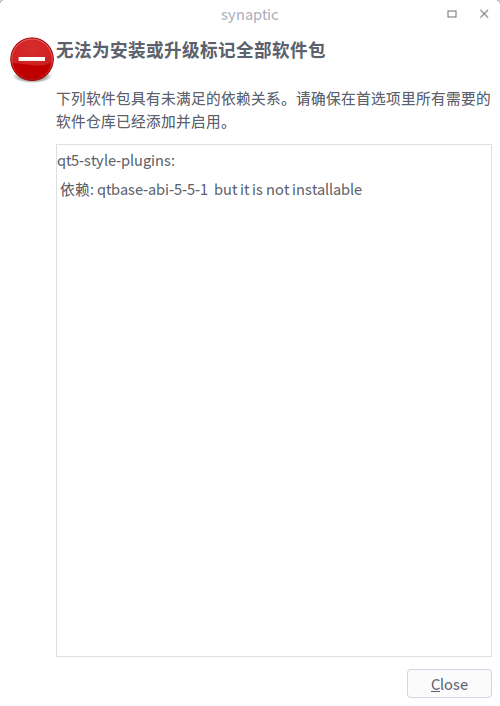

是不是为了这三个plugin所以没法装qt5-styleplugins和qt5ct了,现在这两个东西都没法安装了,报错是相同的,不能满足qtbase-abi的依赖
Reply View the author
avatar
Island
deepin
2016-10-24 22:49
#17
这个插件需要在qt6.1的环境下面重新打包。我们会考虑下是否上架。
Reply View the author
avatar
nbxwj
deepin
2016-10-29 20:48
#18
楼主桌面非常漂亮!
Reply View the author
avatar
joybely
deepin
2016-12-05 18:48
#19
https://bbs.deepin.org/post/42945
顶起来。。亲测有效
有个小贴士:如果选择GTK+主题那qt程序的主题就和系统主题一致了

倒是没有成功,也不成功的说,觉得现在的还行
Reply View the author
avatar
泳衡
deepin
2017-01-18 00:01
#20
https://bbs.deepin.org/post/42945
每三个月发布一次小版本,比如,一年更新一次大版本。

三个月发一个小版本,你确定?
小心过劳死呀!
Reply View the author
1 / 2
To page