deepin 2015.2怎么用root登录
Tofloor
poster avatar
hexy1989
deepin
2016-09-01 00:40
Author
最近一直在找一个可以用于办公的软件,平时使用qq比较多,最终选择了deepin.首先非常感谢深度的这个linux系统,用起来很清爽。
现在一直有一个问题困扰着我,就是之前的版本都可以使用root用户来登录,到了2015.2不能使用root登录了,我试了很多种方法。
请问,如何才能使用root登录该系统呢,终端的不算。
谢谢!

Reply Favorite View the author
All Replies
avatar
q1205556364
deepin
2016-09-01 00:57
#1
额。。。对你来说,root登录是必须的吗。。。特别重要?还是图个方便。。。
Reply View the author
avatar
aurthur
deepin
2016-09-01 01:00
#2
什么业务得要root登录,普通用户sudo还满足不了你的需求
Reply View the author
avatar
macaiyun0629
deepin
2016-09-01 01:11
#3
进入tty,然后root登陆,执行startx就可以了,不过有点提醒你,在root权限下,有很多软件无法使用
Reply View the author
avatar
macaiyun0629
deepin
2016-09-01 01:12
#4
https://bbs.deepin.org/post/42925
进入tty,然后root登陆,执行startx就可以了,不过有点提醒你,在root权限下,有很多软件无法使用 ...

进入tty,直接执行sudo startx也可以
Reply View the author
avatar
laoguang
deepin
2016-09-01 01:17
#5
https://bbs.deepin.org/post/42925
进入tty,直接执行sudo startx也可以

然后卡成老夫一样的单身狗。。。

dde不支持,换gnome/kde/unity吧(虽说dde root登陆在我反馈问题后快了很多,但根用户有一些特定的插件还是没有滴)
Reply View the author
avatar
jingle
deepin
2016-09-01 01:18
#6
我刚才试验了下:

1、修改/etc/lightdm/lightdm.conf文件。

2、找到#autologin-user= 字段,修改成 autologin-user=root

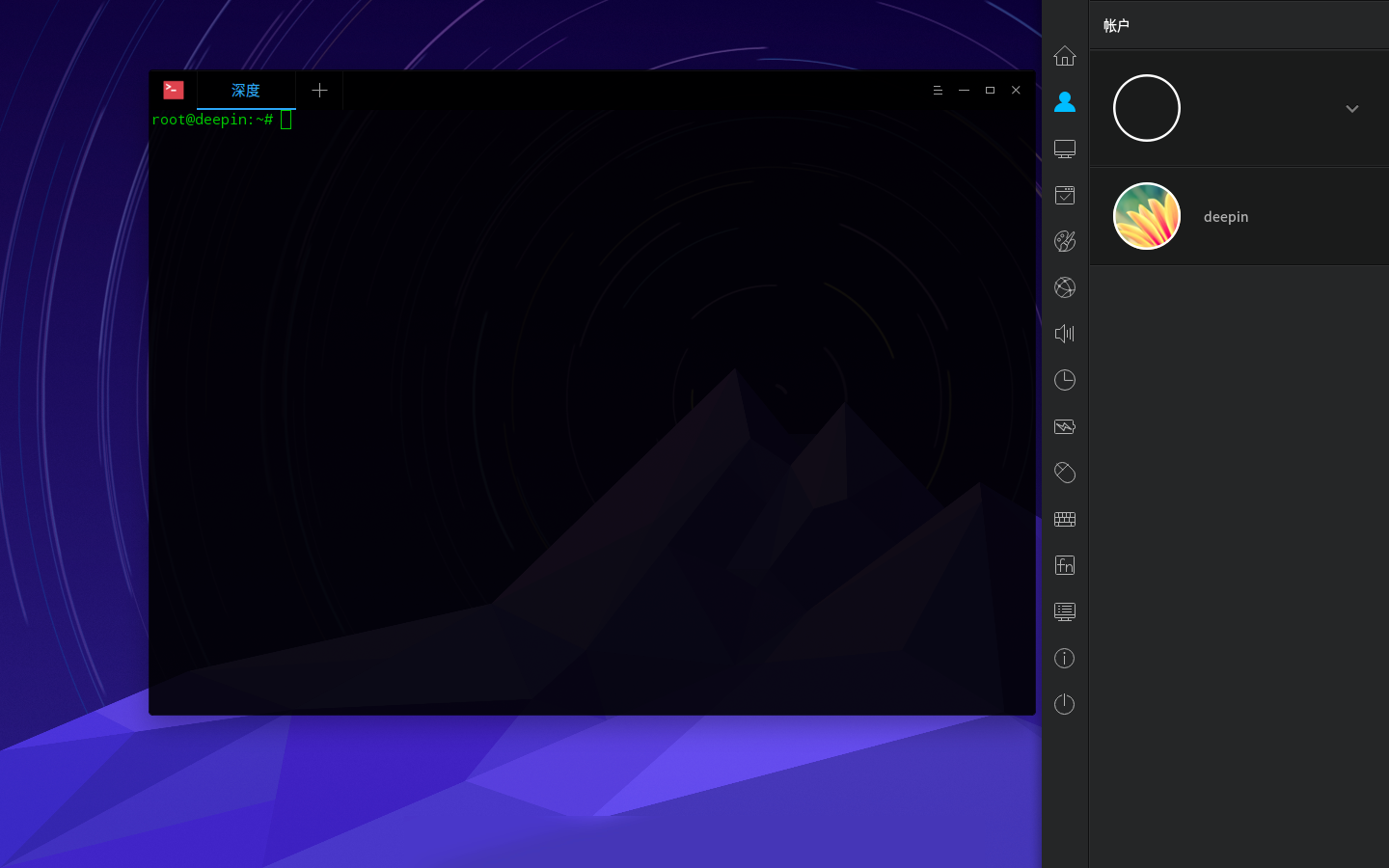
3、重启登陆后出现了提示(我直接点确定了),登陆桌面后dock没有了,终端打开就是root了,账户里面有个无头像为空的。(我是15.3 所以你试试15.2)


4、不行就在tty下面再屏蔽改回来。
Reply View the author
avatar
macaiyun0629
deepin
2016-09-01 01:29
#7
https://bbs.deepin.org/post/42925
然后卡成老夫一样的单身狗。。。

dde不支持,换gnome/kde/unity吧(虽说dde root登陆在我反馈问题后快 ...

是卡得出翔,只能作为临时用用了
Reply View the author
avatar
phpdashan
deepin
2016-09-01 01:32
#8
15.3  看样子快出来了
Reply View the author
avatar
hexy1989
deepin
2016-09-01 01:46
#9
https://bbs.deepin.org/post/42925
我刚才试验了下:

1、修改/etc/lightdm/lightdm.conf文件。

好的,我试下。谢谢了!
Reply View the author
avatar
hexy1989
deepin
2016-09-01 01:47
#10
https://bbs.deepin.org/post/42925
额。。。对你来说,root登录是必须的吗。。。特别重要?还是图个方便。。。 ...

必须用root,否则开启不了。
Reply View the author
avatar
laoguang
deepin
2016-09-01 02:42
#11
https://bbs.deepin.org/post/42925
好的,我试下。谢谢了!

换个greeter,有提供other login的那种。

百科里有写。
Reply View the author
avatar
huanhuachengfeng
deepin
2016-09-01 16:08
#12
本帖最后由 huanhuachengfeng 于 2016-9-1 08:09 编辑

sudo   passwd  root
Reply View the author
avatar
phpdashan
deepin
2016-09-02 19:35
#13
https://bbs.deepin.org/post/42925
进入tty,直接执行sudo startx也可以

我的是15.2 用这方法之后一直黑屏,然后重启之后,登陆账号输入密码就一直登陆不上了,输入完密码之后在调到登陆页面,看样子得重装系统了
Reply View the author
avatar
macaiyun0629
deepin
2016-09-02 19:39
#14
https://bbs.deepin.org/post/42925
我的是15.2 用这方法之后一直黑屏,然后重启之后,登陆账号输入密码就一直登陆不上了,输入完密码之后在 ...

重装dde就行了,先卸载dde,然后在安装,sudo apt-get remove dde,之后sudo apt-get install dde  
这种方式登陆太卡,临时用用可以
我一般是用来删除文件的,不想用命令行
Reply View the author
avatar
phpdashan
deepin
2016-09-02 21:52
#15
https://bbs.deepin.org/post/42925
重装dde就行了,先卸载dde,然后在安装,sudo apt-get remove dde,之后sudo apt-get install dde  
这种方式 ...

关键是进入不了系统,一直停留在用户登录页面
Reply View the author
avatar
macaiyun0629
deepin
2016-09-02 22:11
#16
https://bbs.deepin.org/post/42925
关键是进入不了系统,一直停留在用户登录页面

进tty,你不是会玩tty了
Reply View the author