
[求助]启动器突然就用不了
Tofloor
poster avatar
flamboyant
deepin
2016-08-29 19:47
Author
本帖最后由 flamboyant 于 2016-8-29 14:08 编辑

今天第一次开机都还正常,也没做什么特别的事情,后来因为有需要,关机换了一下无线网卡。开机之后就不能使用启动器了。
百度了一下,试过关闭再开dde-launcher,无效,试过重启,无效,试过删除~/.cache ,无效。
终端运行dde-launcher命令的结果是:
alex@alex-pc:~$ dde-launcher
terminate called after throwing an instance of 'std::bad_alloc'
  what():  std::bad_alloc
已放弃


求解。
也不知道什么信息有用,麻烦有经验的指导一下。


目前除了启动器打开不了,好像没出现其它问题。但在这里想先请教一个替代方法,我在/usr/share/applications里找到的desktop文件看了一下,无法直接运行,我查看一些文件,找到Exec值,直接在终端里打开相应的文件,软件一般都能打开,但是一些软件的配置文件好像无效了,如idea,这个影响很大,不知有没有方法可以不进入启动器便把某些软件的快捷方式添加到桌面?
Reply Favorite View the author
All Replies
1 / 2
To page
avatar
jingle
deepin
2016-08-29 20:08
#1
在终端界面重新安装下启动器,sudo apt-get install --reinstall dde-launcher
Reply View the author
avatar
flamboyant
deepin
2016-08-29 22:06
#2
https://bbs.deepin.org/post/42854
在终端界面重新安装下启动器,sudo apt-get install --reinstall dde-launcher

还是无效...
Reply View the author
avatar
jingle
deepin
2016-08-29 22:08
#3
Reply View the author
avatar
flamboyant
deepin
2016-08-29 22:18
#4
https://bbs.deepin.org/post/42854
https://bbs.deepin.org/post/42117 按照这个试试。

不行,终端里的显示内容如下:
alex@alex-pc:~$ dde-launcher --show
terminate called after throwing an instance of 'std::bad_alloc'
  what():  std::bad_alloc
已放弃
alex@alex-pc:~$ cd .cache/deepin/dde-launcher/
alex@alex-pc:~/.cache/deepin/dde-launcher$ ls -a
.  ..


就是里面根本没有dde-launcher.conf这个文件
话说在这里回复的时候怎么添加图片的啊?
Reply View the author
avatar
jingle
deepin
2016-08-29 22:21
#5
https://bbs.deepin.org/post/42854
不行,终端里的显示内容如下:
alex@alex-pc:~$ dde-launcher --show
terminate called after throwing a ...

上面那个帖子5楼和7楼的办法试了吗,回复时候选择高级模式可以添加
Reply View the author
avatar
flamboyant
deepin
2016-08-29 22:31
#6
https://bbs.deepin.org/post/42854
上面那个帖子5楼和7楼的办法试了吗,回复时候选择高级模式可以添加
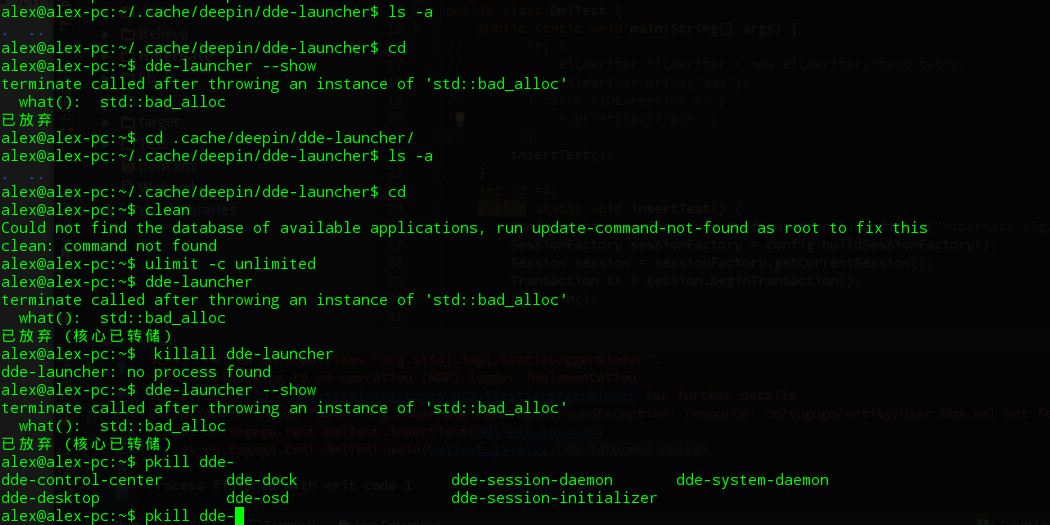


试过了,无效,另我用pkill命令时用tab键发现,没有dde-launcher

Reply View the author
avatar
HualetWang
deepin
2016-08-29 23:00
#7
这是内存分配失败了,机器多大的内存?
另外,好像有coredump生成,麻烦看下你的home下面是不是有一个很大的文件,叫core或者什么的
Reply View the author
avatar
flamboyant
deepin
2016-08-29 23:29
#8
https://bbs.deepin.org/post/42854
这是内存分配失败了,机器多大的内存?
另外,好像有coredump生成,麻烦看下你的home下面是不是有一个很大的文 ...


4G内存,core只有36M啊,

看了一下,还有内存才对啊

Reply View the author
avatar
flamboyant
deepin
2016-08-30 05:16
#9
没人了吗?好大问题啊,重装系统太麻烦了,装了好多软件了
Reply View the author
avatar
emofode
deepin
2016-08-30 05:50
#10
https://bbs.deepin.org/post/42854
4G内存,core只有36M啊,

看了一下,还有内存才对啊

要的就是这个 core 文件,快发给我吧
Reply View the author
avatar
flamboyant
deepin
2016-08-30 07:34
#11
https://bbs.deepin.org/post/42854
要的就是这个 core 文件,快发给我吧

怎么发给你?
Reply View the author
avatar
macaiyun0629
deepin
2016-08-30 07:41
#12

上传附件........
Reply View the author
avatar
flamboyant
deepin
2016-08-30 08:11
#13

我上传附件的大小限制是4M,你有没有邮箱?

Reply View the author
avatar
macaiyun0629
deepin
2016-08-30 08:21
#14
https://bbs.deepin.org/post/42854
我上传附件的大小限制是4M,你有没有邮箱?

我不是官方人员,你直接发个百度网盘共享链接给他们也是可以的
Reply View the author
avatar
emofode
deepin
2016-08-30 16:59
#15

看你的私信
Reply View the author
avatar
flamboyant
deepin
2016-08-30 18:01
#16

昨晚已经发给你了
Reply View the author
avatar
emofode
deepin
2016-08-30 21:14
#17
应该是库版本不正确,确保更新到最新系统了
apt-get update
apt-get dist-upgrade
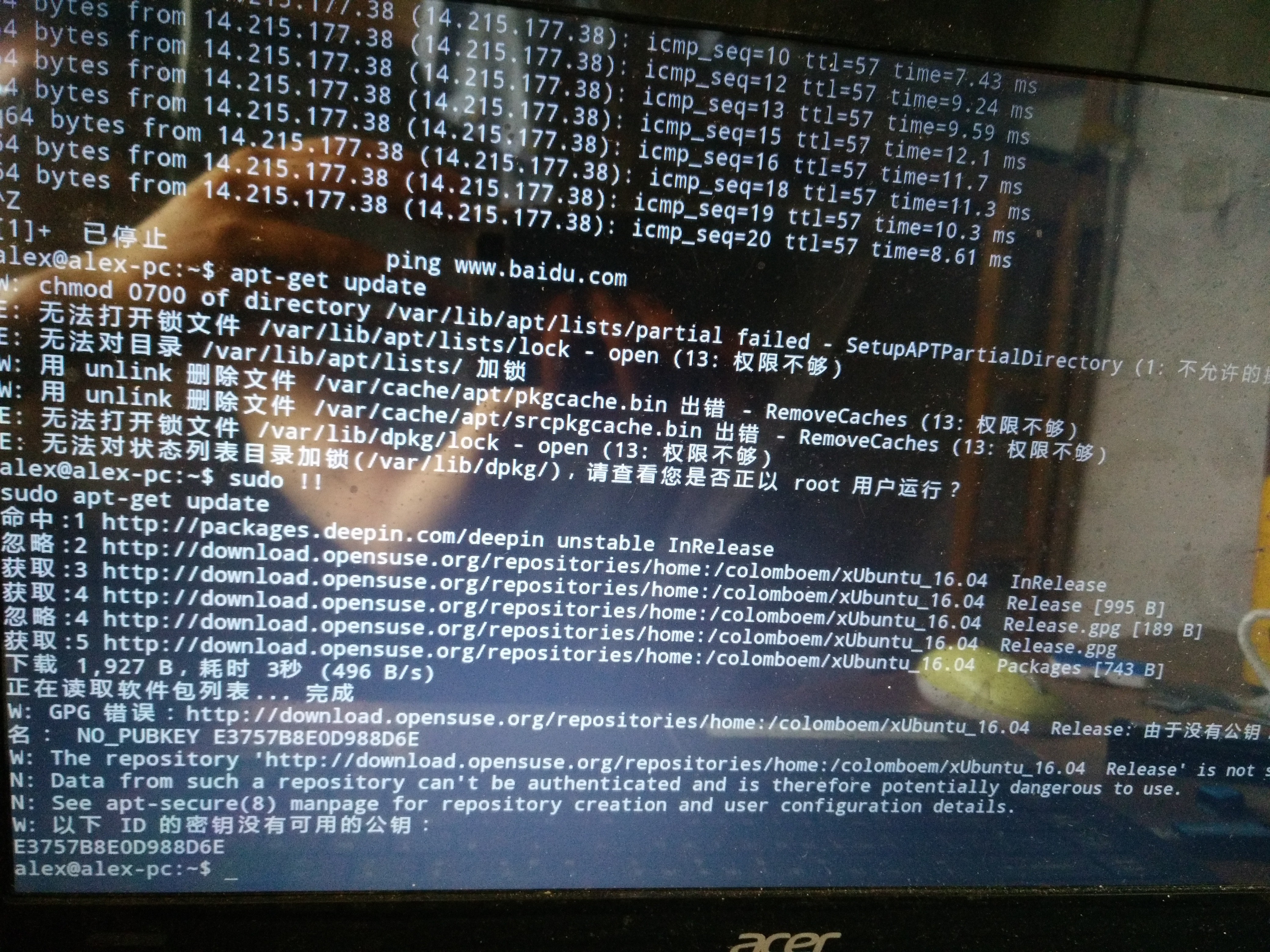
确保没有使用其它奇怪的源
Reply View the author
avatar
flamboyant
deepin
2016-08-30 23:29
#18
https://bbs.deepin.org/post/42854
应该是库版本不正确,确保更新到最新系统了
apt-get update
apt-get dist-upgrade

我都没安装过什么东西就突然不行的。。。
现在我进入tty模式了,执行apt-update结果如下

不知你能不能看清楚?
Reply View the author
avatar
emofode
deepin
2016-08-31 00:08
#19
https://bbs.deepin.org/post/42854
我都没安装过什么东西就突然不行的。。。
现在我进入tty模式了,执行apt-update结果如下

你这个明显是加了其它源了,作死呀
Reply View the author
avatar
flamboyant
deepin
2016-08-31 00:46
#20
https://bbs.deepin.org/post/42854
你这个明显是加了其它源了,作死呀

什么加了其它源?我不懂啊,要怎么解决?
Reply View the author
1 / 2
To page

