终端2.0的更换主题更方便了
Tofloor
poster avatar
wangyong
deepin
2016-08-28 02:51
Author
非常感谢大家终端2.0内测活动的热情反馈。

这两天根据大家的意见已经修复和改进了32个问题:https://github.com/manateelazycat/deepin-terminal/commits/master
今天还修改了终端的更换主题的方式, 比原来的设置对话框中更换主题的方式更方便。 ;)


Reply Favorite View the author
All Replies
2 / 4
To page
avatar
Lyvnee
deepin
2016-08-28 22:57
#21
https://bbs.deepin.org/post/42801
在深度终端中使用/usr/bin/deepin-terminal -e ,提示如图

  1. /usr/bin/deepin-terminal -e  <脚本>
Copy the Code


这才是正确姿势吧
Reply View the author
avatar
Smokey Joe
deepin
2016-08-28 23:38
#22
不错,放在右键里没必要,设置里足够了。
Reply View the author
avatar
wangyong
deepin
2016-08-28 23:39
#23
https://bbs.deepin.org/post/42801
怎么还是没有滚动条?

滚动条要你终端内容高于窗口, 并且鼠标放到右边的时候才有, 默认不会显示。
Reply View the author
avatar
wangyong
deepin
2016-08-28 23:40
#24
https://bbs.deepin.org/post/42801
在深度终端中使用/usr/bin/deepin-terminal -e ,提示如图

你要把 /usr/bin/deepin-terminal -e 填到 qtcreator 或 codeblock 里面去
Reply View the author
avatar
4***8@qq.com
deepin
2016-08-29 02:28
#25
关闭再点击,再点击再关闭,窗口一次比一次大啊。是bug?https://bbs.deepin.org/user/33235
Reply View the author
avatar
132******13
deepin
2016-08-29 02:56
#26
老王也是很热情啊
Reply View the author
avatar
macaiyun0629
deepin
2016-08-29 05:00
#27
https://bbs.deepin.org/post/42801
你要把 /usr/bin/deepin-terminal -e 填到 qtcreator 或 codeblock 里面去

我就是填在qt或者codeblocks呢,就是启动不了深度终端,konsole没任何问题
Reply View the author
avatar
wangyong
deepin
2016-08-29 05:40
#28
olaohu 发表于 2016-8-28 18:28
关闭再点击,再点击再关闭,窗口一次比一次大啊。是bug?@wangyong

bigger than bigger 的bug我已经修复了,15.3发布时保证没问题
Reply View the author
avatar
rekols
deepin
2016-08-29 05:47
#29
https://bbs.deepin.org/post/42801
bigger than bigger 的bug我已经修复了,15.3发布时保证没问题

lib/animation.vala.c:24:18: fatal error: glib.h: 没有那个文件或目录
我已经安了libglib2.0-dev,怎么还是没有。
Reply View the author
avatar
rekols
deepin
2016-08-29 06:17
#30
https://bbs.deepin.org/post/42801
bigger than bigger 的bug我已经修复了,15.3发布时保证没问题

Archive Manager也有bigger than bigger
Reply View the author
avatar
wangyong
deepin
2016-08-29 06:25
#31
https://bbs.deepin.org/post/42801
Archive Manager也有bigger than bigger

附件中有周末修了60+bug的版本, 直接安装, 不要自己编译啦。

这个版本几乎和正式版没啥差别了
Reply View the author
Comments
rekols
2016-08-29 06:28
可以,我试试。
avatar
lodan
deepin
2016-08-29 06:29
#32
以前深度终端不支持zsh的这种主题,现在可以了吗?
Reply View the author
avatar
zwq133
deepin
2016-08-29 06:32
#33
https://bbs.deepin.org/post/42801
附件中有周末修了60+bug的版本, 直接安装, 不要自己编译啦。

这个版本几乎和正式版没啥差别了

既然放了,为啥不干脆点整个正式版本啊!!
Reply View the author
avatar
wangyong
deepin
2016-08-29 07:01
#34
lodan 发表于 2016-8-28 22:29
以前深度终端不支持zsh的这种主题,现在可以了吗?

可以
Reply View the author
avatar
兴安
deepin
2016-08-29 17:33
#35
下载试用。
Reply View the author
avatar
立青
deepin
2016-08-29 18:00
#36
命令窗口的主题不重要,重要的是整个系统的主题/窗口主题少的可怜。。。。。
Reply View the author
avatar
wangyong
deepin
2016-08-29 23:54
#37
https://bbs.deepin.org/post/42801
在深度终端中使用/usr/bin/deepin-terminal -e ,提示如图

你用 sudo dpkg -i ./ deepin-terminal_2.0.4+r83_amd64.deb 更新到你的系统中, 然后再把 codeblocks 和 qtcreator 改成  /usr/bin/deepin-terminal -e 来试一下, 看看行不行。
Reply View the author
avatar
macaiyun0629
deepin
2016-08-30 03:54
#38
本帖最后由 macaiyun0629 于 2016-8-29 19:58 编辑
https://bbs.deepin.org/post/42801
你用 sudo dpkg -i ./ deepin-terminal_2.0.4+r83_amd64.deb 更新到你的系统中, 然后再把 codeblocks 和 ...

还是不行,去掉参数e可以弹出窗口,但是不能输出任何数据;应该是参数那里有问题吧,运行konsole命令和深度终端命令如图
Reply View the author
avatar
wangyong
deepin
2016-08-30 05:20
#39
https://bbs.deepin.org/post/42801
还是不行,去掉参数e可以弹出窗口,但是不能输出任何数据;应该是参数那里有问题吧,运行konsole命令和深度终 ...

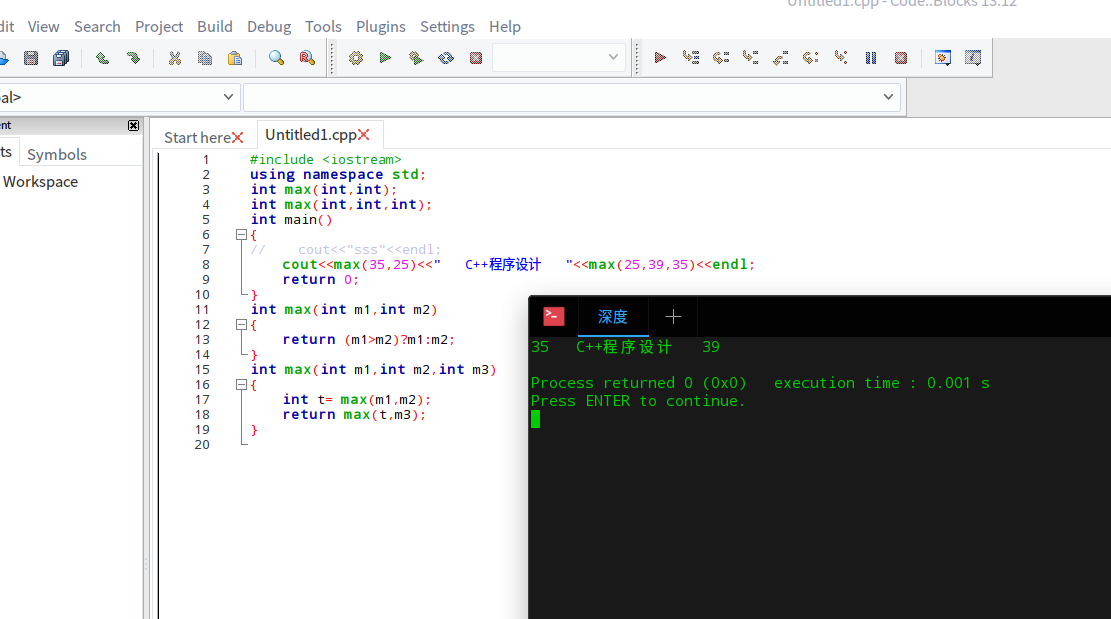
实在不好意思, 我调试了一下, 发现是终端解析 -e 参数的方式有问题, 我已经通过补丁修正了 https://github.com/manateelazyca ... d7e8d6da5aeb7bbcba6

请安装我附件中的 deb 包, 然后在qtcreator 和 codeblocks 里面设置终端命令为 /usr/bin/deepin-terminal -e 就可以了。

我自己已经我的机器上测试了, qtcreator 和 codeblocks 里面都可以了, 请看我的截图。
Reply View the author
avatar
macaiyun0629
deepin
2016-08-30 05:31
#40
https://bbs.deepin.org/post/42801
实在不好意思, 我调试了一下, 发现是终端解析 -e 参数的方式有问题, 我已经通过补丁修正了 https://gi ...
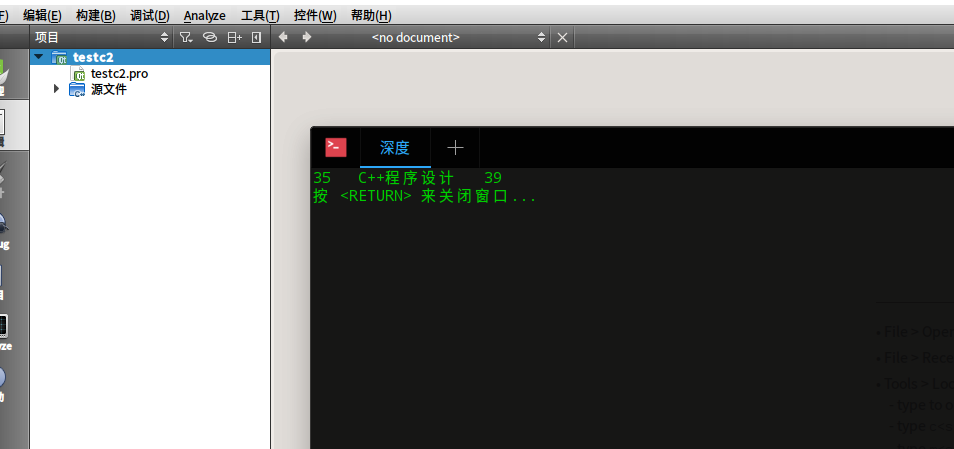
现在可以了;老王你今天很闲嘛,这么积极的解决bug
Reply View the author
2 / 4
To page