请问如何让QT程序使用breeze主题
Tofloor
poster avatar
132******13
deepin
2016-08-23 09:06
Author
我给deepin装了breeze主题和相关的依赖

我按照https://wiki.archlinux.org/index.php/Uniform_look_for_Qt_and_GTK_applications#Styles_for_both_Qt_and_GTK.2B 添加环境变量并没有效果,还是原来那副丑样(噗),安装qt5ct效果也不好,比如qtcreator会有一大块黑块。请问应该怎么办呢?
deepin的主题似乎没有考虑到qt程序,它们的样子不怎么好看

如果可以使用breeze主题那它大概是这个样子的

先谢谢各位大佬了

Reply Favorite View the author
All Replies
avatar
132******13
deepin
2016-08-23 09:08
#1
deepin如果条件允许,能把主题覆盖到qt程序上那自然最好,不行的话慢慢来,能用breeze也可以了
Reply View the author
avatar
emofode
deepin
2016-08-23 17:02
#2
https://wiki.archlinux.org/index.php/Uniform_look_for_Qt_and_GTK_applications
Reply View the author
avatar
132******13
deepin
2016-08-23 17:15
#3
https://bbs.deepin.org/post/42648
https://wiki.archlinux.org/index.php/Uniform_look_for_Qt_and_GTK_applications

这就是我文中给的那个链接。你也有这个需求?你那边能用吗
Reply View the author
avatar
usckur
deepin
2016-08-23 17:27
#4
楼主的Shadows有效果么?我代理连上了无效,不知道咋回事。
Reply View the author
avatar
emofode
deepin
2016-08-23 17:51
#5
https://bbs.deepin.org/post/42648
这就是我文中给的那个链接。你也有这个需求?你那边能用吗

QT_STYLE_OVERRIDE=breeze  你设置这个环境变量没用吗?
Reply View the author
avatar
132******13
deepin
2016-08-23 22:05
#6
https://bbs.deepin.org/post/42648
QT_STYLE_OVERRIDE=breeze  你设置这个环境变量没用吗?

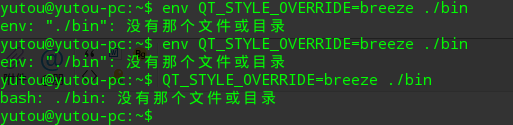
终端里输入 env QT_STYLE_OVERRIDE=breeze ,重启没有效果哦。。
Reply View the author
avatar
132******13
deepin
2016-08-23 22:06
#7
https://bbs.deepin.org/post/42648
楼主的Shadows有效果么?我代理连上了无效,不知道咋回事。

有啊,你需要在浏览器里安装插件才可以,chrome用switchy omega,火狐用pan,设置代理服务器为ss-qt5里设置的本地服务器地址和端口选socks5协议
Reply View the author
avatar
emofode
deepin
2016-08-23 22:08
#8
https://bbs.deepin.org/post/42648
终端里输入 env QT_STYLE_OVERRIDE=breeze ,重启没有效果哦。。

如果你运行方式是
$ ./bin
就换成
$ QT_STYLE_OVERRIDE=breeze ./bin
Reply View the author
avatar
132******13
deepin
2016-08-24 01:42
#9
https://bbs.deepin.org/post/42648
如果你运行方式是
$ ./bin
就换成

应该不是

Reply View the author
avatar
emofode
deepin
2016-08-24 03:44
#10

...........我的 ./bin 只是个示例,你当然要替换成自己的程序呀
Reply View the author
avatar
132******13
deepin
2016-08-24 03:57
#11
本帖最后由 yutouyes 于 2016-8-23 19:58 编辑

谷歌
Reply View the author
avatar
132******13
deepin
2016-08-24 03:59
#12
https://bbs.deepin.org/post/42648
...........我的 ./bin 只是个示例,你当然要替换成自己的程序呀

哦。。意思是这个只是对某个程序有效,不是全局的?
Reply View the author
avatar
emofode
deepin
2016-08-24 16:58
#13
https://bbs.deepin.org/post/42648
哦。。意思是这个只是对某个程序有效,不是全局的?

全局的你要加环境变量,加到 你的 shell rc 之类的文件里面
Reply View the author
avatar
132******13
deepin
2016-08-24 17:37
#14
https://bbs.deepin.org/post/42648
全局的你要加环境变量,加到 你的 shell rc 之类的文件里面

非常感谢,但是
$ env QT_STYLE_OVERRIDE=breeze 不就是添加 全局变量的命令吗,难道我又搞错了
Reply View the author
avatar
L56675
deepin
2016-09-01 02:13
#15
本帖最后由 L56675 于 2016-8-31 18:26 编辑
https://bbs.deepin.org/post/42648
非常感谢,但是
$ env QT_STYLE_OVERRIDE=breeze 不就是添加 全局变量的命令吗,难道我又搞错了 ...

env 这一命令仅在当前终端页面有效,并不是永久和全局的,另外其实Qt5 的主题也算是一个Bug 吧,绝大多数非KDE 5 的桌面(例如Gnome、DDE等)的Qt5 应用用的都是Fusion 这一Fallback 主题 。解决方法如下:
1) 安装 qt5-styleplugins and qt5ct
2) 在终端输入sudo gedit /etc/environment在下面空行添加
QT_QPA_PLATFORMTHEME=qt5ct
3)重启系统
4) 在终端运行运行 qt5ct,在风格那栏选择你想要换的主题(Breeze、GTK+等)
5) 保存后关闭窗口,再在终端输入sudo -i
6)输入qt5ct 重复4的步骤,这样可以让调用 Root 权限的Qt5 应用也有主题这样Qt5 程序就不再丑了
Reply View the author
avatar
132******13
deepin
2016-09-01 06:03
#16
https://bbs.deepin.org/post/42648
env 这一命令仅在当前终端页面有效,并不是永久和全局的,另外其实Qt5 的主题也算是一个Bug 吧,绝大多数 ...

非常感谢,我按archwiki上在~/.profile里添加 export QT_QPA_PLATFORMTHEME="qt5ct" ,似乎也没法完全覆盖所有的qt程序,我试试你的方法,Thank ♂ U
Reply View the author