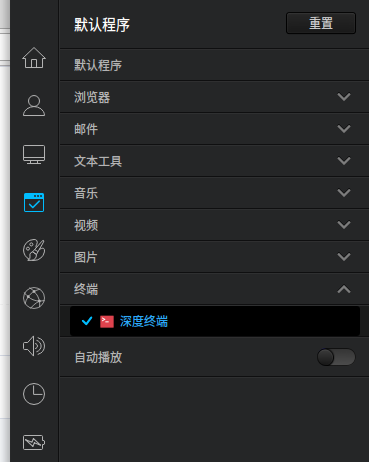
默认终端2.0
Tofloor
poster avatar
fant
deepin
2016-08-19 19:09
Author
安装了新终端,怎么更改成默认终端?
Reply Favorite View the author
All Replies
avatar
rekols
deepin
2016-08-19 19:22
#1
控制中心-默认程序-终端-深度终端
Reply View the author
avatar
fant
deepin
2016-08-19 20:28
#2
https://bbs.deepin.org/post/42519
控制中心-默认程序-终端-深度终端

找不到的
Reply View the author
avatar
rekols
deepin
2016-08-19 20:36
#3
Reply View the author
avatar
fant
deepin
2016-08-20 00:16
#4

对。但是安装2.0之后,这里还是只有一个选项,1.0版本的
Reply View the author
avatar
rekols
deepin
2016-08-20 03:07
#5
https://bbs.deepin.org/post/42519
对。但是安装2.0之后,这里还是只有一个选项,1.0版本的

你怎么安装的?
Reply View the author
avatar
fant
deepin
2016-08-20 05:22
#6
https://bbs.deepin.org/post/42519
你怎么安装的?

github中有最新的
Reply View the author
avatar
rekols
deepin
2016-08-20 05:30
#7
https://bbs.deepin.org/post/42519
github中有最新的

sudo make install
Reply View the author
avatar
fant
deepin
2016-08-20 05:43
#8

readme.md有安装方式
Reply View the author
avatar
yjqcx89
deepin
2016-08-20 05:44
#9
老实交代,怎么装上的?我怎么没有呢?求指导
Reply View the author
avatar
rekols
deepin
2016-08-20 05:49
#10
https://bbs.deepin.org/post/42519
老实交代,怎么装上的?我怎么没有呢?求指导

make & sudo make install
Reply View the author
avatar
fant
deepin
2016-08-20 06:19
#11
https://bbs.deepin.org/post/42519
老实交代,怎么装上的?我怎么没有呢?求指导

先执行
  1. sudo apt-get install valac libgtk-3-dev libgee-0.8-dev libvte-2.91-dev libjson-glib-dev libsecret-1-dev libwnck-3-dev
Copy the Code

再执行
  1. make && ./main
Copy the Code
Reply View the author
Comments
fredy4212
2016-08-20 06:38
sudo make install