

 中文

huizq deepin
2016-08-19 07:01 deepin 说明一下: 本人也是略懂Linux操作系统,第一次做个教程也挺不容易的,还望各位Linux大神们轻喷.
如果教程有什么不合理之处大家尽管提出来,本人一定会仔细核实,认真修改.
如果教程有什么不合理之处大家尽管提出来,本人一定会仔细核实,认真修改.
Reply Like 0 View the author
 deepin
 deepin

 deepin deepin

 deepin deepin


 deepin
 deepin deepin deepin
默认下载路径的「/Users/xxx/Downloads」可以改为任何你想要的绝对路径。此处写为 Downloads 目录,xxx 请自行替换成你的 Mac 用户名,然后保存,退出编辑器。
第四步:启动 RPC 模式
在终端输入aria2c --conf-path="/Users/xxxxxx/.aria2/aria2.conf" -D,然后 aria2 就启动了
 deepin deepin deepin deepin deepin
 deepin
https://bbs.deepin.org/post/42503
我直接用wine的破解限速版云管家
deepin https://bbs.deepin.org/post/42503
我直接用wine的破解限速版云管家
 deepin
https://bbs.deepin.org/post/42503
这才是正确方式。
:) 简单粗暴
deepin https://bbs.deepin.org/post/42503
我也是wine破解限速版,但不知为什么没办法输入,导致我打不了账号密码,求破 ...
 deepin
https://bbs.deepin.org/post/42503
试过了。。能不能把你用的版本分享下?
Popular Ranking
ChangePopular Events
More


 Adding a Dancing Spectrum Bar to the Deepin Taskbar | deepin-spectrum
前言:
很多人吐槽: Linux用网页版百度云下载大文件十分蛋疼,各种限速搞的人十分不爽! 于是今天我在这里开一贴,来教大家如何使用正确姿势来下载百度云大文件.
第一步:下载Chrome插件
如图:我们需要下载YAAW和网盘助手这两个插件. (请到Chrome网上应用店下载)
也许你可以尝试github,但是这个我没有试验: https://github.com/acgotaku/BaiduExporter
第二步:安装aria2
1.DEB系:
sudo apt install aria2
2.RPM系:
sudo yum install aria2(CentOS) 或 sudo dnf install aria2(Fedora) 或 sudo zypper in aria2(openSUSE)
3.Arch:
sudo pacman -S aria2 或 yaourt -S aria2
4.Gentoo:
emerge aria2
第三步:配置aria2
nano ~/.aria2/aria2.conf
将以下配置直接拷贝进去:
#用户名
#rpc-user=user
#密码
#rpc-passwd=passwd
#上面的认证方式不建议使用,建议使用下面的token方式
#设置加密的密钥
#rpc-secret=token
#允许rpc
enable-rpc=true
#允许所有来源, web界面跨域权限需要
rpc-allow-origin-all=true
#允许外部访问,false的话只监听本地端口
rpc-listen-all=true
#RPC端口, 仅当默认端口被占用时修改
#rpc-listen-port=6800
#最大同时下载数(任务数), 路由建议值: 3
max-concurrent-downloads=5
#断点续传
continue=true
#同服务器连接数
max-connection-per-server=5
#最小文件分片大小, 下载线程数上限取决于能分出多少片, 对于小文件重要
min-split-size=10M
#单文件最大线程数, 路由建议值: 5
split=10
#下载速度限制
max-overall-download-limit=0
#单文件速度限制
max-download-limit=0
#上传速度限制
max-overall-upload-limit=0
#单文件速度限制
max-upload-limit=0
#断开速度过慢的连接
#lowest-speed-limit=0
#验证用,需要1.16.1之后的release版本
#referer=*
#文件保存路径, 默认为当前启动位置
dir=/home/xxx/Downloads
#文件缓存, 使用内置的文件缓存, 如果你不相信Linux内核文件缓存和磁盘内置缓存时使用, 需要1.16及以上版本
#disk-cache=0
#另一种Linux文件缓存方式, 使用前确保您使用的内核支持此选项, 需要1.15及以上版本(?)
#enable-mmap=true
#文件预分配, 能有效降低文件碎片, 提高磁盘性能. 缺点是预分配时间较长
#所需时间 none < falloc ? trunc « prealloc, falloc和trunc需要文件系统和内核支持
file-allocation=prealloc
默认下载路径的「/home/xxx/Downloads」可以改为任何你想要的绝对路径。此处写为 Downloads 目录,xxx 请自行替换成你的 Linux 用户名,然后保存,退出编辑器。
第四步:启动 RPC 模式
在终端输入aria2c --conf-path="/home/xxx/.aria2/aria2.conf" -D,然后 aria2 就启动了
第五步:下载文件
重启google-chrome浏览器,随便打开一个百度网盘的链接,会发现网页上多出一个「导出下载」按钮,点击它弹出的「ARIA2 RPC」就自动添加到你的下载队列里了,此时点击浏览器右上角的YAAW插件即可管理下载任务. 当然你也可以使用 http://ziahamza.github.io/webui-aria2/ 这个网址来管理下载任务.
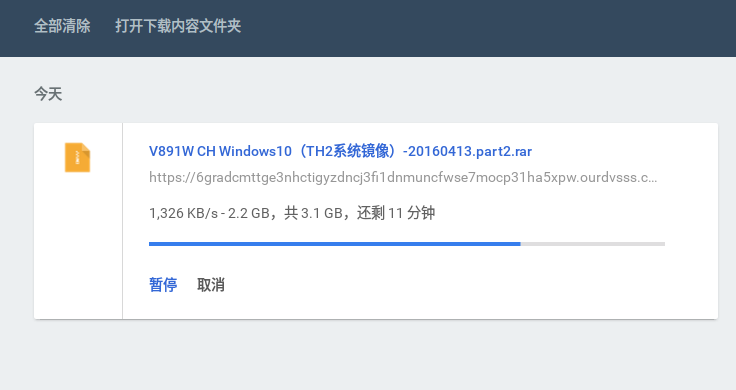
教程到此结束,放一张效果图:
如图: 百度云下载大文件由原来的100KB/s 提速到了 7MB/s