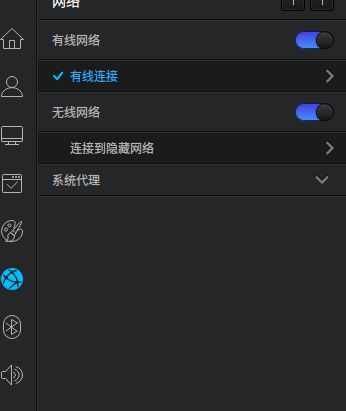
打开了网络那一栏,但是找不到搜索无线的东西。
Tofloor
poster avatar
189******84
deepin
2016-08-03 20:51
Author
如题,搜索无线网络的地方在哪里?求大神指点
Reply Favorite View the author
All Replies
avatar
jingle
deepin
2016-08-03 20:59
#1
执行lspci -v 命令,上报下无线网卡型号。
Reply View the author
avatar
189******84
deepin
2016-08-12 03:19
#2
https://bbs.deepin.org/post/42044
执行lspci -v 命令,上报下无线网卡型号。

00:00.0 Host bridge: Intel Corporation Sky Lake Host Bridge/DRAM Registers (rev 07)
00:01.0 PCI bridge: Intel Corporation Sky Lake PCIe Controller (x16) (rev 07)
00:02.0 VGA compatible controller: Intel Corporation Skylake Integrated Graphics (rev 06)
00:14.0 USB controller: Intel Corporation Sunrise Point-H USB 3.0 xHCI Controller (rev 31)
00:14.2 Signal processing controller: Intel Corporation Sunrise Point-H Thermal subsystem (rev 31)
00:15.0 Signal processing controller: Intel Corporation Sunrise Point-H LPSS I2C Controller #0 (rev 31)
00:15.1 Signal processing controller: Intel Corporation Sunrise Point-H LPSS I2C Controller #1 (rev 31)
00:16.0 Communication controller: Intel Corporation Sunrise Point-H CSME HECI #1 (rev 31)
00:17.0 SATA controller: Intel Corporation Sunrise Point-H SATA Controller [AHCI mode] (rev 31)
00:1c.0 PCI bridge: Intel Corporation Sunrise Point-H PCI Express Root Port #3 (rev f1)
00:1c.3 PCI bridge: Intel Corporation Sunrise Point-H PCI Express Root Port #4 (rev f1)
00:1c.4 PCI bridge: Intel Corporation Sunrise Point-H PCI Express Root Port #5 (rev f1)
00:1f.0 ISA bridge: Intel Corporation Sunrise Point-H LPC Controller (rev 31)
00:1f.2 Memory controller: Intel Corporation Sunrise Point-H PMC (rev 31)
00:1f.3 Multimedia audio controller: Intel Corporation Sunrise Point-H HD Audio (rev 31)
00:1f.4 SMBus: Intel Corporation Sunrise Point-H SMBus (rev 31)
01:00.0 3D controller: NVIDIA Corporation GM107M [GeForce GTX 960M] (rev a2)
07:00.0 Network controller: Qualcomm Atheros QCA6174 802.11ac Wireless Network Adapter (rev 32)
08:00.0 Ethernet controller: Realtek Semiconductor Co., Ltd. RTL8111/8168/8411 PCI Express Gigabit Ethernet Controller (rev 15)
Reply View the author
avatar
189******84
deepin
2016-08-12 03:19
#3
https://bbs.deepin.org/post/42044
执行lspci -v 命令,上报下无线网卡型号。

然后该怎么做?
Reply View the author
avatar
heaven97
deepin
2016-08-12 04:45
#4
终端执行这条命令    sudo echo “options asus_nb_wmi wapf=1” | sudo tee /etc/modprobe.d/asus_nb_wmi.conf
Reply View the author
avatar
whitecold
deepin
2016-08-12 05:06
#5
这款网卡坑了一代的linux用户。。
Reply View the author
avatar
189******84
deepin
2016-08-12 05:23
#6
https://bbs.deepin.org/post/42044
终端执行这条命令    sudo echo “options asus_nb_wmi wapf=1” | sudo tee /etc/modprobe.d/asus_nb_wmi. ...

usage: sudo -h | -K | -k | -V
usage: sudo -v [-AknS] [-g group] [-h host] [-p prompt] [-u user]
usage: sudo -l [-AknS] [-g group] [-h host] [-p prompt] [-U user] [-u
            user] [command]
usage: sudo [-AbEHknPS] [-r role] [-t type] [-C num] [-g group] [-h
            host] [-p prompt] [-u user] [VAR=value] [-i|-s] []
usage: sudo -e [-AknS] [-r role] [-t type] [-C num] [-g group] [-h
            host] [-p prompt] [-u user] file ...
Could not find the database of available applications, run update-command-not-found as root to fix this
susudo: command not found
Reply View the author
avatar
189******84
deepin
2016-08-12 05:23
#7
https://bbs.deepin.org/post/42044
终端执行这条命令    sudo echo “options asus_nb_wmi wapf=1” | sudo tee /etc/modprobe.d/asus_nb_wmi. ...

怎么办?
Reply View the author
avatar
lieri
deepin
2016-08-12 05:29
#8
https://bbs.deepin.org/post/42044
usage: sudo -h | -K | -k | -V
usage: sudo -v [-AknS] [-g group] [-h host] [-p prompt] [-u user]
us ...

你是不是多打了个su,最后怎么提示susudo。打开终端直接输那个命令试试
Reply View the author
avatar
189******84
deepin
2016-08-12 05:44
#9
https://bbs.deepin.org/post/42044
你是不是多打了个su,最后怎么提示susudo。打开终端直接输那个命令试试

“options asus_nb_wmi wapf=1”
Reply View the author
avatar
189******84
deepin
2016-08-12 05:45
#10
https://bbs.deepin.org/post/42044
你是不是多打了个su,最后怎么提示susudo。打开终端直接输那个命令试试

出现了这个,然后类?
Reply View the author
avatar
p091001
deepin
2016-08-12 06:23
#11
heaven97 发表于 2016-8-11 20:45
终端执行这条命令    sudo echo “options asus_nb_wmi wapf=1” | sudo tee /etc/modprobe.d/asus_nb_wmi. ...

雷凌 rt3290网卡同样情况,也可以使用这条命令吗?
Reply View the author
avatar
liujianfeng
deepin
2016-08-12 17:04
#12
Reply View the author
avatar
189******84
deepin
2016-08-17 07:20
#13
https://bbs.deepin.org/post/42044
http://proposed.packages.deepin.com/rpa/a6c7c15bd3fe31511ab58db6b30e01b3/pool/non-free/f/firmware-no ...

这个包是什么?怎么用?
Reply View the author
avatar
jingle
deepin
2016-08-17 16:40
#14
https://bbs.deepin.org/post/42044
这个包是什么?怎么用?

解决你的问题的,sudo dpkg -i xxxx,deb命令安装  或者下载后直接双击。
Reply View the author
avatar
luowenhao
deepin
2016-08-17 17:50
#15
如果是usb网卡可以拔了重新插,我之前这样可以解决
Reply View the author
avatar
189******84
deepin
2016-08-19 07:46
#16
https://bbs.deepin.org/post/42044
解决你的问题的,sudo dpkg -i xxxx,deb命令安装  或者下载后直接双击。

    我安装完了, 还是搜不到啊
Reply View the author
avatar
189******84
deepin
2016-08-19 16:57
#17
https://bbs.deepin.org/post/42044
解决你的问题的,sudo dpkg -i xxxx,deb命令安装  或者下载后直接双击。

谢谢,我重启之后完成了
Reply View the author
avatar
189******84
deepin
2016-08-19 16:57
#18
https://bbs.deepin.org/post/42044
http://proposed.packages.deepin.com/rpa/a6c7c15bd3fe31511ab58db6b30e01b3/pool/non-free/f/firmware-no ...

谢谢,我重启之后完成了
Reply View the author
avatar
189******84
deepin
2016-08-19 16:59
#19
现在已经解决该问题,需安装13楼的附件,然后重启一下,希望能对其他朋友有帮助。
Reply View the author