
CrossOver打不开
Tofloor
poster avatar
217黑带
deepin
2016-07-21 02:46
Author
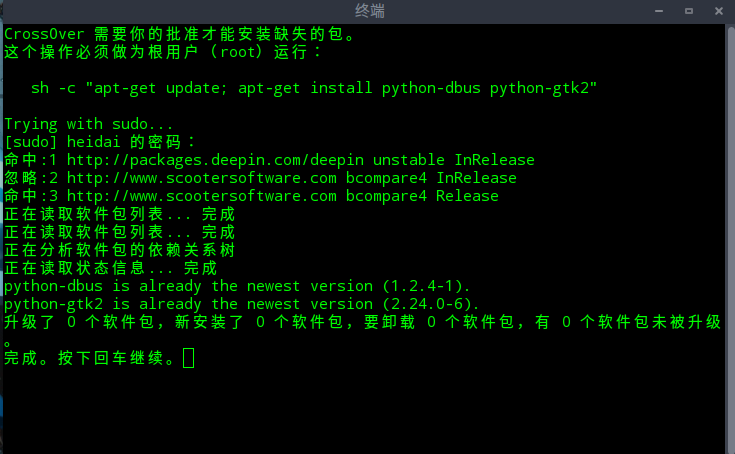
每次打开CrossOver都提示:
CrossOver 需要你的批准才能安装缺失的包。
这个操作必须做为根用户(root)运行:
   sh -c "apt-get update; apt-get install python-dbus python-gtk2"

但是安装都提示已经是最新版本:
python-dbus is already the newest version (1.2.4-1).
python-gtk2 is already the newest version (2.24.0-6).


Reply Favorite View the author
All Replies
avatar
jingle
deepin
2016-07-21 03:02
#1
请问是从深度商店下载安装的嘛,crossover版本是15嘛?
Reply View the author
avatar
217黑带
deepin
2016-07-21 20:02
#2
https://bbs.deepin.org/post/41600
请问是从深度商店下载安装的嘛,crossover版本是15嘛?

通过命令安装的
sudo apt-get install crossover-15
sudo apt-get install deepin-crossover-helper
之后通过sudo apt-get install apps.com.qq安装的QQ能正常使用,就是crossover一打开就报更新。
之前本地通过源代码编译安装过Pyhon,不知道是不是这个影响的。
Reply View the author
avatar
xiewei
deepin
2016-07-21 21:51
#3
https://bbs.deepin.org/post/41600
通过命令安装的
sudo apt-get install crossover-15
sudo apt-get install deepin-crossover-helper

麻烦发个提示的截图,
然后在终端中执行下面命令获取下日志发出来下
export CX_LOG=$HOME/cx.log
/opt/cxoffice/bin/crossover
Reply View the author
avatar
217黑带
deepin
2016-07-22 20:59
#4
https://bbs.deepin.org/post/41600
麻烦发个提示的截图,
然后在终端中执行下面命令获取下日志发出来下
export CX_LOG=$HOME/cx.log

日志跟截图放到附件了


cx.log
  1. Error importing gtk
  2. python executable: /usr/local/bin/python
  3. site file: /usr/local/lib/python2.7/site.pyc
  4. sys.path: ['/opt/cxoffice/bin', '/usr/local/lib/python27.zip', '/usr/local/lib/python2.7', '/usr/local/lib/python2.7/plat-linux2', '/usr/local/lib/python2.7/lib-tk', '/usr/local/lib/python2.7/lib-old', '/usr/local/lib/python2.7/lib-dynload', '/usr/local/lib/python2.7/site-packages', '/opt/cxoffice/lib/python']
  5. Traceback (most recent call last):
  6.   File "/opt/cxoffice/lib/python/checkgtk.py", line 21, in status
  7.     import gtk
  8. ImportError: No module named gtk

  9. Error importing gtk
  10. python executable: /usr/local/bin/python
  11. site file: /usr/local/lib/python2.7/site.pyc
  12. sys.path: ['/opt/cxoffice/lib/python', '/usr/local/lib/python27.zip', '/usr/local/lib/python2.7', '/usr/local/lib/python2.7/plat-linux2', '/usr/local/lib/python2.7/lib-tk', '/usr/local/lib/python2.7/lib-old', '/usr/local/lib/python2.7/lib-dynload', '/usr/local/lib/python2.7/site-packages']
  13. Traceback (most recent call last):
  14.   File "/opt/cxoffice/lib/python/checkgtk.py", line 21, in status
  15.     import gtk
  16. ImportError: No module named gtk

  17. Error importing gtk
  18. python executable: /usr/local/bin/python2
  19. site file: /usr/local/lib/python2.7/site.pyc
  20. sys.path: ['/opt/cxoffice/lib/python', '/usr/local/lib/python27.zip', '/usr/local/lib/python2.7', '/usr/local/lib/python2.7/plat-linux2', '/usr/local/lib/python2.7/lib-tk', '/usr/local/lib/python2.7/lib-old', '/usr/local/lib/python2.7/lib-dynload', '/usr/local/lib/python2.7/site-packages']
  21. Traceback (most recent call last):
  22.   File "/opt/cxoffice/lib/python/checkgtk.py", line 21, in status
  23.     import gtk
  24. ImportError: No module named gtk

  25. locale path '/opt/cxoffice/share/locale'
  26. reading '/opt/cxoffice/etc/cxoffice.conf' took 0.0011s
  27. reading '/home/heidai/.cxoffice/cxoffice.conf' took 0.0002s
  28. running cxdiag with LD_LIBRARY_PATH=/opt/cxoffice/lib
  29. Running: '/opt/cxoffice/bin/cxdiag'
  30. 'cxdiag' -> rc=0  (took 0.082 seconds)
  31. out=[[Properties]
  32. "display.depth"="24"

  33. [Properties]
  34. "opengl.vendor"="Intel Open Source Technology Center"

  35. [Properties]
  36. "opengl.version"="3.0 Mesa 11.1.2"

  37. [Properties]
  38. "opengl.renderer"="Mesa DRI Intel(R) Sandybridge Mobile x86/MMX/SSE2"

  39. [Properties]
  40. "opengl.glsl_version"="1.30"

  41. ]
  42. parsing '/home/heidai/.cxoffice/cxfixes.xml' took 0.032s
  43. parsing '/opt/cxoffice/share/crossover/data/cxfixes.xml' took 0.026s
  44. using the builtin fixes information (release 2)
  45. found a match for distro debian8 (0)
  46. Running: 'env' 'POSIXLY_CORRECT=1' 'file' '/bin/ls'
  47. 'env' -> rc=0  (took 0.009 seconds)
  48. out=[/bin/ls: ELF 64-bit LSB executable, x86-64, version 1 (SYSV), dynamically linked, interpreter /lib64/ld-linux-x86-64.so.2, for GNU/Linux 2.6.32, BuildID[sha1]=67e5a7101005b84ab8d795f38cd4b0e34c4cf281, stripped
  49. ]
  50. Running: '/opt/cxoffice/bin/cxsu' '--description' u'CrossOver \u9700\u8981\u4f60\u7684\u6279\u51c6\u624d\u80fd\u5b89\u88c5\u7f3a\u5931\u7684\u5305\u3002' '--console' '--ignore-home' 'sh' '-c' u'apt-get update; apt-get install python-dbus python-gtk2'


  51. ***** Fri Jul 22 12:54:05 2016
  52. Starting: '/opt/cxoffice/bin/cxsu' '--description' 'CrossOver 需要你的批准才能安装缺失的包。' '--console' '--ignore-home' 'sh' '-c' 'apt-get update; apt-get install python-dbus python-gtk2'

  53. system encoding='UTF-8'
  54. Running `"/opt/cxoffice/bin/cxgettext" --textdomain crossover --textdomaindir "/opt/cxoffice/share/locale" --encoding UTF-8 "Enter the root password"`
  55. -> rc=0  (took 0.00162696838378906 seconds)
  56. output=[输入 ROOT 密码]
  57. desktop environment: gnome
  58. Running 'mkfifo' '-m' '0600' '/tmp/cxsu-fifo.12445'
  59. -> rc=0  (took 0.00102996826171875 seconds)
  60. Exec-ing '/usr/bin/gnome-terminal' '--title' '输入 ROOT 密码' '--hide-menubar' '-x' '/bin/sh' '-c' '/opt/cxoffice/bin/cxsu --parent /tmp/cxsu-fifo.12445 --wait --console --description "CrossOver 需要你的批准才能安装缺失的包。" sh -c "apt-get update; apt-get install python-dbus python-gtk2"'
  61. 参数 “--title” 在这个版本的 gnome-terminal 中不再支持。


  62. ***** Fri Jul 22 12:54:05 2016
  63. Starting: '/opt/cxoffice/bin/cxsu' '--parent' '/tmp/cxsu-fifo.12445' '--wait' '--console' '--description' 'CrossOver 需要你的批准才能安装缺失的包。' 'sh' '-c' 'apt-get update; apt-get install python-dbus python-gtk2'

  64. system encoding='UTF-8'
  65. Running `"/opt/cxoffice/bin/cxgettext" --textdomain crossover --textdomaindir "/opt/cxoffice/share/locale" --encoding UTF-8 "This operation must be run as root:
  66. "`
  67. -> rc=0  (took 0.00411105155944824 seconds)
  68. output=[这个操作必须做为根用户(root)运行:
  69. ]
  70. Running: "/usr/bin/sudo" -l |
  71. Running '/usr/bin/sudo' 'sh' '-c' 'apt-get update; apt-get install python-dbus python-gtk2'
  72. -> rc=0  (took 7.16649699211121 seconds)
  73. Running `"/opt/cxoffice/bin/cxgettext" --textdomain crossover --textdomaindir "/opt/cxoffice/share/locale" --encoding UTF-8 "Finished. Press Return to continue."`
  74. -> rc=0  (took 0.00160408020019531 seconds)
  75. output=[完成。按下回车继续。]
  76. 'cxsu' -> rc=0  (took 14.568 seconds)
  77. Error importing gtk
  78. python executable: /usr/local/bin/python
  79. site file: /usr/local/lib/python2.7/site.pyc
  80. sys.path: ['/opt/cxoffice/bin', '/usr/local/lib/python27.zip', '/usr/local/lib/python2.7', '/usr/local/lib/python2.7/plat-linux2', '/usr/local/lib/python2.7/lib-tk', '/usr/local/lib/python2.7/lib-old', '/usr/local/lib/python2.7/lib-dynload', '/usr/local/lib/python2.7/site-packages', '/opt/cxoffice/lib/python']
  81. Traceback (most recent call last):
  82.   File "/opt/cxoffice/lib/python/checkgtk.py", line 21, in status
  83.     import gtk
  84. ImportError: No module named gtk

  85. Error importing gtk
  86. python executable: /usr/local/bin/python
  87. site file: /usr/local/lib/python2.7/site.pyc
  88. sys.path: ['/opt/cxoffice/lib/python', '/usr/local/lib/python27.zip', '/usr/local/lib/python2.7', '/usr/local/lib/python2.7/plat-linux2', '/usr/local/lib/python2.7/lib-tk', '/usr/local/lib/python2.7/lib-old', '/usr/local/lib/python2.7/lib-dynload', '/usr/local/lib/python2.7/site-packages']
  89. Traceback (most recent call last):
  90.   File "/opt/cxoffice/lib/python/checkgtk.py", line 21, in status
  91.     import gtk
  92. ImportError: No module named gtk

  93. Error importing gtk
  94. python executable: /usr/local/bin/python2
  95. site file: /usr/local/lib/python2.7/site.pyc
  96. sys.path: ['/opt/cxoffice/lib/python', '/usr/local/lib/python27.zip', '/usr/local/lib/python2.7', '/usr/local/lib/python2.7/plat-linux2', '/usr/local/lib/python2.7/lib-tk', '/usr/local/lib/python2.7/lib-old', '/usr/local/lib/python2.7/lib-dynload', '/usr/local/lib/python2.7/site-packages']
  97. Traceback (most recent call last):
  98.   File "/opt/cxoffice/lib/python/checkgtk.py", line 21, in status
  99.     import gtk
  100. ImportError: No module named gtk

  101. cxdiag: pruning obsolete results
  102. running cxdiag with LD_LIBRARY_PATH=/opt/cxoffice/lib
  103. Running: '/opt/cxoffice/bin/cxdiag'
  104. 'cxdiag' -> rc=0  (took 0.108 seconds)
  105. out=[[Properties]
  106. "display.depth"="24"

  107. [Properties]
  108. "opengl.vendor"="Intel Open Source Technology Center"

  109. [Properties]
  110. "opengl.version"="3.0 Mesa 11.1.2"

  111. [Properties]
  112. "opengl.renderer"="Mesa DRI Intel(R) Sandybridge Mobile x86/MMX/SSE2"

  113. [Properties]
  114. "opengl.glsl_version"="1.30"

  115. ]
  116. Running: 'zenity' '--error' '--no-markup' '--title' '\xe6\x97\xa0\xe6\xb3\x95\xe5\xae\x89\xe8\xa3\x85Unix\xe8\xbd\xaf\xe4\xbb\xb6\xe5\x8c\x85' '--text' '\xe6\x9f\x90\xe4\xba\x9b\xe9\x94\x99\xe8\xaf\xaf\xe5\x8f\xaf\xe8\x83\xbd\xe4\xbd\xbf\xe5\xbe\x97 CrossOver Linux \xe6\x97\xa0\xe6\xb3\x95\xe6\xad\xa3\xe7\xa1\xae\xe8\xbf\x90\xe8\xa1\x8c\xef\xbc\x9a\n* \xe6\x97\xa0\xe6\xb3\x95\xe5\x8a\xa0\xe8\xbd\xbd D-Bus Python \xe6\xa8\xa1\xe5\x9d\x97\xe3\x80\x82\n* \xe6\x97\xa0\xe6\xb3\x95\xe5\x8a\xa0\xe8\xbd\xbd GTK+ Python \xe6\xa8\xa1\xe5\x9d\x97\xe3\x80\x82\n\n\xe4\xbd\xa0\xe5\x8f\xaf\xe4\xbb\xa5\xe5\xb0\x9d\xe8\xaf\x95\xe7\x94\xa8 root \xe6\x89\xa7\xe8\xa1\x8c\xe5\xa6\x82\xe4\xb8\x8b\xe5\x91\xbd\xe4\xbb\xa4\xe6\x9d\xa5\xe4\xbf\xae\xe5\xa4\x8d\xe9\x97\xae\xe9\xa2\x98\xef\xbc\x9a\nArch Linux             \tpacman -Syu pygtk python2-dbus\nDebian <= 6            \tapt-get install python-dbus python-gtk2\nDebian <= 7            \tapt-get install python-dbus python-gtk2\nFedora                 \tdnf install dbus-python pygtk2\nMandriva               \t/usr/sbin/urpmi dbus-python pygtk2.0\nopenSUSE               \tzypper install dbus-1-python python-gtk\n'
  117. 'zenity' -> rc=0  (took 1.922 seconds)
Copy the Code


Reply View the author
avatar
xiewei
deepin
2016-07-23 00:34
#5
https://bbs.deepin.org/post/41600
日志跟截图放到附件了

尝试用下面命令修复下
sudo apt-get install python-dbus python-gtk2 --reinstall
Reply View the author
avatar
217黑带
deepin
2016-07-25 20:42
#6
https://bbs.deepin.org/post/41600
尝试用下面命令修复下
sudo apt-get install python-dbus python-gtk2 --reinstall

还是一样报错
  1. Error importing gtk
  2. python executable: /usr/local/bin/python
  3. site file: /usr/local/lib/python2.7/site.pyc
  4. sys.path: ['/opt/cxoffice/bin', '/usr/local/lib/python27.zip', '/usr/local/lib/python2.7', '/usr/local/lib/python2.7/plat-linux2', '/usr/local/lib/python2.7/lib-tk', '/usr/local/lib/python2.7/lib-old', '/usr/local/lib/python2.7/lib-dynload', '/usr/local/lib/python2.7/site-packages', '/opt/cxoffice/lib/python']
  5. Traceback (most recent call last):
  6.   File "/opt/cxoffice/lib/python/checkgtk.py", line 21, in status
  7.     import gtk
  8. ImportError: No module named gtk

  9. Error importing gtk
  10. python executable: /usr/local/bin/python
  11. site file: /usr/local/lib/python2.7/site.pyc
  12. sys.path: ['/opt/cxoffice/lib/python', '/usr/local/lib/python27.zip', '/usr/local/lib/python2.7', '/usr/local/lib/python2.7/plat-linux2', '/usr/local/lib/python2.7/lib-tk', '/usr/local/lib/python2.7/lib-old', '/usr/local/lib/python2.7/lib-dynload', '/usr/local/lib/python2.7/site-packages']
  13. Traceback (most recent call last):
  14.   File "/opt/cxoffice/lib/python/checkgtk.py", line 21, in status
  15.     import gtk
  16. ImportError: No module named gtk

  17. Error importing gtk
  18. python executable: /usr/local/bin/python2
  19. site file: /usr/local/lib/python2.7/site.pyc
  20. sys.path: ['/opt/cxoffice/lib/python', '/usr/local/lib/python27.zip', '/usr/local/lib/python2.7', '/usr/local/lib/python2.7/plat-linux2', '/usr/local/lib/python2.7/lib-tk', '/usr/local/lib/python2.7/lib-old', '/usr/local/lib/python2.7/lib-dynload', '/usr/local/lib/python2.7/site-packages']
  21. Traceback (most recent call last):
  22.   File "/opt/cxoffice/lib/python/checkgtk.py", line 21, in status
  23.     import gtk
  24. ImportError: No module named gtk

  25. locale path '/opt/cxoffice/share/locale'
  26. reading '/opt/cxoffice/etc/cxoffice.conf' took 0.0010s
  27. reading '/home/heidai/.cxoffice/cxoffice.conf' took 0.0002s
  28. running cxdiag with LD_LIBRARY_PATH=/opt/cxoffice/lib
  29. Running: '/opt/cxoffice/bin/cxdiag'
  30. 'cxdiag' -> rc=0  (took 0.088 seconds)
  31. out=[[Properties]
  32. "display.depth"="24"

  33. [Properties]
  34. "opengl.vendor"="Intel Open Source Technology Center"

  35. [Properties]
  36. "opengl.version"="3.0 Mesa 11.1.2"

  37. [Properties]
  38. "opengl.renderer"="Mesa DRI Intel(R) Sandybridge Mobile x86/MMX/SSE2"

  39. [Properties]
  40. "opengl.glsl_version"="1.30"

  41. ]
  42. parsing '/home/heidai/.cxoffice/cxfixes.xml' took 0.032s
  43. parsing '/opt/cxoffice/share/crossover/data/cxfixes.xml' took 0.026s
  44. using the builtin fixes information (release 2)
  45. found a match for distro debian8 (0)
  46. Running: 'env' 'POSIXLY_CORRECT=1' 'file' '/bin/ls'
  47. 'env' -> rc=0  (took 0.011 seconds)
  48. out=[/bin/ls: ELF 64-bit LSB executable, x86-64, version 1 (SYSV), dynamically linked, interpreter /lib64/ld-linux-x86-64.so.2, for GNU/Linux 2.6.32, BuildID[sha1]=67e5a7101005b84ab8d795f38cd4b0e34c4cf281, stripped
  49. ]
  50. Running: '/opt/cxoffice/bin/cxsu' '--description' u'CrossOver \u9700\u8981\u4f60\u7684\u6279\u51c6\u624d\u80fd\u5b89\u88c5\u7f3a\u5931\u7684\u5305\u3002' '--console' '--ignore-home' 'sh' '-c' u'apt-get update; apt-get install python-dbus python-gtk2'


  51. ***** Mon Jul 25 12:29:16 2016
  52. Starting: '/opt/cxoffice/bin/cxsu' '--description' 'CrossOver 需要你的批准才能安装缺失的包。' '--console' '--ignore-home' 'sh' '-c' 'apt-get update; apt-get install python-dbus python-gtk2'

  53. system encoding='UTF-8'
  54. Running `"/opt/cxoffice/bin/cxgettext" --textdomain crossover --textdomaindir "/opt/cxoffice/share/locale" --encoding UTF-8 "Enter the root password"`
  55. -> rc=0  (took 0.00171303749084473 seconds)
  56. output=[输入 ROOT 密码]
  57. desktop environment: gnome
  58. Running 'mkfifo' '-m' '0600' '/tmp/cxsu-fifo.16050'
  59. -> rc=0  (took 0.00106906890869141 seconds)
  60. Exec-ing '/usr/bin/gnome-terminal' '--title' '输入 ROOT 密码' '--hide-menubar' '-x' '/bin/sh' '-c' '/opt/cxoffice/bin/cxsu --parent /tmp/cxsu-fifo.16050 --wait --console --description "CrossOver 需要你的批准才能安装缺失的包。" sh -c "apt-get update; apt-get install python-dbus python-gtk2"'
  61. 参数 “--title” 在这个版本的 gnome-terminal 中不再支持。


  62. ***** Mon Jul 25 12:29:17 2016
  63. Starting: '/opt/cxoffice/bin/cxsu' '--parent' '/tmp/cxsu-fifo.16050' '--wait' '--console' '--description' 'CrossOver 需要你的批准才能安装缺失的包。' 'sh' '-c' 'apt-get update; apt-get install python-dbus python-gtk2'

  64. system encoding='UTF-8'
  65. Running `"/opt/cxoffice/bin/cxgettext" --textdomain crossover --textdomaindir "/opt/cxoffice/share/locale" --encoding UTF-8 "This operation must be run as root:
  66. "`
  67. -> rc=0  (took 0.00320887565612793 seconds)
  68. output=[这个操作必须做为根用户(root)运行:
  69. ]
  70. Running: "/usr/bin/sudo" -l |
  71. Running '/usr/bin/sudo' 'sh' '-c' 'apt-get update; apt-get install python-dbus python-gtk2'
  72. -> rc=0  (took 13.6929309368134 seconds)
  73. Running `"/opt/cxoffice/bin/cxgettext" --textdomain crossover --textdomaindir "/opt/cxoffice/share/locale" --encoding UTF-8 "Finished. Press Return to continue."`
  74. -> rc=0  (took 0.00172591209411621 seconds)
  75. output=[完成。按下回车继续。]
  76. 'cxsu' -> rc=0  (took 324.317 seconds)
  77. Error importing gtk
  78. python executable: /usr/local/bin/python
  79. site file: /usr/local/lib/python2.7/site.pyc
  80. sys.path: ['/opt/cxoffice/bin', '/usr/local/lib/python27.zip', '/usr/local/lib/python2.7', '/usr/local/lib/python2.7/plat-linux2', '/usr/local/lib/python2.7/lib-tk', '/usr/local/lib/python2.7/lib-old', '/usr/local/lib/python2.7/lib-dynload', '/usr/local/lib/python2.7/site-packages', '/opt/cxoffice/lib/python']
  81. Traceback (most recent call last):
  82.   File "/opt/cxoffice/lib/python/checkgtk.py", line 21, in status
  83.     import gtk
  84. ImportError: No module named gtk

  85. Error importing gtk
  86. python executable: /usr/local/bin/python
  87. site file: /usr/local/lib/python2.7/site.pyc
  88. sys.path: ['/opt/cxoffice/lib/python', '/usr/local/lib/python27.zip', '/usr/local/lib/python2.7', '/usr/local/lib/python2.7/plat-linux2', '/usr/local/lib/python2.7/lib-tk', '/usr/local/lib/python2.7/lib-old', '/usr/local/lib/python2.7/lib-dynload', '/usr/local/lib/python2.7/site-packages']
  89. Traceback (most recent call last):
  90.   File "/opt/cxoffice/lib/python/checkgtk.py", line 21, in status
  91.     import gtk
  92. ImportError: No module named gtk

  93. Error importing gtk
  94. python executable: /usr/local/bin/python2
  95. site file: /usr/local/lib/python2.7/site.pyc
  96. sys.path: ['/opt/cxoffice/lib/python', '/usr/local/lib/python27.zip', '/usr/local/lib/python2.7', '/usr/local/lib/python2.7/plat-linux2', '/usr/local/lib/python2.7/lib-tk', '/usr/local/lib/python2.7/lib-old', '/usr/local/lib/python2.7/lib-dynload', '/usr/local/lib/python2.7/site-packages']
  97. Traceback (most recent call last):
  98.   File "/opt/cxoffice/lib/python/checkgtk.py", line 21, in status
  99.     import gtk
  100. ImportError: No module named gtk

  101. cxdiag: pruning obsolete results
  102. running cxdiag with LD_LIBRARY_PATH=/opt/cxoffice/lib
  103. Running: '/opt/cxoffice/bin/cxdiag'
  104. 'cxdiag' -> rc=0  (took 0.090 seconds)
  105. out=[[Properties]
  106. "display.depth"="24"

  107. [Properties]
  108. "opengl.vendor"="Intel Open Source Technology Center"

  109. [Properties]
  110. "opengl.version"="3.0 Mesa 11.1.2"

  111. [Properties]
  112. "opengl.renderer"="Mesa DRI Intel(R) Sandybridge Mobile x86/MMX/SSE2"

  113. [Properties]
  114. "opengl.glsl_version"="1.30"

  115. ]
  116. Running: 'zenity' '--error' '--no-markup' '--title' '\xe6\x97\xa0\xe6\xb3\x95\xe5\xae\x89\xe8\xa3\x85Unix\xe8\xbd\xaf\xe4\xbb\xb6\xe5\x8c\x85' '--text' '\xe6\x9f\x90\xe4\xba\x9b\xe9\x94\x99\xe8\xaf\xaf\xe5\x8f\xaf\xe8\x83\xbd\xe4\xbd\xbf\xe5\xbe\x97 CrossOver Linux \xe6\x97\xa0\xe6\xb3\x95\xe6\xad\xa3\xe7\xa1\xae\xe8\xbf\x90\xe8\xa1\x8c\xef\xbc\x9a\n* \xe6\x97\xa0\xe6\xb3\x95\xe5\x8a\xa0\xe8\xbd\xbd D-Bus Python \xe6\xa8\xa1\xe5\x9d\x97\xe3\x80\x82\n* \xe6\x97\xa0\xe6\xb3\x95\xe5\x8a\xa0\xe8\xbd\xbd GTK+ Python \xe6\xa8\xa1\xe5\x9d\x97\xe3\x80\x82\n\n\xe4\xbd\xa0\xe5\x8f\xaf\xe4\xbb\xa5\xe5\xb0\x9d\xe8\xaf\x95\xe7\x94\xa8 root \xe6\x89\xa7\xe8\xa1\x8c\xe5\xa6\x82\xe4\xb8\x8b\xe5\x91\xbd\xe4\xbb\xa4\xe6\x9d\xa5\xe4\xbf\xae\xe5\xa4\x8d\xe9\x97\xae\xe9\xa2\x98\xef\xbc\x9a\nArch Linux             \tpacman -Syu pygtk python2-dbus\nDebian <= 6            \tapt-get install python-dbus python-gtk2\nDebian <= 7            \tapt-get install python-dbus python-gtk2\nFedora                 \tdnf install dbus-python pygtk2\nMandriva               \t/usr/sbin/urpmi dbus-python pygtk2.0\nopenSUSE               \tzypper install dbus-1-python python-gtk\n'
  117. 'zenity' -> rc=1  (took 26.591 seconds)
Copy the Code


Reply View the author
avatar
xiewei
deepin
2016-07-26 00:42
#7
本帖最后由 xiewei 于 2016-7-25 16:47 编辑

那你运行下 深度终端 看看是否会有相同的提示
然后确认下你运行环境的python版本是否被你编译的覆盖了python --version
Python 2.7.11+


Reply View the author
avatar
217黑带
deepin
2016-07-27 02:33
#8
https://bbs.deepin.org/post/41600
那你运行下 深度终端 看看是否会有相同的提示
然后确认下你运行环境的python版本是否被你编译的覆盖了pyth ...

深度终端可以运行。但深度截图、爱壁纸无法运行,也不报错。
Python 版本是2.7.12
Reply View the author
avatar
xiewei
deepin
2016-07-27 17:28
#9
https://bbs.deepin.org/post/41600
深度终端可以运行。但深度截图、爱壁纸无法运行,也不报错。
Python 版本是2.7.12 ...

有可能你环境里面有两个python,运行深度终端对比下下面两条命令的输出
ps -ef | grep python 查看执行deepin-terminal的python路径
which python 查看环境变量中python的路径
如果which python 输出的不是/usr/bin目录下的,查看echo $PATH看下环境变量是不是多添加了which python 输出的路径,这个情况的话应该是你编译的python安装到其它位置在,需要卸载你编译的python或者去掉环境变量中多出来的which python 输出的路径
如果which python 输出的路径和执行deepin-terminal的python路径相同,sudo apt-get install python2.7 --reinstall重新安装下看看
Reply View the author
avatar
217黑带
deepin
2016-07-28 20:43
#10
https://bbs.deepin.org/post/41600
有可能你环境里面有两个python,运行深度终端对比下下面两条命令的输出
ps -ef | grep python 查看执行de ...

是这个问题,本地编译安装的Python引起的,感谢
Reply View the author
avatar
iamnotterminator
deepin
2017-05-20 04:32
#11
https://bbs.deepin.org/post/41600
有可能你环境里面有两个python,运行深度终端对比下下面两条命令的输出
ps -ef | grep python 查看执行de ...

您好,我也遇到这个问题,google结果国外的相关帖子都找不到,这有深度这个讲解挺好,
但我重新安装python后还不管用,这应该怎么解决?
Reply View the author
avatar
iamnotterminator
deepin
2017-05-20 04:32
#12
https://bbs.deepin.org/post/41600
是这个问题,本地编译安装的Python引起的,感谢

您好,请问您怎么解决的?我重装python 也不行
Reply View the author
avatar
xiewei
deepin
2017-05-22 17:09
#13
https://bbs.deepin.org/post/41600
您好,我也遇到这个问题,google结果国外的相关帖子都找不到,这有深度这个讲解挺好,
但我重新安装python后 ...

按照我之前回复的方法先确认python执行的是那个目录下的
你的可能不是/usr/bin目录下的,
如果不是就用dpkg -S 命令确认是那个包里面的,卸载这个非/usr/bin目录下的python
Reply View the author

