Home
Categories
WIKI
Topic
User
LANGUAGE:
中文
English
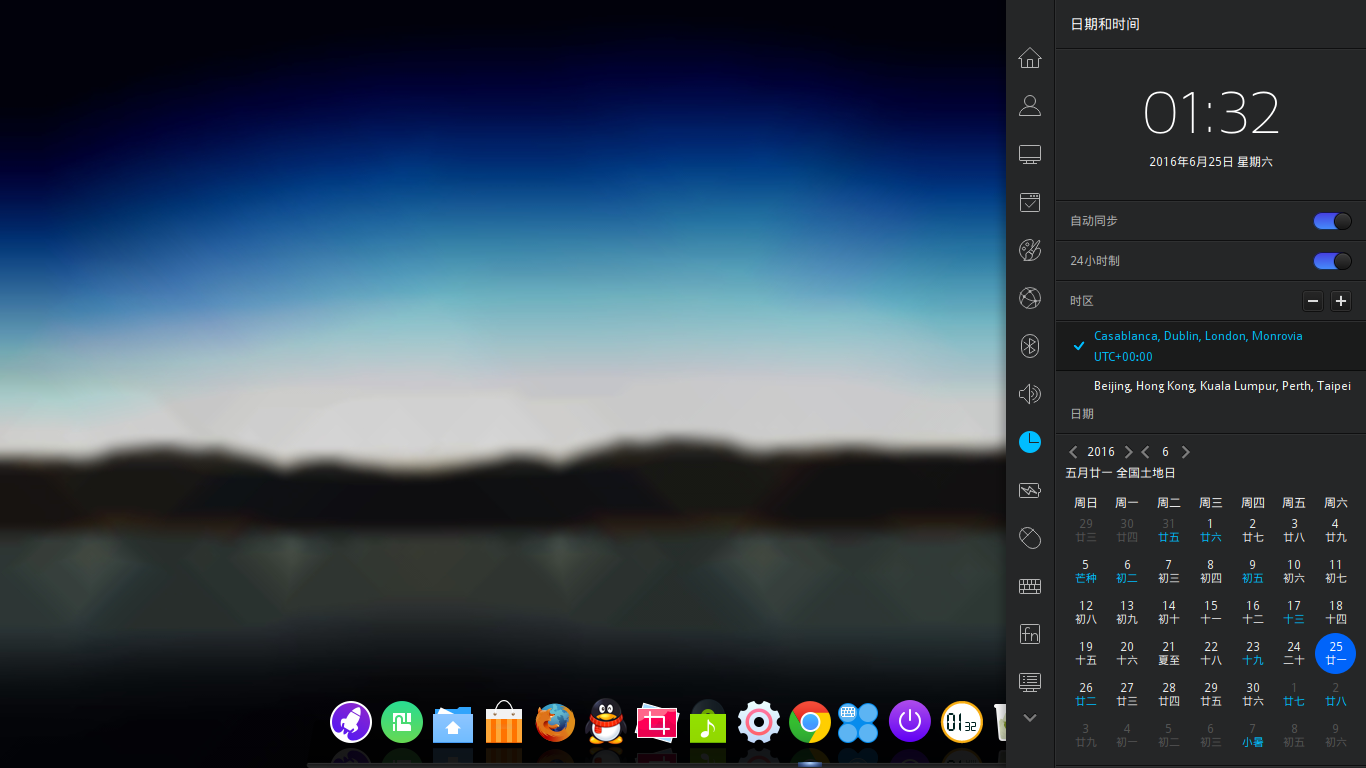
为何我的时区变成+00:00了,而且不能删除?
Experiences and Insight
1742
views ·
6
replies ·
To
floor
Go
leader
deepin
2016-06-25 17:39
Author
今天一看发现时间不对,仔细一看原来时区不对,赶紧增加了咱天朝所在的+8:00,结果发现默认的是+0:00而且无法删除,神马情况?
Reply
Like 0
Favorite
View the author
All Replies
lcw0268
deepin
2016-06-26 02:10
#1
怎么做到的?
只能选一个,楼主选东八区不起作用吗?好像要重启 。
Reply
Like 0
View the author

wanywhn
deepin
2016-06-26 03:44
#2
先选我天朝,然后点击删除,选择删除+0就好了。
Reply
Like 0
View the author
justforlxz
deepin
2016-06-26 07:44
#3
删除 ~/.config/deepin/dde-control-center-datetime.conf
然后重新设置时区。
https://github.com/linuxdeepin/developer-center/issues/96
Reply
Like 0
View the author
xflcx1991
deepin
2016-06-26 19:32
#4
本帖最后由 xflcx1991 于 2016-6-26 11:34 编辑
我也遇到相同的问题了,2015.1 版 dist-upgrade 升级后遇到的,用了3楼的方法好了。
我是新增东8区,重启,再选择东8区,删除+0区。
Reply
Like 0
View the author
键盘机
deepin
2016-06-27 00:56
#5
15.2应该已经修复该问题了
Reply
Like 0
View the author
leader
deepin
2016-07-01 04:28
#6
多谢各位,已经按照上面的方法弄好了
Reply
Like 0
View the author
Please
sign
in first
Featured Collection
Change
Nuntia - Modern IMAP/SMTP mail client for Deepin (Beta tester wanted!)
[Tutorial] deepin25 WSL Offline Installation Guide
UOS AI 2.8 Released! Three New Intelligent Agents & Major Evolution
Solid Q&A | deepin 25 Common Questions – The Immutable System Edition
New Thread
Popular Ranking
Change
Adding a Dancing Spectrum Bar to the Deepin Taskbar | deepin-spectrum
Popular Events
More