系统更新真是按下葫芦浮起瓢,合上盖子时待机又出bug了
Tofloor
poster avatar
u855697021
deepin
2016-06-03 00:18
Author
以前系统在合上盖子的时候会自动待机的,结果内核更新以后貌似就出了问题...现在除非选择待机选项,不然扣上盖子的时候根本不会待机,遭不住...
设置面板上调睡眠选项,reset都没有什么卵用...
估计不大可能是电脑的问题...

笔记本是索尼vaio svt131b11t,intel i5-3337u,集显...
虽然是三四年前的本,其实对Linux兼容性还不错,除了蓝牙都识别了...

另外放一份诊断工具的结果:
Reply Favorite View the author
All Replies
avatar
jingle
deepin
2016-06-03 00:35
#1
已上报。
Reply View the author
avatar
u855697021
deepin
2016-06-10 03:43
#2

现在发现有时盖上盖子就能自动待机,有时就不行,好奇怪...
Reply View the author
avatar
li46381
deepin
2016-06-10 03:54
#3
我的笔记本正常
Reply View the author
avatar
electricface
deepin
2016-06-15 17:38
#4
调用命令 systemctl suspend 可以正常待机吗?

是否有连接多个显示器呢?
Reply View the author
avatar
electricface
deepin
2016-06-15 18:14
#5
执行这一条命令
killall dde-session-daemon ;env DDE_DEBUG_MATCH=power /usr/lib/deepin-daemon/dde-session-daemon > /tmp/dde-session-daemon-log

再关闭笔记本盖子,重现一下这个bug,之后按 Ctrl+C 结束

然后将日志文件提交给我,文件位置在   /tmp/dde-session-daemon-log
Reply View the author
avatar
u855697021
deepin
2016-06-15 21:33
#6
https://bbs.deepin.org/post/40064
调用命令 systemctl suspend 可以正常待机吗?

是否有连接多个显示器呢?

这个没问题...
另外没连接其它显示器...
Reply View the author
avatar
u855697021
deepin
2016-06-15 21:37
#7
https://bbs.deepin.org/post/40064
执行这一条命令
killall dde-session-daemon ;env DDE_DEBUG_MATCH=power /usr/lib/deepin-daemon/dde-ses ...

日志文件是空的...不过确实执行完命令会重现这个bug...
顺带dde-session-daemon这个进程是干什么的?
Reply View the author
avatar
electricface
deepin
2016-06-16 04:32
#8
不可能是空的吧,这个程序实现的逻辑。
Reply View the author
avatar
electricface
deepin
2016-06-16 17:10
#9
再尝试一次吗?也许是命令打错了

  1. killall dde-session-daemon ;env DDE_DEBUG_MATCH=power /usr/lib/deepin-daemon/dde-session-daemon > /tmp/dde-session-daemon-log
Copy the Code
Reply View the author
avatar
zhqh100
deepin
2016-06-16 22:19
#10
本帖最后由 zhqh100 于 2016-6-16 14:22 编辑
https://bbs.deepin.org/post/40064
再尝试一次吗?也许是命令打错了

晚上我也回去取下日志,我的神舟的本,在15.1版本时,合盖就休眠,在15.2发布前两天更新那次是可以合盖继续运行的,在版本更新到15.2之后,合盖又关机了顺便问下,怎么把日志发给你?
Reply View the author
avatar
electricface
deepin
2016-06-17 05:10
#11
上传附件,或者是将日志文件的下载链接发到下面就行了
Reply View the author
avatar
electricface
deepin
2016-06-21 18:40
#12
请问还有谁可以重新这个bug的吗?

执行这一条命令
killall dde-session-daemon ;env DDE_DEBUG_MATCH=power /usr/lib/deepin-daemon/dde-session-daemon > /tmp/dde-session-daemon-log

再关闭笔记本盖子,重现一下这个bug,之后按 Ctrl+C 结束

然后将日志文件提交给我,文件位置在   /tmp/dde-session-daemon-log
Reply View the author
avatar
zhqh100
deepin
2016-06-21 20:50
#13
这次没有复现,先把日志发给你吧,看看能否定位一下,我后面多试几次
Reply View the author
avatar
zhqh100
deepin
2016-06-26 17:02
#14
问题复现了,日志如附件
Reply View the author
avatar
electricface
deepin
2016-06-27 22:01
#15
本帖最后由 electricface 于 2016-6-27 14:03 编辑
https://bbs.deepin.org/post/40064
问题复现了,日志如附件
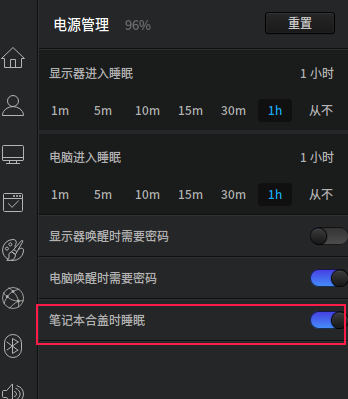
看了你的日志,发现 exec "" ,说明你没有开启 控制中心 - 电源 -“笔记本合上盖子时休眠”的选项。


目前应该是没有发现bug的。
Reply View the author
avatar
zhqh100
deepin
2016-06-28 17:06
#16
https://bbs.deepin.org/post/40064
看了你的日志,发现 exec "" ,说明你没有开启 控制中心 - 电源 -“笔记本合上盖子时休眠”的选项。

您好,我不明白您什么意思,我是没有开启该选项,我合上盖子不是要睡眠,也不是要关机,而是要正常运行啊,现在它关机了,这不算bug吗?
Reply View the author
avatar
electricface
deepin
2016-06-28 18:48
#17
这个日志里并没有记录关机了,我在 dde-daemon power 模块里绝对没有写盖上盖子关机的代码。

我需要看看这个文件里的内容   /etc/systemd/logind.conf

请把这条命令的输出贴出来
cat /etc/systemd/logind.conf
Reply View the author
avatar
zhqh100
deepin
2016-06-30 03:58
#18
pc:~$ cat /etc/systemd/logind.conf
#  This file is part of systemd.
#
#  systemd is free software; you can redistribute it and/or modify it
#  under the terms of the GNU Lesser General Public License as published by
#  the Free Software Foundation; either version 2.1 of the License, or
#  (at your option) any later version.
#
# Entries in this file show the compile time defaults.
# You can change settings by editing this file.
# Defaults can be restored by simply deleting this file.
#
# See logind.conf(5) for details.

[Login]
#NAutoVTs=6
#ReserveVT=6
#KillUserProcesses=no
#KillOnlyUsers=
#KillExcludeUsers=root
#InhibitDelayMaxSec=5
HandlePowerKey=ignore
#HandleSuspendKey=suspend
#HandleHibernateKey=hibernate
HandleLidSwitch=ignore
#HandleLidSwitchDocked=ignore
#PowerKeyIgnoreInhibited=no
#SuspendKeyIgnoreInhibited=no
#HibernateKeyIgnoreInhibited=no
#LidSwitchIgnoreInhibited=yes
#HoldoffTimeoutSec=30s
#IdleAction=ignore
#IdleActionSec=30min
#RuntimeDirectorySize=10%
#RemoveIPC=yes
#UserTasksMax=12288
Reply View the author
avatar
electricface
deepin
2016-06-30 19:23
#19
你的这个文件里的 HandleLidSwitch=ignore 是正常的,没有问题。

我也不知道是什么问题了。
Reply View the author
avatar
yanbowen
deepin
Community Developer
2016-07-06 02:57
#20
本帖最后由 yanbowen 于 2016-7-7 13:44 编辑

能否在合上盖子之前执行下 dbus-monitor --system sender=org.freedesktop.UPower > ~/upower.log  这个命令,然后把  ~/upower.log 这个文件上传下,谢谢!
Reply View the author