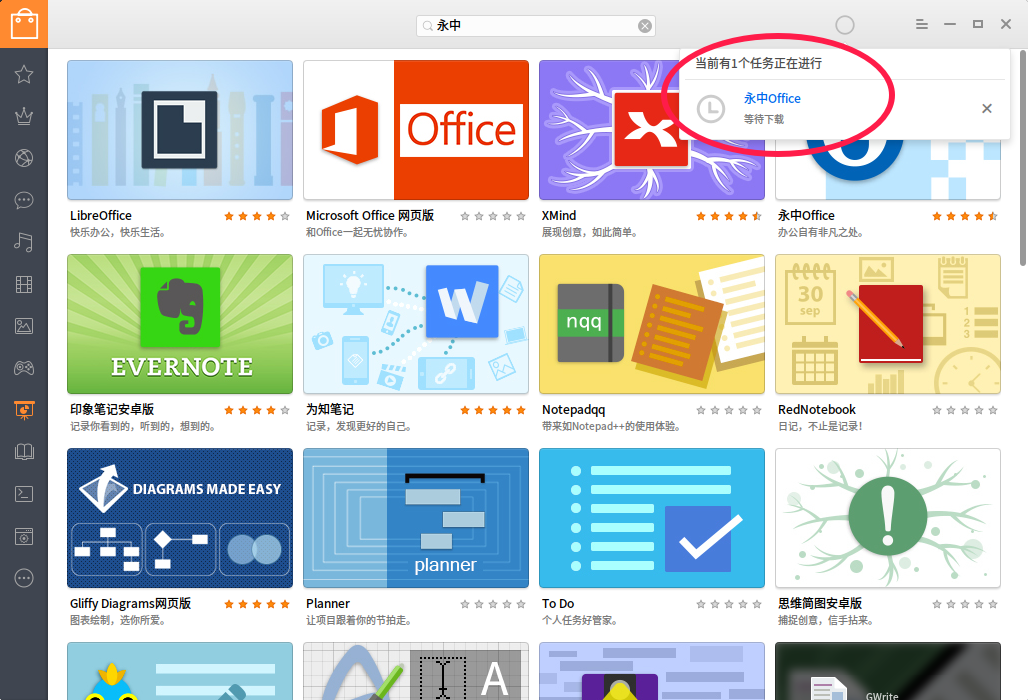
镜像源显示异常 一直连接超时
Tofloor
poster avatar
phil
deepin
2016-05-24 19:42
Author
见图 安装好后安装啥软件都下载不了 镜像源一直超时
Reply Favorite View the author
All Replies
avatar
phil
deepin
2016-05-24 19:44
#1
这有什么办法处理吗? 一直没找到方法  sudo apt-get update 一直0%
Reply View the author
avatar
lcw0268
deepin
2016-05-24 20:26
#2
弱弱的问下,有网络吗?
Reply View the author
avatar
jingle
deepin
2016-05-24 21:40
#3
本帖最后由 jingle 于 2016-5-24 13:59 编辑
https://bbs.deepin.org/post/39634
弱弱的问下,有网络吗?

同问,确定网络ping的正常吗?现在使用还超时吗?
Reply View the author
avatar
mutong
deepin
2016-05-24 22:12
#4
我的是部分超时
Reply View the author
avatar
phil
deepin
2016-05-25 01:26
#5
可以上网  WiFi正常 一直这样全部超时 无法更新
Reply View the author
avatar
phil
deepin
2016-05-25 01:28
#6
我又在另一台电脑win7下用虚拟机安装最新版本 依然如此
Reply View the author
avatar
容克地主
deepin
2016-05-25 06:14
#7
我的也是,官方源显示的是【快】,但是软件商店无法刷新,更新进度也是0%
Reply View the author
avatar
容克地主
deepin
2016-05-25 06:29
#8
首先网络是连接的,网页打开速度极快,就是在软件商店卡主,安装软件一直处于“等待下载”的状态,如图~
Reply View the author
avatar
jingle
deepin
2016-05-26 16:56
#9
本帖最后由 jingle 于 2016-5-26 09:09 编辑
https://bbs.deepin.org/post/39634
首先网络是连接的,网页打开速度极快,就是在软件商店卡主,安装软件一直处于“等待下载”的状态,如图~
...

最好不要修改/etc/apt/sources.list文件,请参考此处https://bbs.deepin.org/post/39539 三、解决办法。
Reply View the author
avatar
jingle
deepin
2016-05-26 16:57
#10
本帖最后由 jingle 于 2016-5-26 09:09 编辑
https://bbs.deepin.org/post/39634
我又在另一台电脑win7下用虚拟机安装最新版本 依然如此

最好不要修改/etc/apt/sources.list文件,请参考此处https://bbs.deepin.org/post/39539 三、解决办法。
Reply View the author
avatar
phil
deepin
2016-05-27 07:25
#11
https://bbs.deepin.org/post/39634
最好不要修改/etc/apt/sources.list文件,请参考此处https://bbs.deepin.org/forum.php?mod=viewthread&ti ...

没有修改过 参考无用  sudo apt-get update 一直0% 已将日志反馈给官方 希望解决  谢谢您
Reply View the author
avatar
jingle
deepin
2016-05-27 14:57
#12
phil 发表于 2016-5-26 23:25
没有修改过 参考无用  sudo apt-get update 一直0% 已将日志反馈给官方 希望解决  谢谢您 ...

我提供的那个方法可以解决不,确定不是网络本身问题。
Reply View the author
avatar
phil
deepin
2016-05-30 08:26
#13
https://bbs.deepin.org/post/39634
我提供的那个方法可以解决不,确定不是网络本身问题。

没有解决 确定网络正常
Reply View the author